
Inleiding
The GIGABYTE GM-M7600 is a wireless precision optical mouse designed for comfortable and reliable use. This manual provides instructions for setting up, operating, maintaining, and troubleshooting your device.
Pakketinhoud
Kontroleer asseblief die inhoud van die pakket om seker te maak dat alle items teenwoordig is:
- GIGABYTE GM-M7600 Wireless Optical Mouse
- Portable Nano USB Receiver
- 2 x AAA-batterye
Opstelling
1. Installering van batterye
The GM-M7600 mouse requires two AAA batteries for operation. The batteries are included in the package.
- Vind die batteryklep aan die onderkant van die muis.
- Skuif of lig die deksel liggies op om die kompartement oop te maak.
- Plaas die twee AAA-batterye in en maak seker dat die positiewe (+) en negatiewe (-) terminale korrek in lyn is met die merke binne-in die kompartement.
- Maak die batterykompartement se deksel stewig toe.
2. Koppel die USB-ontvanger
The mouse connects to your computer via a portable Nano USB receiver.
- Locate the Nano USB receiver. It may be stored inside the mouse's battery compartment or packaged separately.
- Plug the Nano USB receiver into an available USB port on your computer (Laptop or Personal Computer).
- Your operating system (e.g., Windows XP, Linux) should automatically detect and install the necessary drivers. This process may take a few moments.
- Sodra die drywers geïnstalleer is, is die muis gereed vir gebruik.
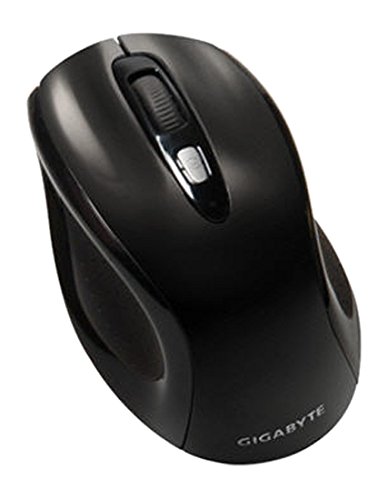
Figuur 1: GIGABYTE GM-M7600 Wireless Optical Mouse. This image displays the ergonomic design of the mouse, highlighting its form factor and the location of its buttons. The Nano USB receiver is typically stored within the mouse or connected to a computer's USB port.
Bedryfsinstruksies
1. Skakel aan/af
The mouse typically has a power switch on its underside. Slide the switch to the 'ON' position to activate the mouse. Slide it to 'OFF' when not in use to conserve battery life.
2. Aanpassing van DPI (Sensitiwiteit)
The GM-M7600 features an adjustable DPI switch, allowing you to change the mouse sensitivity between 800 DPI and 1600 DPI. This switch is usually located near the scroll wheel. Press the DPI button to toggle between the two sensitivity settings.
3. Basiese Muisfunksies
- Links klik: Primêre knoppie vir die seleksie van items, oopmaak files, and interacting with software.
- Regs klik: Sekondêre knoppie vir toegang tot kontekskieslyste en bykomende opsies.
- Rolwiel: Gebruik om deur dokumente te blaai en web bladsye. Dit kan ook as 'n middelste klikknoppie funksioneer.
Onderhoud
1. Skoonmaak
Om optimale prestasie en voorkoms te handhaaf:
- Disconnect the mouse from your computer and turn off the power switch.
- Gebruik 'n sagte, pluisvrye lap effens dampmet water of 'n sagte skoonmaakoplossing om die oppervlak van die muis af te vee.
- Vermy die gebruik van harde chemikalieë, skuurmiddels of die spuit van vloeistowwe direk op die muis.
- Clean the optical sensor area on the underside of the mouse with a dry cotton swab to remove any dust or debris.
2. Battery vervanging
When the mouse performance degrades or it stops responding, it may be time to replace the batteries.
- Skakel die muis af met die aan/uit-skakelaar.
- Open the battery compartment as described in the 'Installing Batteries' section.
- Verwyder die ou AAA-batterye.
- Plaas twee nuwe AAA-batterye in en let op die korrekte polariteit (+/-).
- Maak die batterykompartement toe en skakel die muis weer aan.
Probleemoplossing
If you encounter issues with your GIGABYTE GM-M7600 mouse, try the following solutions:
- Muis reageer nie:
- Maak seker dat die muis aangeskakel is.
- Kontroleer of die batterye korrek geïnstalleer is en voldoende gelaai is. Vervang indien nodig.
- Ensure the Nano USB receiver is securely plugged into a working USB port on your computer. Try a different USB port.
- Herbegin jou rekenaar.
- Onreëlmatige wyserbeweging:
- Maak die optiese sensor aan die onderkant van die muis skoon.
- Maak seker dat jy die muis op 'n geskikte oppervlak gebruik. Vermy hoogs weerkaatsende of deursigtige oppervlaktes.
- Check for any wireless interference. Move the mouse closer to the receiver or away from other wireless devices.
- DPI switch not working:
- Maak seker dat die muis aangeskakel en gekoppel is.
- Druk die DPI-knoppie stewig vas.
Spesifikasies
| Model Naam | GM-M7600 |
| Handelsmerk | GIGABYTE |
| Verbindingstegnologie | 2.4GHz Radio Frequency Wireless |
| Bewegingsopsporing | Opties |
| Verstelbare DPI | 800 / 1600 DPI |
| Aantal knoppies | 3 (Left, Right, Scroll Wheel/Middle Click) |
| Kragbron | 2 x AAA-batterye (ingesluit) |
| Ontvanger tipe | Portable Nano USB Receiver |
| Versoenbare toestelle | Skootrekenaar, persoonlike rekenaar |
| Ondersteuning van bedryfstelsels | Linux, Windows XP |
| Omhulselmateriaal | Plastic with Rubberized Finish |
| Kleur | Swart |
Waarborg en Ondersteuning
For warranty information and technical support, please refer to the warranty card included with your product or visit the official GIGABYTE webwerf. Hou jou aankoopkwitansie vir waarborgeise.