
Stap 2 706000
Step2 Deluxe Kids Workbench (Model 706000) Instruction Manual
Omvattende gids vir montering, werking en onderhoud.
Inleiding
Thank you for choosing the Step2 Deluxe Kids Workbench. This playset is designed to provide an engaging and realistic pretend play experience for children, encouraging the development of fine motor skills, role-playing, language skills, critical thinking, and social skills. This manual contains important information regarding the safe assembly, operation, and care of your new workbench. Please read it thoroughly before assembly and retain it for future reference.

A child engaged in pretend play with the Step2 Deluxe Kids Workbench, demonstrating its interactive features.
Veiligheidsinligting
- VERKOKKINGSGEVAAR: This product contains small parts and sharp points. Adult assembly is required. Keep small parts away from children before and during assembly.
- Maak seker dat alle dele stewig vasgemaak is voordat kinders toegelaat word om te speel.
- Regularly inspect the workbench for any loose or damaged parts. Discontinue use if damage is found.
- This toy is intended for children aged 36 to 84 months (3-7 years).
Ingesluit komponente
The Step2 Deluxe Kids Workbench comes with a comprehensive 50-piece accessory set to enhance the play experience. These accessories include various tools and building materials.
- Play Workbench structure
- Electronic drill with drill bits
- Hamer
- Saag
- Tang
- Skroewedraaiers
- Moersleutel
- Pretend shop vacuum
- Durafoam™ wood pieces for building projects
- Assorted nuts, bolts, and screws
- Storage bins and jars

All 50 accessories included with the workbench, laid out for clear viewing.
Opstelling en samestelling
Adult assembly is required for the Step2 Deluxe Kids Workbench. While assembly is generally straightforward, it may take approximately one hour. Follow the detailed instructions provided in the packaging for step-by-step guidance.
Battery installasie
The electronic drill requires 2 AA batteries, and the overhead shop light requires 3 AAA batteries. Ensure batteries are inserted with correct polarity. Replace batteries when electronic features cease to function or dim.
Aanvanklike opstelling
- Place the workbench on a flat, stable surface.
- Organize the included tools and accessories into the designated storage areas, such as the hanging pegs, parts bins, and sliding drawer.
- Familiarize yourself and your child with the various features and tools.
Bedryfsinstruksies
The Deluxe Kids Workbench offers a variety of interactive elements for imaginative play.
Interaktiewe kenmerke
- Electronic Drill: Use the electronic drill to simulate drilling into the foam wood pieces. The drill makes realistic sounds and movements.
- Overhead Shop Light: Press the button on the overhead light to illuminate the work surface, adding to the realistic workshop experience.
- Pretend Shop Vacuum: The workbench includes a pretend shop vacuum to encourage clean-up after projects.
- Werkoppervlak: The work surface features screw holes and recesses for nuts, allowing children to practice fastening and unfastening.
- Clamp/Vise: Utilize the working clamp/vise to hold foam wood pieces in place while working.

A child demonstrating the pretend shop vacuum feature for cleaning up the workspace.
Creative Play with Durafoam™
The Durafoam™ blocks are designed to interlock easily, allowing children to create various projects. Use the included tools like the saw and hammer with these foam pieces for a realistic building experience.
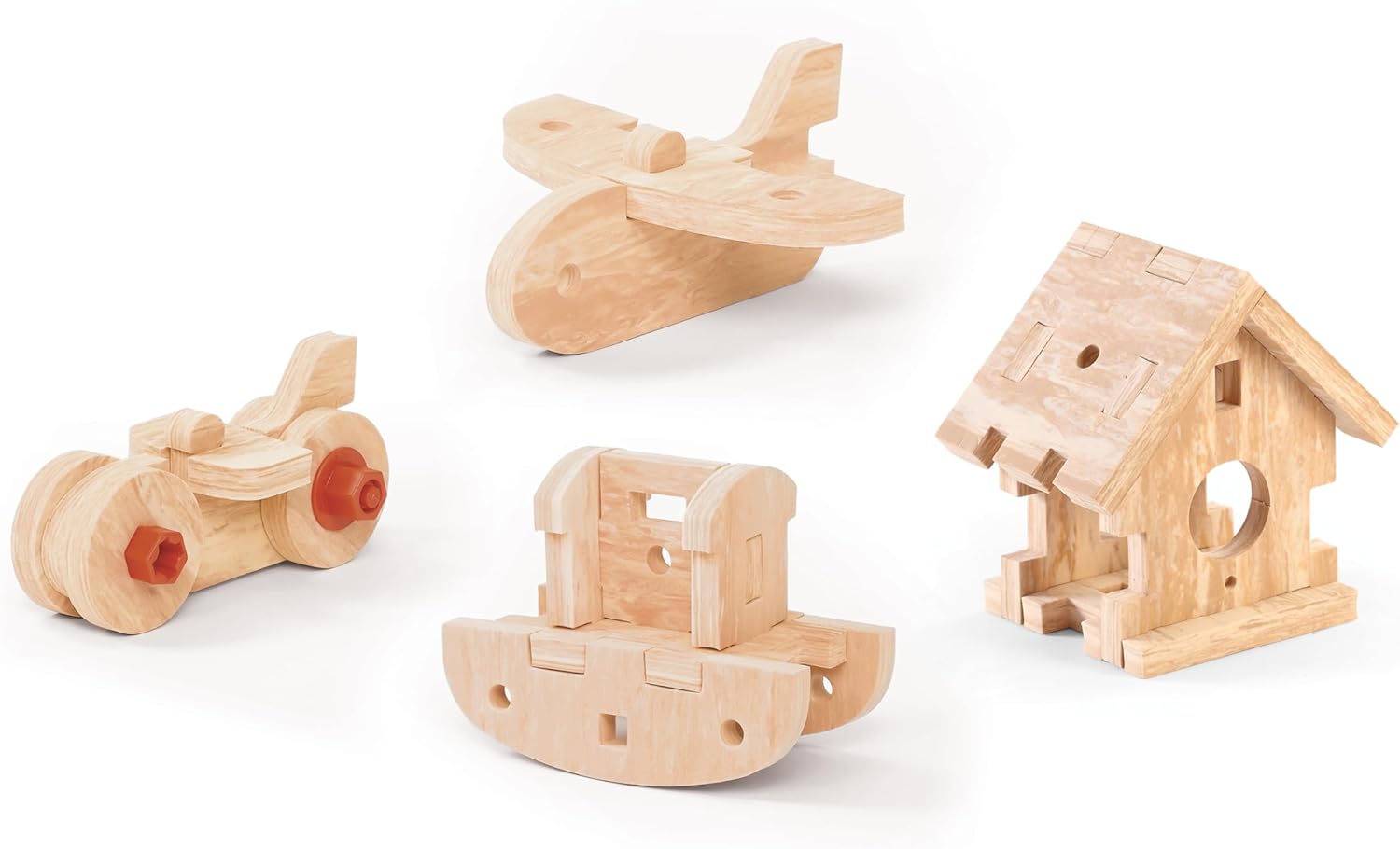
Examples of creative projects that can be built using the Durafoam™ wood pieces.
Bergingsoplossings
The workbench features multiple storage options to keep tools and accessories organized:
- Tool Chest Cabinet: A cabinet with shelves for larger items.
- Skuiflaai: Located under the main work surface, ideal for smaller tools.
- Parts Bins and Hanging Jars: Perfect for organizing nuts, screws, and other small accessories.
- Pegbord: Use the included hooks to hang tools on the pegboard for easy access.

A child utilizing the storage cabinet to organize building pieces.
Onderhoud
The Step2 Deluxe Kids Workbench is designed for low maintenance. Simply wipe down the surfaces as needed with a damp cloth and mild soap. Avoid using abrasive cleaners or solvents.
Probleemoplossing
Elektroniese funksies werk nie
- Gaan batterye na: Ensure that the electronic drill and overhead light have fresh batteries installed correctly (2 AA for drill, 3 AAA for light).
- Battery-oriëntasie: Verify that the batteries are inserted with the correct positive (+) and negative (-) terminals aligned.
Los onderdele
- Draai skroewe: Periodically check and tighten any screws or fasteners that may have become loose during play.
Spesifikasies
| Kenmerk | Detail |
|---|---|
| Modelnommer | 706000 |
| Handelsmerk | Stap 2 |
| Saamgestelde afmetings (H x B x D) | 40.75" x 34" x 15" |
| Item gewig | 12.9 kilogram |
| Materiaal tipe | Durafoam™ |
| Ouderdomsreeks | 36 - 84 Maande |
| Ingesluit komponente | Play workbench; 50-piece accessory kids toy tool set |

Visual representation of the workbench dimensions.
Produk verbyview Video
Amptelike produkvideo-vertoningasing the features and play possibilities of the Step2 Deluxe Kids Workbench.
Waarborg inligting
Hierdie produk word verkoop met Geen waarborg nie from the manufacturer. Please refer to your retailer's return policy for any issues.
Ondersteuning
For further assistance or inquiries regarding your Step2 Deluxe Kids Workbench, please contact The Step2 Company, LLC customer service directly. Contact information can typically be found on the product packaging or the official Step2 webwebwerf.
Ask a question about this manual
Ask about setup, troubleshooting, compatibility, parts, safety, or missing instructions. Manuals+ will review the question and use this page’s manual context to help answer it.