
GoPro CHD960-001
GoPro HD Hero 960 Action Camera User Manual
Model: CHD960-001
Inleiding
This manual provides essential information for the proper setup, operation, and maintenance of your GoPro HD Hero 960 action camera. Please read these instructions carefully before using your device to ensure optimal performance and longevity.

Image: The GoPro HD Hero 960 camera, enclosed in its clear waterproof housing, ready for use.
Pakketinhoud
Verifieer dat alle items in jou pakket teenwoordig is:
- GoPro HD Hero 960 Camera
- Waterdigte behuising
- Herlaaibare litium-ioonbattery
- Geboë kleefmontage
- Plat gom Mount
- Helmet Front Mount
- Kopamp-Style Head Strap
- Quick-Release Buckle
- USB kabel
- Composite Video Cable (RCA)
- Komponent video kabel
- Mini driepoot
- Afstandbeheer

Beeld: 'n Omvattende view of the GoPro HD Hero 960 camera and its various included accessories, such as cables, mounts, and a mini tripod, spread out on a white surface.
Opstelling
1. Battery installasie en laai
- Open the camera's rear door.
- Insert the included Lithium-Ion battery, ensuring correct orientation.
- Close the rear door securely.
- Connect the camera to a USB power source using the provided USB cable to charge the battery. A full charge provides approximately 2.5 hours of recording time.
2. SD-kaart invoeging
- With the camera powered off, open the rear door.
- Insert a standard SD card (up to 32GB recommended for 9 hours of storage) into the SD card slot until it clicks into place.
- Maak die agterdeur toe.
- Let wel: Use a Class 4 or higher SD card for optimal video recording performance.
3. Attaching Mounts
The GoPro HD Hero 960 comes with several mounting options:
- Adhesive Mounts (Curved/Flat): These mounts are designed for semi-permanent attachment to surfaces like helmets or vehicles. Ensure the surface is clean and dry before applying. Press firmly for 30 seconds and allow 24 hours for the adhesive to cure before use.
- Helmet Front Mount: Attaches to the front of a helmet, allowing for a forward-facing perspective.
- Kopamp-Style Head Strap: Worn directly on the head or over a helmet for a head-level point-of-view.
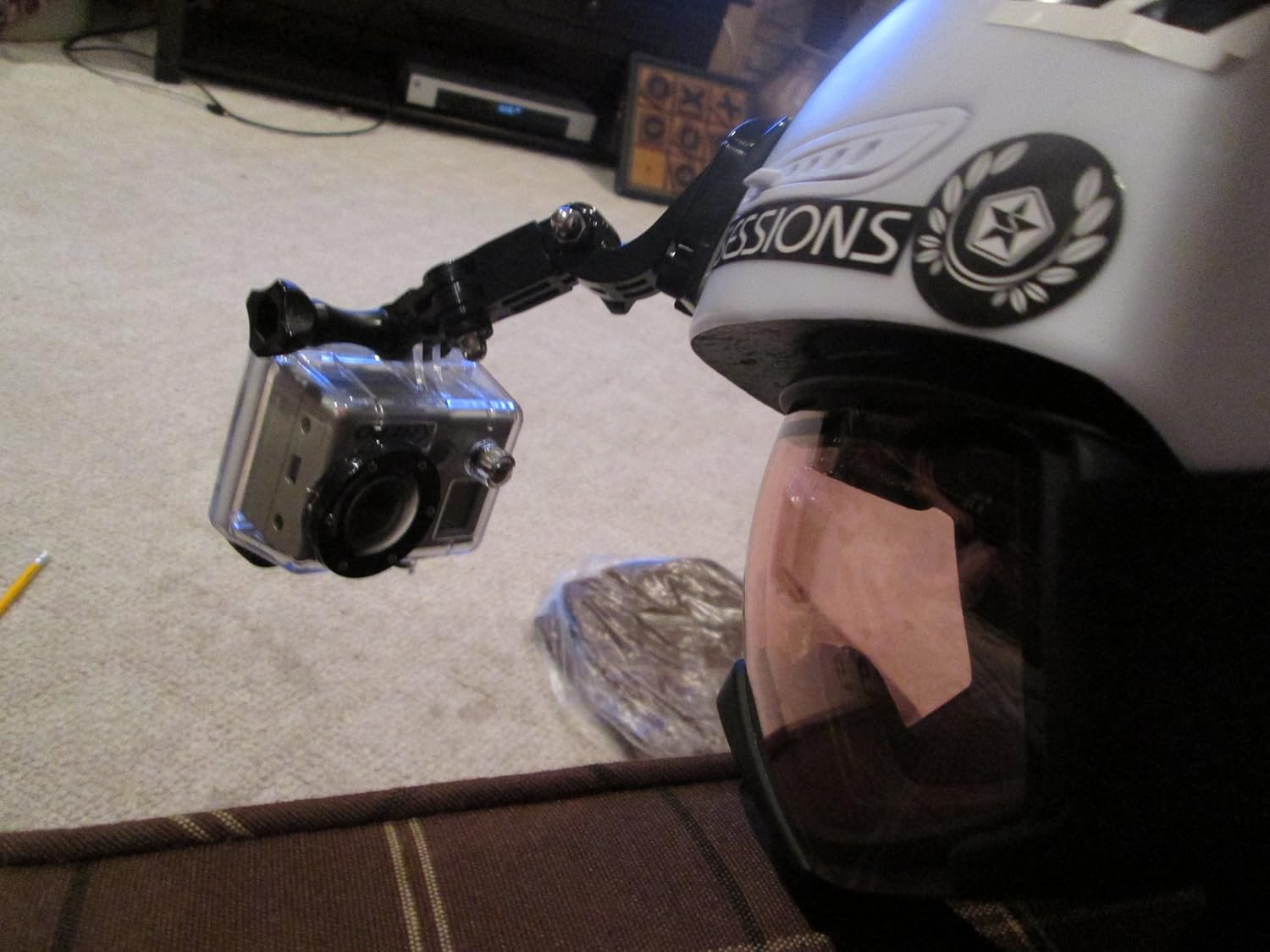
Image: The GoPro HD Hero 960 camera securely attached to the side of a white helmet, demonstrating a common mounting configuration for action sports.

Image: The GoPro HD Hero 960 camera attached to a red baseball cap with a head strap, illustrating another versatile mounting option for hands-free recording.
Bedryfsinstruksies
1. Skakel aan/af
- To power on, press and hold the Power/Mode button until the camera turns on.
- To power off, press and hold the Power/Mode button until the camera turns off.
2. Video-opname
- Press the Power/Mode button repeatedly to cycle through modes until the video icon is displayed.
- Press the Shutter/Select button to start recording. The red LED will flash.
- Press the Shutter/Select button again to stop recording.
- The camera supports 960p (1280x960) and 720p video resolutions, recorded in H.264 (MPEG-4) format.
3. Foto-opname
- Press the Power/Mode button repeatedly to cycle through modes until the photo icon is displayed.
- Press the Shutter/Select button to take a single 5-megapixel photo.
- The camera also supports interval shooting (2 to 60 seconds for up to 2.5 hours), self-timer, and 'triple shot' modes. Refer to the on-screen menu for selecting these options.
4. Underwater Use
The included waterproof housing allows the camera to be used safely up to a depth of 180 feet (55 meters). Ensure the housing is properly sealed before submerging the camera.

Image: The GoPro HD Hero 960 camera, encased in its waterproof housing, attached to the side of an aquarium, demonstrating its capability for underwater or water-adjacent recording.
Onderhoud
- Skoonmaak: After use, especially in saltwater, rinse the camera and housing with fresh water and dry thoroughly. Use a soft, lint-free cloth for cleaning the lens.
- Behuisingsorg: Regularly inspect the waterproof housing's O-ring for dirt, sand, or damage. Clean the O-ring and apply a thin layer of silicone grease if necessary to maintain the seal.
- Berging: Store the camera and accessories in a cool, dry place away from direct sunlight.
- Batterysorg: For long-term storage, charge the battery to approximately 50% and remove it from the camera.
Probleemoplossing
- Kamera skakel nie aan nie: Ensure the battery is charged and correctly inserted. Try connecting to a power source to see if it powers on.
- Poor Video/Photo Quality:
- Lae lig: The HD Hero 960 performs best in bright, daylight conditions. Footage in low light may appear grainy or noisy.
- Vaag Foto's: Hold the camera very still for a second after pressing the shutter button to avoid blur, especially in challenging lighting.
- Underwater Blur: The standard waterproof housing has a curved lens which can cause blur underwater. For clearer underwater footage, consider purchasing an aftermarket housing with a flat lens.
- Waterkolle: Always wipe the waterproof lens clean and dry before recording or taking photos, especially after being in water, to prevent water spots on your media.
- Vibration Noise in Recordings: If you experience rattling or vibration noises, ensure the camera is securely fastened in its housing and mount. Sometimes, inserting a small piece of paper or foam into the housing can help dampen vibrasies.
- SD-kaartfoute: Ensure the SD card is properly inserted and formatted. Use a high-speed SD card (Class 4 or higher) for reliable recording.
Spesifikasies
| Modelnommer | CHD960-001 |
| Video-resolusies | 960p (1280x960), 720p |
| Foto resolusie | 5 megapixels |
| Fotosensortegnologie | CMOS |
| Video-opname-formaat | H.264, MPEG-4 |
| Tipe flitsgeheue | SD (tot 32 GB) |
| Battery Tipe | 1 litiumioon (ingesluit) |
| Batterylewe (Video) | Ongeveer 2.5 uur |
| Waterdigte diepte | Up to 180 feet (55 meters) with housing |
| Item gewig | 1.5 pond |
| Produk afmetings | 1 x 1 x 1 duim |
| Verbindingstegnologie | Wi-Fi (for remote control/app, if supported by specific firmware version) |
| Spesiale kenmerke | Liggewig, Tydsverloop |
Waarborg inligting
Specific warranty details for the GoPro HD Hero 960 are not provided in this manual. Please refer to the original product packaging or visit the official GoPro webwebwerf vir die mees onlangse waarborginligting.
Ondersteuning
For further assistance, technical support, or to explore additional accessories, please visit the official GoPro support webwebwerf:
Amptelike Produkvideo's
No official product videos from the seller were found in the provided data for direct embedding in this manual.
Ask a question about this manual
Ask about setup, troubleshooting, compatibility, parts, safety, or missing instructions. Manuals+ will review the question and use this page’s manual context to help answer it.