
1. Inleiding
The D-Link DES-1008E is an 8-Port Fast Ethernet Desktop Switch designed to expand your network connectivity. This unmanaged switch provides eight 10/100 Mbps Ethernet ports, allowing you to connect multiple devices such as computers, printers, and network-attached storage (NAS) to your network. It supports full-duplex mode, delivering up to 200 Mbps throughput per port for efficient data transfer. The plug-and-play design ensures easy installation without the need for software configuration.
2. Pakketinhoud
Verifieer asseblief dat u pakket die volgende items bevat:
- D-Link DES-1008E 8-Port Fast Ethernet Desktop Switch
- Kragadapter
- Vinnige installasiegids
If any items are missing or damaged, please contact your local D-Link reseller for assistance.
3. Opstelling
Follow these steps to set up your D-Link DES-1008E switch:
- Posisioneer die skakelaar: Place the switch on a flat, stable surface or mount it to a wall using appropriate hardware (not included). Ensure adequate ventilation around the device.
- Koppel die kragadapter: Plug the provided power adapter into the power port on the back of the DES-1008E switch. Connect the other end of the power adapter to a standard electrical outlet. The power LED on the front of the switch should illuminate.
- Koppel netwerktoestelle: Connect your network devices (e.g., computers, routers, game consoles) to any of the eight Ethernet ports on the switch using standard Ethernet cables. The corresponding port LED on the front of the switch will illuminate when a connection is established.
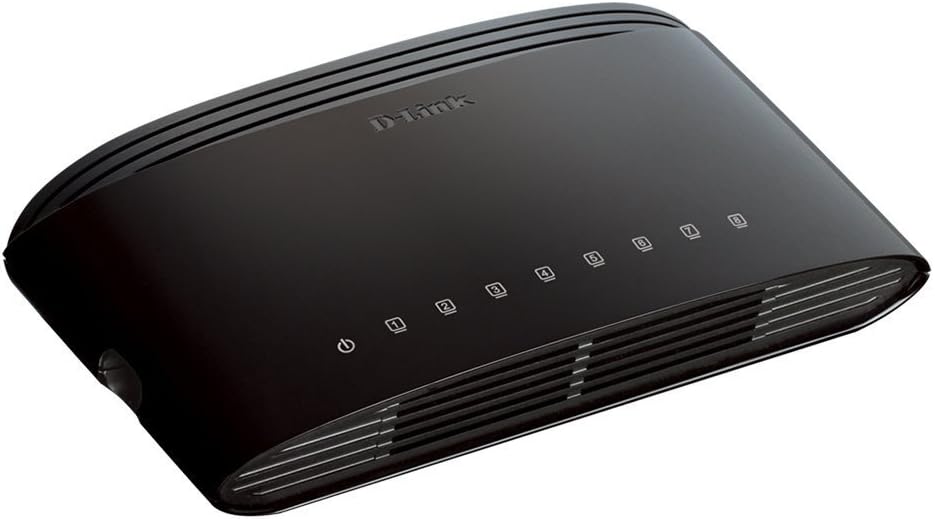
Figuur 1: Voorkant view of the D-Link DES-1008E switch, showing the power indicator and eight port status LEDs.

Figuur 2: Agter view of the D-Link DES-1008E switch, illustrating the eight Ethernet ports for device connections.
The D-Link DES-1008E is a plug-and-play device, requiring no software installation or configuration. Once connected, your devices should automatically detect the network connection.
4. Bediening van die skakelaar
The DES-1008E operates automatically once powered on and connected. It functions as an unmanaged switch, meaning it requires no user intervention for basic network traffic management.
LED-aanwysers:
- Krag LED: Illuminates green when the switch is receiving power.
- Poort-LED's (1-8): Each port has an associated LED. This LED illuminates green when a device is connected to the port and flashes to indicate network activity (data transmission).
5. Onderhoud
To ensure optimal performance and longevity of your D-Link DES-1008E switch, consider the following maintenance guidelines:
- Skoonmaak: Gently wipe the exterior of the switch with a soft, dry cloth. Avoid using liquid or aerosol cleaners directly on the device.
- Ventilasie: Ensure that the ventilation slots on the switch are not blocked. Proper airflow prevents overheating.
- Omgewing: Gebruik die skakelaar binne die gespesifiseerde temperatuur- en humiditeitsreekse. Vermy blootstelling aan direkte sonlig, oormatige hitte of vog.
- Krag siklus: If the switch experiences issues, a simple power cycle (unplugging and replugging the power adapter) can often resolve minor problems.
6. Probleemoplossing
If you encounter issues with your D-Link DES-1008E switch, refer to the following troubleshooting tips:
- Geen krag:
- Maak seker dat die kragadapter stewig aan beide die skakelaar en 'n werkende elektriese aansluiting gekoppel is.
- Verifieer dat die elektriese aansluiting funksioneel is deur 'n ander toestel in te prop.
- Kontroleer die kragadapter vir enige sigbare skade.
- Geen skakel/aktiwiteit op 'n poort nie:
- Confirm that the Ethernet cable is securely plugged into both the switch port and the connected device.
- Probeer 'n ander Ethernet-kabel om 'n foutiewe kabel uit te sluit.
- Connect a different device to the same port to check if the port is functional.
- Maak seker dat die gekoppelde toestel aangeskakel is en dat die netwerkadapter geaktiveer is.
- Stadige netwerkprestasie:
- Verifieer dat alle gekoppelde toestelle teen hul verwagte snelhede werk.
- Kontroleer vir oormatige netwerkverkeer of bandwydte-intensiewe toepassings wat op gekoppelde toestelle loop.
- Ensure your internet service provider (ISP) is delivering the expected speeds to your router.
- High-Pitched Sound from Power Adapter:
- Some users have reported a high-pitched sound from the included power adapter. If this occurs, consider using an alternative 5V power supply with compatible specifications. Ensure the replacement power supply meets the voltage and current requirements of the switch to avoid damage.
7. Spesifikasies
| Modelnommer | DES-1008E |
| Aantal poorte | 8 |
| Ethernet-standaard | 10/100 Mbps Fast Ethernet |
| Data-oordragtempo | Up to 200 Mbps (full-duplex) |
| Skakelkapasiteit | 1.6 Gbps |
| MAC adres tabel grootte | 1K inskrywings |
| Krag Invoer | 5V GS |
| Item gewig | 9.44 onse |
| Kleur | Swart |
8. Waarborg en Ondersteuning
The D-Link DES-1008E 8-Port Fast Ethernet Desktop Switch comes with a Beperkte lewenslange waarborg. For detailed warranty terms and conditions, please refer to the warranty information provided with your product or visit the official D-Link webwebwerf.
For technical support, product registration, or to download the latest firmware and documentation, please visit the D-Link support website or contact D-Link customer service in your region. Support contact information can typically be found on the D-Link official webwebwerf.