
Eibenstock 35230000
Eibenstock Dust Extraction Adapter M 18 to 1 ¼" User Manual
Model: 35230000
Brand: Eibenstock
1. Inleiding
This manual provides essential information for the safe and effective use of the Eibenstock Dust Extraction Adapter, Model 35230000. This adapter is designed to facilitate dust extraction during drilling operations, specifically compatible with Eibenstock Diamond Dry Drills.
Please read this manual thoroughly before operating the product to ensure proper handling, maintenance, and to prevent potential hazards.
2. Veiligheidsinstruksies
Always adhere to the following safety guidelines when using the dust extraction adapter:
- Ensure the adapter is securely attached to both the drilling machine and the dust extraction system before operation.
- Verify that the dust extraction system is functioning correctly and has sufficient capacity for the task.
- Wear appropriate personal protective equipment (PPE), including safety glasses, dust mask, and hearing protection.
- Do not modify the adapter in any way. Use only original Eibenstock parts and accessories.
- Hou die werkarea skoon en goed belig. Deurmekaar of donker areas nooi ongelukke uit.
- Store the adapter in a dry, secure place away from children and unauthorized personnel.
3. Produk verbyview
The Eibenstock Dust Extraction Adapter Model 35230000 is a robust accessory designed to connect Eibenstock diamond dry drills to a dust extraction system. It features an M 18 thread for connection to the drill and a 1 ¼" connection for the dust extractor hose.
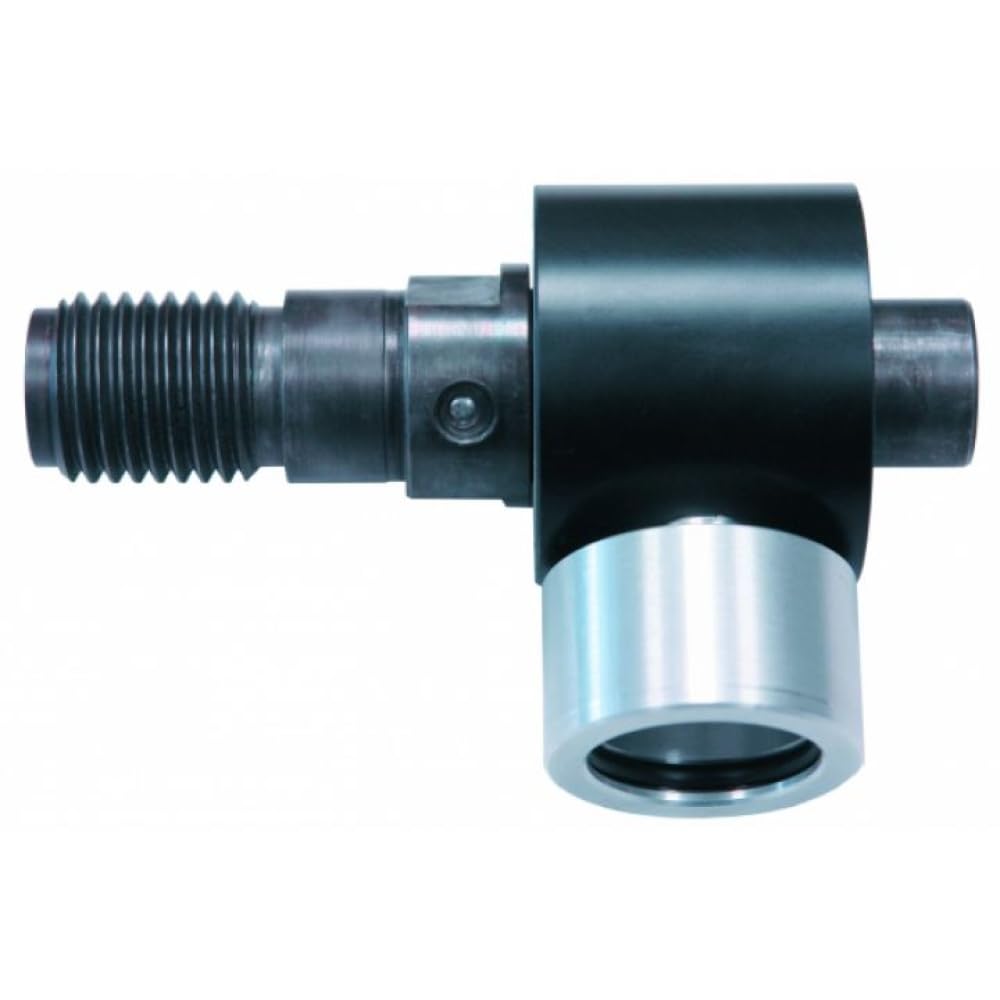
Figuur 3.1: Eibenstock Dust Extraction Adapter. This image shows the adapter, which is primarily black with a silver-colored cylindrical end. On the left, a threaded metal shaft extends, designed for attachment to a drilling machine. The main body is cylindrical, with a side port for dust extraction.
3.1. Verenigbaarheid
This adapter is compatible with the following Eibenstock Diamond Dry Drill models:
- EHD 2000 S
- ESD 1801
- EHD 1801
4. Opstelling
Follow these steps to set up the dust extraction adapter:
- Prepare the Drill: Ensure your Eibenstock diamond dry drill (e.g., EHD 2000 S, ESD 1801, EHD 1801) is powered off and disconnected from the power source.
- Attach Adapter to Drill: Screw the M 18 threaded end of the dust extraction adapter onto the corresponding thread on your Eibenstock diamond dry drill. Tighten securely by hand.
- Connect Dust Extractor Hose: Connect the 1 ¼" end of the adapter to the hose of your dust extraction system. Ensure a snug fit to prevent dust leakage.
- Verifieer verbindings: Double-check all connections to ensure they are secure before proceeding with operation.
5. Bedryfsinstruksies
Once the adapter is properly set up, follow these steps for operation:
- Power On Dust Extractor: Turn on your dust extraction system before starting the drilling operation. This ensures immediate dust capture.
- Begin boorwerk: Operate your Eibenstock diamond dry drill according to its specific instructions. The dust extraction adapter will work in conjunction with the drill to collect debris.
- Monitor Stofversameling: Periodically check the dust collection system to ensure it is effectively capturing dust and that the filter is not clogged.
- Skakel af: After completing the drilling task, turn off the drill first, then allow the dust extraction system to run for a few more seconds to clear any remaining dust from the hose. Finally, turn off the dust extractor.
6. Onderhoud
Proper maintenance ensures the longevity and optimal performance of your dust extraction adapter:
- Skoonmaak: After each use, disconnect the adapter and clean any accumulated dust or debris from its surfaces, especially around the connections. Use a dry cloth or soft brush. Do not use harsh chemicals or abrasive materials.
- Inspeksie: Regularly inspect the adapter for any signs of wear, damage, or cracks. Pay close attention to the threaded connections and the hose connection point.
- Berging: Store the adapter in a clean, dry environment, protected from extreme temperatures and direct sunlight.
- Vervanging: If the adapter shows significant wear or damage, replace it with an original Eibenstock part to maintain safety and performance.
7. Probleemoplossing
Hierdie afdeling spreek algemene probleme aan wat jy mag teëkom:
| Probleem | Moontlike oorsaak | Oplossing |
|---|---|---|
| Poor dust extraction | Loose connection to drill or hose; clogged dust extractor filter; insufficient dust extractor power. | Ensure all connections are tight; clean or replace dust extractor filter; use a dust extractor with adequate power for the application. |
| Adapter does not fit drill | Incorrect drill model; damaged adapter thread. | Verify drill model compatibility (EHD 2000 S, ESD 1801, EHD 1801); inspect adapter thread for damage and replace if necessary. |
| Adapter feels loose during operation | Not tightened sufficiently; worn threads. | Retighten the adapter securely; if threads are worn, replace the adapter. |
8. Spesifikasies
| Kenmerk | Detail |
|---|---|
| Modelnommer | 35230000 |
| Handelsmerk | Eibenstock |
| Connection to Drill | M 18 thread |
| Connection to Dust Extractor | 1 ¼" (1.25 inches) |
| Materiaal | Likely metal (compatible with Diamond drill bits) |
| Pakket afmetings | 21 x 10.5 x 9.5 cm |
| Item gewig | 500 gram |
| Compatible Drill Models | EHD 2000 S, ESD 1801, EHD 1801 |
| Oppervlak-aanbeveling | Wood, Concrete, Masonry, Metal, Stone, Plastic (for compatible drills) |
9. Waarborg en Ondersteuning
Information regarding specific warranty terms and conditions for the Eibenstock Dust Extraction Adapter Model 35230000 is not provided in this manual. For warranty claims, technical support, or to inquire about spare parts, please contact your authorized Eibenstock dealer or visit the official Eibenstock webwebwerf.
Always refer to the official Eibenstock documentation or contact their customer service for the most accurate and up-to-date information.
Ask a question about this manual
Ask about setup, troubleshooting, compatibility, parts, safety, or missing instructions. Manuals+ will review the question and use this page’s manual context to help answer it.