
Inleiding
Welcome to the Greenlee DM-810A True RMS Digital Multimeter user manual. This document provides essential information for the safe and effective operation, maintenance, and troubleshooting of your device. The DM-810A is designed for accurate measurement of AC/DC voltage, AC/DC current, resistance, capacitance, frequency, and continuity, making it a versatile tool for electrical professionals.
Veiligheidsinligting
Volg hierdie instruksies om veilige werking en diens van die meter te verseker. As u hierdie waarskuwings nie nakom nie, kan dit ernstig beseer of sterf.
- Always read and understand the entire instruction manual before using the meter.
- Moenie die maksimum invoerlimiete vir enige funksie oorskry nie.
- Wees versigtig wanneer u met voltagbo 30V AC RMS, 42V piek, of 60V DC. Hierdie volumestagdit hou 'n skokgevaar in.
- Always use the proper terminals, function, and range for your measurements. The DM-810A features a Beep-Jack audible and visible warning to guard against improper A and mA terminal plug-in.
- Inspect test leads for damaged insulation or exposed metal before each use. Replace if damaged.
- Moenie die meter gebruik as dit beskadig lyk of as die kas oop is nie.
- Maak seker dat die batteryklep stewig toe is voor gebruik.
- Adhere to local and national safety codes. Use personal protective equipment (PPE) such as approved safety glasses and electrically insulated gloves when necessary.
Produk verbyview
This section identifies the key parts and controls of your Greenlee DM-810A multimeter.

Figuur 1: Voorkant view of the Greenlee DM-810A Digital Multimeter, showing the display, function selector dial, and input jacks.
- Vertoon: Large LCD for clear readings, often with dual display capability.
- Function Selector Dial: Used to select the desired measurement function (e.g., V~, V-, A~, A-, Ω, CAP, Hz, Continuity).
- Invoeraansluitings:
- COM: Gemeenskaplike (negatiewe) invoer vir alle metings.
- VΩHz: Positiewe invoer vir voltage, weerstand-, frekwensie- en kapasitansiemetings.
- mAμA: Positiewe inset vir milliampere en mikroampere huidige metings.
- A: Positive input for ampere huidige metings.
- Knoppies:
- KIES: Toggles between functions on a single dial position (e.g., AC/DC voltage, diode/kontinuïteit).
- RANGE: Manually selects measurement range or returns to auto-ranging.
- △: Delta function for relative measurements.
- HOU: Vries die huidige skermlesing.
Opstelling
Battery installasie
The Greenlee DM-810A requires batteries for operation. Refer to the back of the meter for the battery compartment. Use a screwdriver to open the compartment, insert the specified batteries (typically AA or 9V, check the compartment label), observing correct polarity, and then securely close the cover.
Toetsleidings verbind
Maak altyd seker dat toetsdrade behoorlik gekoppel is voordat u metings neem.
- Plaas die swart toetsdraad in die COM (algemene) invoeraansluiting.
- Insert the red test lead into the appropriate positive input jack based on the measurement you intend to make:
- Vir voltage, resistance, capacitance, or frequency, use the VΩHz domkrag.
- Vir milliampere or microampere current, use the mAμA domkrag.
- Vir ampere current, use the A domkrag.
- The meter's Beep-Jack feature will provide an audible and visible alert if the function selector is set to a current measurement (A or mA) but the test lead is incorrectly plugged into a voltage/resistance jack, or vice-versa. This helps prevent damage to the meter and ensures correct setup.
Bedryfsinstruksies
This section details how to perform various measurements with your DM-810A multimeter.
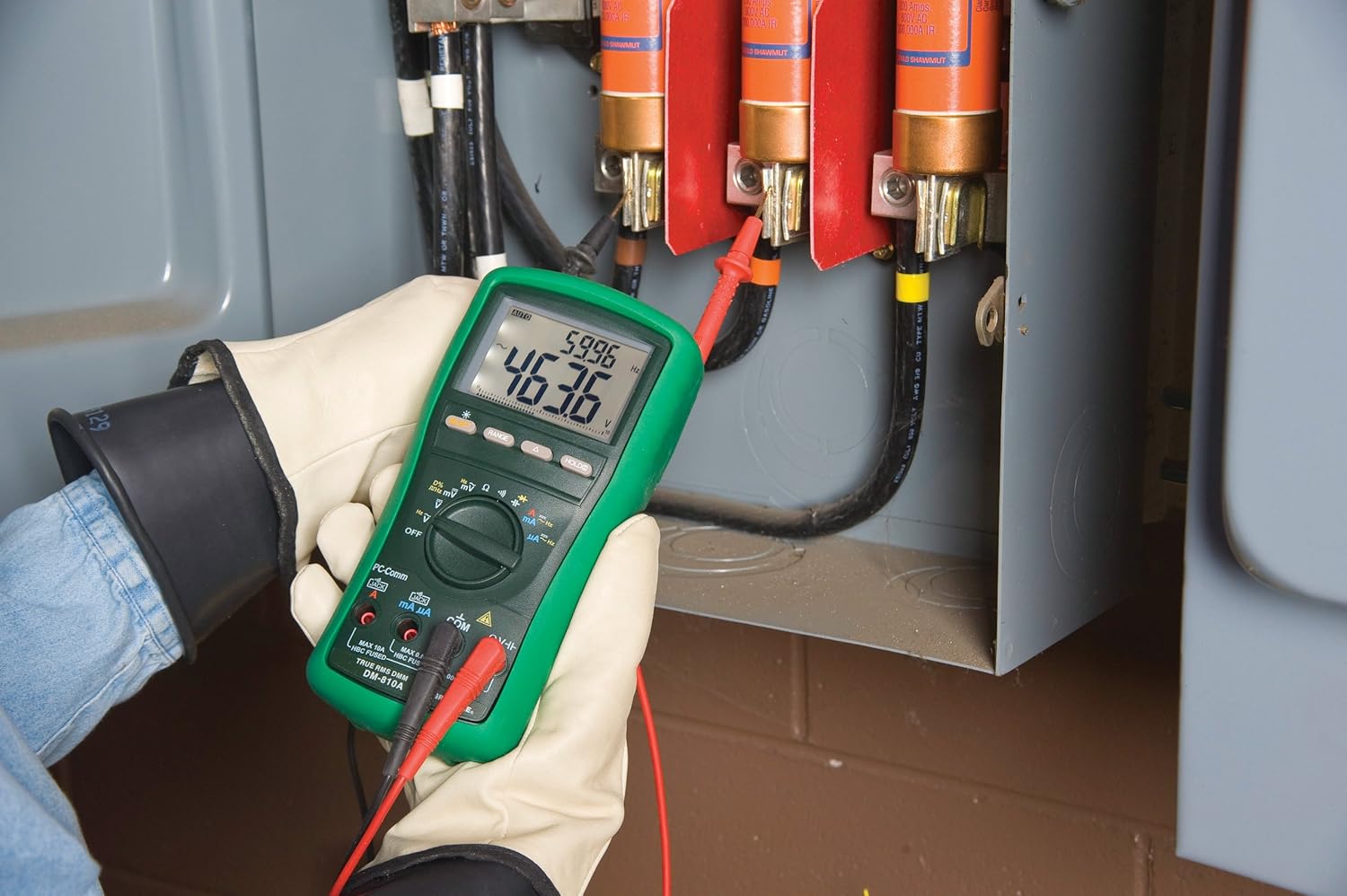
Figuur 2: The Greenlee DM-810A Digital Multimeter being used to take measurements within an electrical panel, demonstrating practical application.
Meet AC/DC Voltage
- Set the function selector to V~ (AC Voltage) of V- (GS Voltage). Use the SELECT button to toggle if both are on one position.
- Verbind die swart toetsleiding met COM and the red test lead to VΩHz.
- Koppel die toetsprobes parallel oor die stroombaan of komponent wat gemeet moet word.
- Lees die voltage waarde op die skerm.
Meet AC/DC stroom
Belangrik: Current measurements require the meter to be connected in series with the circuit. Ensure the circuit is de-energized before connecting the meter.
- Ontspan die stroombaan.
- Set the function selector to A~ (AC Current) or A- (DC Current), or mA~ / mA-.
- Verbind die swart toetsleiding met COM. Connect the red test lead to mAμA for small currents or A for larger currents (up to 10A). The Beep-Jack warning will activate if leads are in the wrong jacks for the selected function.
- Open the circuit where the current is to be measured and connect the meter in series.
- Skakel die stroombaan weer aan en lees die stroomwaarde.
- De-energize the circuit before disconnecting the meter.
Measuring Resistance (Ω)
- De-energize the circuit or component.
- Set the function selector to Ω.
- Verbind die swart toetsleiding met COM and the red test lead to VΩHz.
- Verbind die toetsprobes oor die komponent.
- Lees die weerstandswaarde.
Measuring Capacitance (CAP)
- Maak seker dat die kondensator volledig ontlaai is voor meting.
- Set the function selector to CAP.
- Verbind die swart toetsleiding met COM and the red test lead to VΩHz.
- Verbind die toetsprobes oor die kondensatorterminale.
- Lees die kapasitansiewaarde.
Measuring Frequency (Hz)
- Set the function selector to Hz.
- Verbind die swart toetsleiding met COM and the red test lead to VΩHz.
- Verbind die toetsprobes oor die seinbron.
- Lees die frekwensiewaarde.
Kontinuïteitstoets
- De-energize the circuit or component.
- Set the function selector to the continuity symbol (often shared with diode test, use SELECT to toggle).
- Verbind die swart toetsleiding met COM and the red test lead to VΩHz.
- Connect the test probes across the circuit path or component.
- An audible beep indicates continuity (low resistance). The display will show the resistance value.
Onderhoud
Skoonmaak
Vee die meter met advertensie afamp lap en sagte skoonmaakmiddel. Moenie skuurmiddels of oplosmiddels gebruik nie. Maak seker dat die meter heeltemal droog is voor gebruik.
Battery vervanging
When the battery indicator appears on the display, replace the batteries immediately to ensure accurate readings. Follow the battery installation steps outlined in the Setup section.
Sekering vervanging
If the current measurement functions cease to work, the internal fuses may need replacement. Refer to the meter's internal diagram (usually accessible by opening the battery compartment or back casing) for fuse specifications and replacement instructions. Always replace fuses with those of the specified type and rating to maintain safety and performance.
Probleemoplossing
This section provides solutions for common issues encountered during the operation of your DM-810A multimeter.
| Probleem | Moontlike oorsaak | Oplossing |
|---|---|---|
| Geen vertoon of dowwe vertoon | Dooie of lae batterye | Vervang batterye. |
| Verkeerde lesings | Incorrect function/range selected; Damaged test leads; External interference | Verify function and range; Inspect and replace test leads; Move away from strong electromagnetic fields. |
| Stroommeting werk nie | Blown fuse; Incorrect lead connection | Check and replace fuses; Ensure leads are in the correct A or mA jacks. |
| Beep-Jack warning active | Test leads connected to incorrect input jacks for the selected function | Adjust test lead connections to match the selected function on the dial. |
| Kontinuïteitstoets piep nie | Open circuit; High resistance | Ensure the circuit is closed; Check for breaks in the circuit or component. |
Tegniese spesifikasies
The following table outlines the key technical specifications for the Greenlee DM-810A Digital Multimeter.
| Kenmerk | Waarde |
|---|---|
| Handelsmerk | Greenlee |
| Model | DM-810A |
| Tipe meting | Ware RMS digitale multimeter |
| Kragbron | Battery aangedrewe |
| Styl | Digitaal |
| Item gewig | 16 onse (1 pond) |
| Produkafmetings (L x B x H) | 10 x 10 x 12 duim |
| Sertifiserings | CE, CSA, UL |
| UPC | 783310087434 |
Waarborg en Ondersteuning
Waarborg inligting
The Greenlee DM-810A Digital Multimeter comes with a 1 jaar vervaardiger se waarborgHierdie waarborg dek defekte in materiaal en vakmanskap onder normale gebruik. Bewaar asseblief u bewys van aankoop vir waarborgeise.
Kliënte ondersteuning
For technical assistance, warranty service, or to inquire about replacement parts, please contact Greenlee customer support. Refer to the official Greenlee webwebwerf of produkverpakking vir die mees onlangse kontakinligting.