
Logitech M510 (910-001822)
Logitech M510 Wireless Muis Gebruikershandleiding
Model: M510 (910-001822)
Inleiding
This manual provides comprehensive instructions for the setup, operation, maintenance, and troubleshooting of your Logitech M510 Wireless Mouse. Designed for comfort and efficiency, the M510 offers precise control and convenient features for your computing needs.
The Logitech M510 is a comfortable wireless computer mouse featuring a USB Unifying Receiver, back/forward buttons, and side-to-side scrolling. It operates on 2 AA batteries and is compatible with Personal Computers and Macbooks running operating systems like Windows 10.
Pakketinhoud
- Logitech M510 draadlose muis
- Logitech Univing-ontvanger
- 2 AA-batterye (vooraf geïnstalleer of ingesluit)
Opstelling
1. Battery Installasie
The Logitech M510 mouse requires two AA batteries for operation. These are typically included with your purchase. If not already installed, follow these steps:
- Vind die batteryklep aan die onderkant van die muis.
- Skuif of lig die deksel op om die kompartement oop te maak.
- Plaas twee AA-batterye in en maak seker dat die positiewe (+) en negatiewe (-) terminale korrek met die aanwysers binne die kompartement in lyn is.
- Maak die batterykompartement se deksel stewig toe.
2. Verbinding van die Verenigende Ontvanger
The Logitech M510 uses a Logitech Unifying Receiver for wireless connectivity. This small USB receiver allows you to connect multiple compatible Logitech devices to your computer using a single USB port.
- Locate the Logitech Unifying Receiver. It is often stored inside the battery compartment of the mouse for safekeeping during transport.
- Plug the Unifying Receiver into an available USB port on your computer (desktop, laptop, or Macbook).
- Your computer should automatically detect the receiver and install the necessary drivers. This may take a few moments.
- Once the drivers are installed, the mouse should be ready for use. If not, ensure the mouse's power switch (if present) is in the 'ON' position.

Beeld: Bo-onder view of the Logitech M510 Wireless Mouse alongside its compact USB Unifying Receiver.
Bediening van die muis
The Logitech M510 Wireless Mouse is designed for intuitive use with several programmable buttons and comfortable ergonomics.
Basiese funksies
- Links-klik-knoppie: Primêre knoppie vir die seleksie van items, oopmaak files, and interacting with software.
- Regskliek-knoppie: Sekondêre knoppie vir toegang tot kontekskieslyste en bykomende opsies.
- Rolwiel: Blaai op of af deur dokumente en web pages. The scroll wheel also functions as a middle-click button.
- Side-to-Side Scrolling: Tilt the scroll wheel left or right to scroll horizontally in applications that support this feature.
Advanced Features (Programmable Buttons)
The M510 features two thumb buttons (back/forward) on the left side, which can be customized using Logitech Options software (available for download from the Logitech website). By default, these buttons perform browser navigation functions.
- Terug-knoppie: Navigeer terug in web blaaiers of file ontdekkingsreisigers.
- Aanstuur-knoppie: Navigeer vorentoe in web blaaiers of file ontdekkingsreisigers.
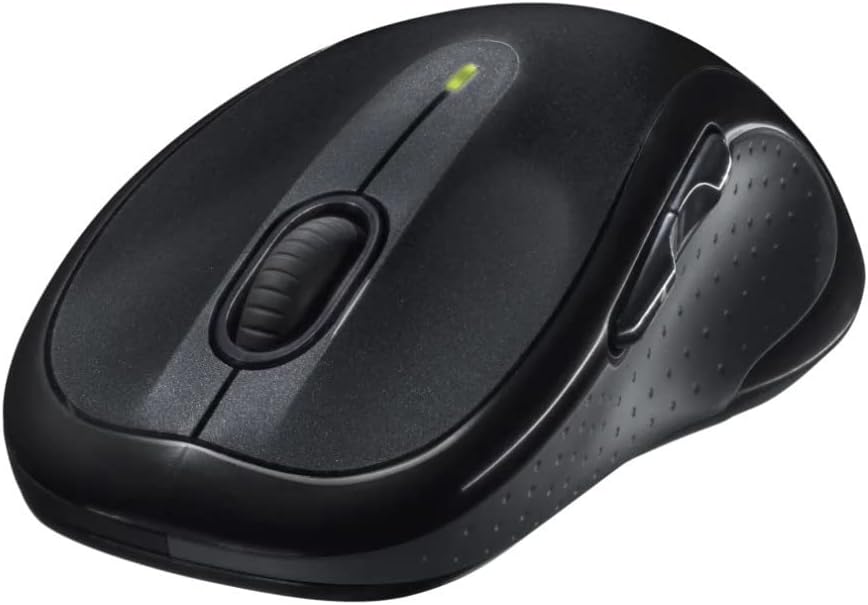
Beeld: Hoekig view of the Logitech M510 Wireless Mouse, highlighting its ergonomic shape and side buttons.
Onderhoud
Maak jou muis skoon
To ensure optimal performance and hygiene, regularly clean your Logitech M510 mouse:
- Disconnect the mouse from your computer by removing the Unifying Receiver.
- Gebruik 'n sagte, pluisvrye lap liggies dampened with water or a mild cleaning solution (e.g., isopropyl alcohol) to wipe down the surface of the mouse.
- For crevices and around buttons, use a cotton swab or a soft brush.
- Avoid getting liquid into the internal components or the optical sensor.
- Allow the mouse to dry completely before re-connecting.
Battery vervanging
The Logitech M510 has an average battery life of 18 months. When the battery indicator light (if present) flashes or mouse performance degrades, it's time to replace the batteries.
- Skakel die muis af met die aan/uit-skakelaar aan die onderkant.
- Maak die batteryvakdeksel oop.
- Verwyder die ou AA-batterye.
- Insert two new AA batteries, observing the correct polarity (+/-).
- Maak die batterykompartement se deksel toe.
- Skakel die muis weer aan.
Probleemoplossing
| Probleem | Moontlike oorsaak | Oplossing |
|---|---|---|
| Muis reageer nie | Low or dead batteries; Unifying Receiver not connected; Mouse power off; Driver issue. | Replace batteries; Ensure Unifying Receiver is securely plugged into a USB port; Turn mouse power switch to 'ON'; Reinstall Logitech Options software or check device manager for driver issues. |
| Lagging or erratic cursor movement | Interference; Dirty optical sensor; Mouse used on unsuitable surface; Low battery. | Move mouse closer to receiver; Clear obstructions; Clean optical sensor; Use a mouse pad or suitable surface; Replace batteries. |
| Syknoppies werk nie | Software not installed or configured; Application does not support custom buttons. | Download and install Logitech Options software from the official Logitech website to customize button functions. Ensure the application you are using supports these functions. |
| Unifying Receiver not recognized | Faulty USB port; Driver issue. | Try a different USB port; Restart your computer; Download and install the Logitech Unifying Software to re-pair the mouse with the receiver. |
Spesifikasies
| Kenmerk | Detail |
|---|---|
| Handelsmerk | Logitech |
| Modelnommer | 910-001822 |
| Reeks | M510 |
| Verbindingstegnologie | Radio Frequency, USB (via Unifying Receiver) |
| Bewegingsopsporingstegnologie | Laser |
| Kleur | Donkergrys |
| Item gewig | 4.6 onse (ongeveer 130 gram) |
| Produkafmetings (LxBxH) | 4.38 x 2.5 x 1.75 duim (ongeveer 11.13 x 6.35 x 4.45 cm) |
| Kragbron | Battery aangedrewe |
| Batterye benodig | 2 AA-batterye (ingesluit) |
| Gemiddelde batterylewe | 18 maande |
| Hardeware Platform | Personal Computer, Macbook |
| Bedryfstelselversoenbaarheid | Windows 10 (and likely earlier versions, macOS) |
| Spesiale kenmerke | Battery Life Indicator, Power Saving Mode, Programmable Buttons, Wireless |
| Datum Eerste Beskikbaar | 7 Junie 2010 |

Beeld: Bo-onder view of the Logitech M510 Wireless Mouse showing its approximate dimensions (4.4" length, 2.5" width).
Waarborg en Ondersteuning
Waarborg inligting
Logitech products typically come with a limited hardware warranty. For specific warranty terms and conditions applicable to your Logitech M510 Wireless Mouse, please refer to the warranty card included with your product or visit the official Logitech webwebwerf.
Kliënte ondersteuning
For further assistance, technical support, or to download the latest software (such as Logitech Options or Unifying Software), please visit the official Logitech support webwebwerf:
Logitech Ondersteuning Webwebwerf
Jy kan ook nuttige hulpbronne, algemene vrae en gemeenskapsforums op hul webwerf vind. webwebwerf.