
1. Produk verbyview
The Amazon Basics 7-Port USB 2.0 Hub Tower provides expanded connectivity for your computer, allowing you to connect multiple USB devices simultaneously. It features a compact design and includes a dedicated power adapter to ensure stable performance for all connected devices.

The Amazon Basics 7-Port USB 2.0 Hub Tower, showcasing its compact design and multiple USB ports.
Pakketinhoud:
- 1 x Amazon Basics 7-Port USB 2.0 Hub Tower
- 1 x 5V/4A-kragadapter
- 1 x USB 2.0 Cable (3 feet)
- 1 x Owner's Manual (this document)
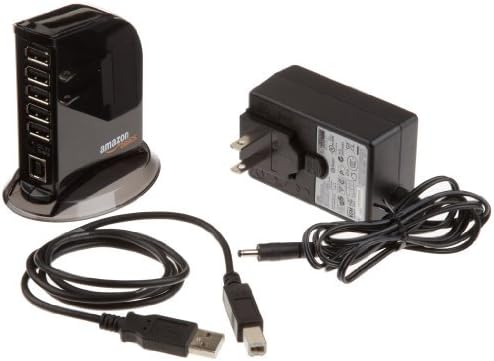
The package includes the 7-Port USB 2.0 Hub, a 5V/4A power adapter, and a USB 2.0 cable.
2. Opstelinstruksies
The Amazon Basics 7-Port USB 2.0 Hub is designed for plug-and-play installation, requiring no additional drivers for most operating systems.
Verbindingstappe:
- Connect the provided 5V/4A Power Adapter to the DC 5V input port on the back of the USB hub. Plug the power adapter into a standard electrical outlet.
- Connect one end of the included USB 2.0 cable to the USB Type B input port on the back of the hub.
- Connect the other end of the USB 2.0 cable (USB Type A) to an available USB port on your computer (laptop or desktop).
- Once connected, the hub's indicator light will illuminate, signifying it is powered on and ready for use.
- You can now connect your USB devices to the available USB Type A ports on the hub.

A visual guide demonstrating the connection of the USB hub to a computer via a USB Type B input, and the connection of various devices like flash drives, external HDDs, keyboards, mice, tablets, and smartphones to the USB Type A output ports.
3. Bedryfsinstruksies
The Amazon Basics 7-Port USB 2.0 Hub is designed to extend your computer's USB connectivity and provide power to connected devices.
USB-poort funksionaliteit:
- Standaard USB-poorte: The hub features 5 standard USB 2.0 ports, each providing a maximum output of 500mA. These ports are suitable for connecting peripherals such as keyboards, mice, flash drives, and other low-power devices.
- Vinnige laaipoorte: Two dedicated USB ports are available for fast charging, each offering a maximum output of 1.5A. These ports are ideal for charging smartphones, tablets, and other devices that require higher current.
- Totale kraguitset: The hub's power adapter provides a total output of 20W (5V/4A) across all 7 ports. For optimal performance and to ensure sufficient power delivery to all connected devices, especially high-power devices, always use the included power adapter.
- Data-oordrag: The hub supports data transfer speeds of up to 480Mbps, compliant with USB 2.0 specifications and backward compatible with USB 1.1.
Belangrike oorwegings:
- When charging devices, verify their loading current requirements. Insufficient current may result in slow charging or device malfunction.
- For high-power devices like external hard drives, ensure the power adapter is connected to prevent operational issues.

The USB hub in operation, with several USB devices connected, illustrating its use as an expansion port for a computer.
4. Onderhoud
To ensure the longevity and optimal performance of your Amazon Basics 7-Port USB 2.0 Hub, follow these simple maintenance guidelines:
- Keep the hub clean by wiping it with a soft, dry cloth. Avoid using harsh chemicals or abrasive cleaners.
- Ensure the hub is placed in a well-ventilated area to prevent overheating.
- Avoid exposing the hub to moisture, extreme temperatures, or direct sunlight.
- Handle the USB cables and ports gently to prevent damage.
5. Probleemoplossing
If you encounter issues with your Amazon Basics 7-Port USB 2.0 Hub, refer to the following troubleshooting tips:
Device Not Recognized or Working Slowly:
- Verifieer kragverbinding: Ensure the 5V/4A power adapter is securely connected to the hub and a working electrical outlet. The hub's indicator light should be on.
- Gaan USB-kabel na: Ensure the USB 2.0 cable connecting the hub to your computer is securely plugged in at both ends. Try using a different USB port on your computer or a different USB cable if available.
- Onvoldoende krag: High-power devices (e.g., external hard drives, some tablets) require more power. Always use the included power adapter. If multiple high-power devices are connected, try disconnecting some to see if performance improves.
- Bestuurder kwessies: The hub is plug-and-play. If a device connected to the hub is not working, the issue might be with the device's specific drivers, not the hub itself. Ensure your computer's USB drivers are up to date.
- Port Specificity: Remember that the two front ports are designed for fast charging (1.5A), while the five side ports are standard (500mA). Ensure you are using the appropriate port for your device's needs.
Hub Indicator Light Not On:
- Ensure the power adapter is correctly connected and the electrical outlet is functional.
- Check for any visible damage to the power adapter or its cable.
6. Spesifikasies
| Kenmerk | Spesifikasie |
|---|---|
| Handelsmerk | Amazon Basics |
| Modelnommer | HU2W70E1 |
| Aantal USB 2.0-poorte | 7 |
| Standard USB Port Output | 500mA per port (5 ports) |
| Fast Charging Port Output | 1.5A per port (2 ports) |
| Totale kraglewering | 20W (5V/4A) |
| Data-oordragspoed | Tot 480 Mbps |
| USB -nakoming | USB 2.0 (agteruit versoenbaar met USB 1.1) |
| Bedryfstelselversoenbaarheid | Windows Vista and newer (Plug-and-Play) |
| Item gewig | 7.1 onse |
| Produkafmetings (LxBxH) | 3.53 x 2.35 x 3.55 duim |
| Kleur | Swart |
7. Waarborg en Ondersteuning
Waarborginligting:
This Amazon Basics product is covered by a standard warranty. For detailed information regarding warranty terms, conditions, and duration, please refer to the official Amazon Basics webwebwerf of die waarborgkaart wat by u aankoop ingesluit is.
Kliëntediens:
For technical assistance, troubleshooting, or any other inquiries regarding your Amazon Basics 7-Port USB 2.0 Hub Tower, please visit the Amazon Basics support page on the official Amazon website. You can find FAQs, contact information, and additional resources there.
Aanlyn hulpbronne: Amazon Basics Winkel