
1. Inleiding
This manual provides detailed instructions for the setup, operation, and maintenance of your Vivitek D511 Portable DLP Projector. The D511 is designed to deliver sharp, detailed images with 2600 lumens of brightness and a 3000:1 contrast ratio, utilizing DLP and BrilliantColor technologies. It is also 3D-ready, supporting future media content. Please read this manual thoroughly before using the projector to ensure proper and safe operation.
2. Veiligheidsinligting
- Ventilasie: Ensure adequate ventilation around the projector. Do not block any ventilation openings. Overheating can cause damage to the projector and pose a fire hazard.
- Kragbron: Gebruik slegs die gespesifiseerde kragadapter en koppel dit aan 'n geaarde kragaansluiting.
- Lamp Veiligheid: Die projektor lamp operates at high temperatures and pressure. Moenie probeer om die l te vervang nieamp onmiddellik na gebruik. Allow the projector to cool down for at least 20 minutes before handling the lamp. Refer to the "Maintenance" section for lamp vervangingsinstruksies.
- Oogbeskerming: Vermy om direk in die projektorlens te kyk wanneer die lamp aan is, aangesien die intense lig oogskade kan veroorsaak.
- Plasing: Place the projector on a stable, level surface. Avoid placing it in direct sunlight, near heat sources, or in environments with high humidity or dust.
- Skoonmaak: Ontkoppel die kragkabel voor skoonmaak. Gebruik 'n sagte, droë lap. Moenie vloeibare of aërosol skoonmaakmiddels gebruik nie.
3. Produk verbyview
3.1 Voorkant View
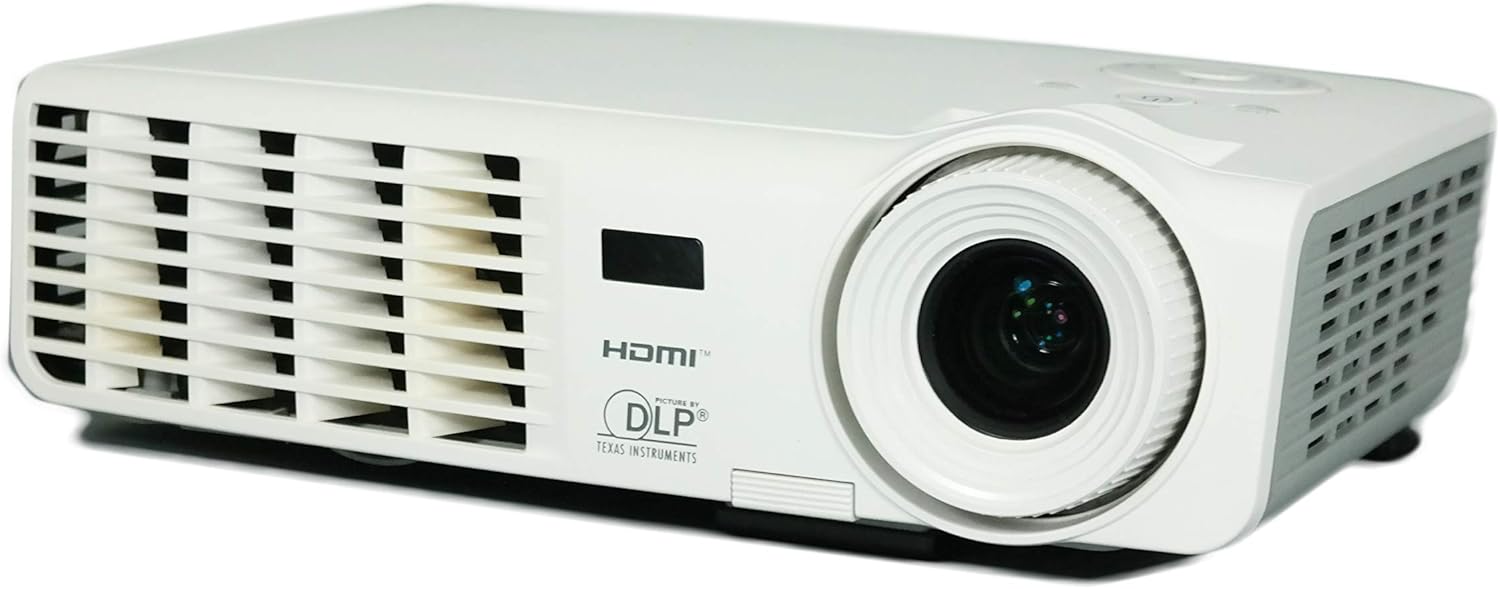
Prent 3.1: Voorkant view of the Vivitek D511 projector, showing the projection lens and front ventilation grille.
The front of the projector features the main projection lens, which is used to focus the image onto your screen or surface. The front also includes ventilation openings to ensure proper airflow and cooling during operation.
3.2 Agterpaneel (Konnektiwiteit)

Prent 3.2: Rear panel of the Vivitek D511 projector, displaying various input and output ports.
The rear panel provides a range of connectivity options for various devices:
- HDMI: High-Definition Multimedia Interface for digital audio and video input.
- VGA (Input 1 & 2): D-sub 15-pin connectors for analog video input from computers.
- Saamgestelde video: RCA yellow jack for standard definition video input.
- S-video: Mini-DIN 4-pin connector for enhanced standard definition video input.
- Audio In (L-Audio-R & Mini-Jack): RCA red/white jacks and a 3.5mm mini-jack for audio input.
- RS-232: Serial port for projector control via a computer or control system.
- Kragtoevoer: AC power connector.
3.3 Top Panel (Control Buttons)

Prent 3.3: Top panel of the Vivitek D511 projector, showing the control buttons and indicator lights.
The top panel houses the primary control buttons for operating the projector without the remote control. These include the Power button, Source selection, Menu access, Auto adjustment, and navigation buttons. Indicator lights for LAMP and TEMP provide status information.
3.4 Kant Views (Ventilation)

Image 3.4a: Linkerkant view with ventilation.

Image 3.4b: Regterkant view with ventilation.
Both sides of the projector feature ventilation grilles crucial for dissipating heat generated during operation. Ensure these areas are unobstructed to maintain optimal performance and prevent overheating.
3.5 Onderkant View (Label and Lamp Toegang)

Prent 3.5: Onderkant view of the Vivitek D511 projector, showing the product label and lamp toegangspaneel.
The bottom of the projector contains the product information label, including the model number (D511), serial number, and regulatory compliance marks. It also features an access panel for lamp vervanging. Always refer to the safety warnings regarding lamp replacement on this label.
4. Opstelling
4.1 Projektorplasing
Place the projector on a stable, flat surface. The D511 is designed for tabletop mounting. Ensure the projector is positioned at an appropriate distance from the screen to achieve the desired image size. Avoid placing it where ventilation grilles could be blocked.
4.2 Koppel toestelle
Connect your source devices (e.g., laptop, gaming console, DVD player) to the appropriate input ports on the projector's rear panel (refer to Image 3.2).
- HDMI: For high-quality digital video and audio, connect an HDMI cable from your source device to the projector's HDMI port.
- VGA: For analog video from a computer, connect a VGA cable to one of the VGA ports. If connecting a computer, you may also need to connect an audio cable to the Audio In mini-jack.
- Composite/S-Video: For older video sources, connect the appropriate cable to the Composite Video or S-Video port. Connect audio cables to the L-Audio-R RCA jacks.
4.3 Aan-/afskakel
- Krag aan: Connect the power cord to the projector and a power outlet. Press the Krag button on the top panel or the remote control. The projector will initiate its startup sequence.
- Skakel af: Druk die Krag button again. A confirmation message may appear. Press the Power button a second time to confirm shutdown. The projector will enter a cooling cycle before completely shutting down. Do not unplug the projector during the cooling cycle.
5. Bediening van die Projektor
5.1 Basiese kontroles
The projector can be controlled using the buttons on the top panel (refer to Image 3.3) or the included remote control.
- BRON: Press to cycle through available input sources (HDMI, VGA, Composite, S-Video).
- SPYSKAART: Press to open the On-Screen Display (OSD) menu for advanced settings. Use the arrow buttons to navigate and ENTER (often the central button) to select.
- VOERTUIG: Automatically adjusts the image for optimal display, particularly useful for VGA sources.
- Pyltjieknoppies (Op/Af/Links/Regs): Navigeer deur spyskaarte en pas instellings aan.
5.2 Aanpassing van die beeld
- Fokus: Draai die fokusring op die projektorlens totdat die beeld skerp en duidelik lyk.
- Keystone-korreksie: If the image appears trapezoidal (wider at the top or bottom), use the keystone correction function (usually found in the OSD menu) to adjust it. The D511 supports vertical keystone correction up to 30 inches.
- Zoem: If available, use the zoom ring on the lens to adjust the image size without moving the projector.
5.3 3D-funksionaliteit
The Vivitek D511 is 3D-ready. To experience 3D content, you will need compatible 3D source material, a 3D-capable player, and active shutter 3D glasses (sold separately). Refer to your 3D source device's manual for specific setup instructions. The projector will automatically detect and display 3D signals when properly configured.
6. Onderhoud
6.1 Lamp Vervanging
Die projektor lamp has an operating life of approximately 4000 hours. When the lamp die einde van sy lewe bereik, die LAMP indicator light may illuminate, or the image brightness may significantly decrease. Refer to the caution label on the bottom of the projector (Image 3.5) before attempting replacement.
- Afkoel: Ensure the projector has been powered off and allowed to cool for at least 20 minutes before proceeding. The lamp operates at high temperatures.
- Ontkoppel krag: Ontkoppel die kragkabel van die projektor.
- Toegangspaneel: Vind die lamp access panel on the bottom of the projector. Unscrew the retaining screw(s) and carefully remove the cover.
- Verwyder Ou Lamp: Unscrew the screws holding the lamp module in place. Carefully pull the lamp module out by its handle.
- Installeer Nuwe Lamp: Plaas die nuwe l inamp module, ensuring it is seated correctly. Secure it with the screws.
- Maak paneel toe: Vervang die lamp access cover and secure it with its screw(s).
- Stel L terugamp Afteller: Na die vervanging van die lamp, jy moet die l herstelamp timer in the projector's OSD menu to accurately track the new lamp's life.
6.2 Skoonmaak
- Projektor Casing: Use a soft, lint-free cloth to wipe the exterior of the projector. For stubborn marks, slightly dampMaak die lap met water skoon. Vermy harde chemikalieë.
- Projektorlens: Gently clean the lens with a lens cleaning cloth or a soft, dry, lint-free cloth specifically designed for optical surfaces. Do not use abrasive materials or excessive force.
- Ventilasieroosters: Periodically check the ventilation grilles for dust accumulation. Use a soft brush or compressed air to clear any blockages.
7. Probleemoplossing
| Probleem | Moontlike oorsaak | Oplossing |
|---|---|---|
| Geen beeld op die skerm nie |
|
|
| Beeld is vaag |
|
|
| Beeld is trapesiumvormig |
|
|
| Projector overheats / TEMP indicator on |
|
|
| Geen oudio nie |
|
|
8. Spesifikasies
| Kenmerk | Detail |
|---|---|
| Handelsmerk | Vivitek |
| Modelnommer | D511 |
| Tipe vertoon | DLP |
| Inheemse resolusie | 1024 x 768 (XGA) |
| Maksimum skermresolusie | 1600 x 1200 |
| Helderheid | 2600 Lumen |
| Kontrasverhouding | 3000:1 |
| Spesiale kenmerk | 3D-gereed |
| Verbindingstegnologie | HDMI, VGA, Composite Video, S-Video, RS-232 |
| Lamp Wattage | 180 Watt |
| Ligbron bedryfslewe | 4000 ure |
| Vormfaktor | Draagbaar |
| Montage tipe | Tafelblad Mount |
| Item gewig | 4.2 pond |
| Kleur | Wit |
| Beheer metode | Afstandbeheer, Knoppies op die toestel |
| Picture Quality Enhancement | BrilliantColor |
9. Waarborg en Ondersteuning
For warranty information, technical support, or service inquiries, please contact Vivitek customer support. Details regarding your product's specific warranty period and terms can typically be found on the Vivitek official website or included in your product packaging. Please have your model number (D511) and serial number ready when contacting support.