
VTech 80-109744
VTech Schulstart Laptop E Instruction Manual
Model: 80-109744
1. Inleiding
This manual provides essential information for the safe and effective use of your VTech Schulstart Laptop E. This learning computer is designed for children aged 6 and up, offering 160 educational games in both German and English. It covers subjects such as letters, words, mathematics, nature, science, and creativity.
Lees asseblief hierdie handleiding deeglik deur voordat u die toestel gebruik en bewaar dit vir toekomstige verwysing.
2. Veiligheidsinligting
WAARSKUWING: Choking hazard due to small parts that can be swallowed. Not suitable for children under 36 months.
WAARSKUWING: Strangulation hazard. Keep packaging materials away from children.
- Hou altyd toesig oor kinders tydens gebruik.
- Moenie die toestel aan uiterste temperature of direkte sonlig blootstel nie.
- Keep the device dry. Do not immerse in water or other liquids.
- Maak die toestel skoon met 'n sagte, droë lap. Moenie skuurmiddels gebruik nie.
- Maak seker dat batterye korrek volgens die polariteitsmerkies geplaas word.
- Verwyder uitgeputte batterye dadelik.
- Moenie ou en nuwe batterye, of verskillende tipes batterye meng nie.
- Nie-herlaaibare batterye mag nie herlaai word nie.
- Herlaaibare batterye moet slegs onder volwasse toesig gelaai word.
- Verwyder herlaaibare batterye uit die speelding voordat dit gelaai word.
- Die toevoerterminale mag nie kortgesluit word nie.
3. Pakketinhoud
The VTech Schulstart Laptop E package includes:
- 1 x VTech Schulstart Laptop E
- 1 x Cursor Mouse
- 3 x AA Demonstration Batteries (for test purposes only)
Note: A VTech power adapter and VTech laptop bag are sold separately and are not included.
4. Opstelling
4.1 Battery installasie
The device requires 3 AA batteries. The included demonstration batteries are for testing purposes only and should be replaced with new batteries for regular use.
- Vind die batterykompartement aan die onderkant van die skootrekenaar.
- Maak die deksel van die batterykompartement oop met 'n skroewedraaier.
- Remove the old demonstration batteries (if present).
- Plaas 3 nuwe AA-batterye in en maak seker dat die polariteit (+/-) korrek is soos aangedui in die kompartement.
- Plaas die deksel van die batterykompartement terug en maak dit met die skroef vas.

Figure 4.1: Battery installation guide. Replace demonstration batteries with new ones for extended play.
4.2 Connecting the Cursor Mouse
The VTech Schulstart Laptop E comes with a wired cursor mouse for interactive play.
- Vind die muispoort aan die kant van die skootrekenaar.
- Carefully insert the mouse connector into the port.
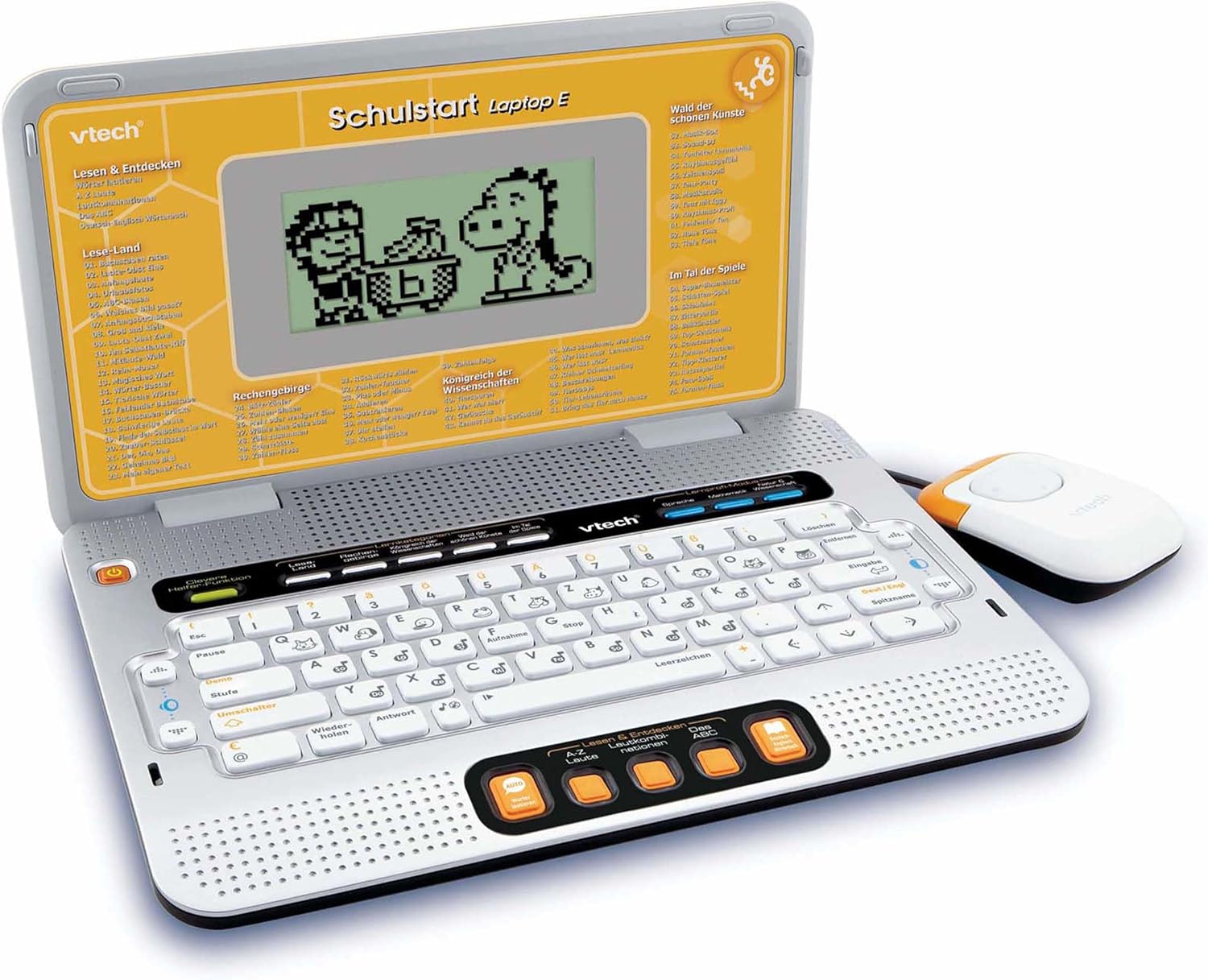
Figure 4.2: VTech Schulstart Laptop E with connected cursor mouse.
5. Bedryfsinstruksies
5.1 Krag aan/af
Om die skootrekenaar aan te skakel, druk die Krag button, usually located on the top left of the keyboard area. To turn off, press the Krag button again or the laptop will automatically shut down after a period of inactivity to conserve battery life.
5.2 Taalkeuse
The VTech Schulstart Laptop E supports both German and English. You can switch between languages using the dedicated language selection button or through the settings menu, if available. Refer to the on-screen prompts for initial setup.
5.3 Game Categories and Selection
The laptop features 160 educational games categorized as follows:
- Language Tools: 5 programme
- Letters & Words: 23 programme
- Wiskunde: 16 programme
- Nature & Science: 12 programme
- Kreatiwiteit: 12 programme
- Logic & Games: 12 programme
Use the arrow keys and the Enter button on the keyboard, or the cursor mouse, to navigate through the menu and select a game.

Figure 5.1: Navigating game categories on the VTech Schulstart Laptop E.
5.4 Tutor Function and Learning Modes
The laptop includes a Tutor function and a Learning Pro mode to enhance the learning experience:
- Tutor Function: Features 5 direct-dial keys for language tools (sounds, phonics, sound combinations, ABC with example words, German-English dictionary). These programs assist with letter pronunciation and reading.
- Learning Pro Mode: Offers progressive learning through increasing difficulty levels, adapting to the child's progress.
- Smart Helper Function: Provides additional hints and tips in many educational games upon request.

Figure 5.2: Child using the VTech Schulstart Laptop E's interactive learning features.
6. Onderhoud
6.1 Skoonmaak
To clean the VTech Schulstart Laptop E, use a soft, slightly damp lap. Moenie harde chemikalieë of skuurmiddels gebruik nie. Maak seker dat die toestel afgeskakel en van enige kragbron ontkoppel is voordat u dit skoonmaak.
6.2 Berging
Store the laptop in a cool, dry place away from direct sunlight and extreme temperatures. If the device will not be used for an extended period, remove the batteries to prevent leakage.

Figure 6.1: Optional VTech laptop bag for storage and transport (sold separately).
7. Probleemoplossing
| Probleem | Moontlike oorsaak | Oplossing |
|---|---|---|
| Toestel kan nie aangeskakel word nie. |
|
|
| Die skerm is leeg of flikker. |
|
|
| Sleutels of muis reageer nie. |
|
|
| Klank is verwring of afwesig. |
|
|
8. Spesifikasies
- Modelnommer: 80-109744
- Afmetings (L x B x H): 4 x 28 x 20 cm (1.57 x 11.02 x 7.87 duim)
- Gewig: 1.29 kg (2.84 lbs)
- Aanbevole ouderdom: 6 jaar en ouer
- Batterye: 3 x AA (not included for regular use)
- Tale: Duits, Engels
- Aantal speletjies: 160
- Vrystellingsdatum: 31 Julie 2010
9. Waarborg en Ondersteuning
Vir waarborginligting en kliëntediens, verwys asseblief na die amptelike VTech-webwerf webwebwerf of kontak u plaaslike VTech-verspreider. Bewaar u aankoopbewys as bewys van aankoop.
VTech-amptenaar Webwebwerf: www.vtech.com