
Inleiding
Dankie vir die aankoopasing the Optimus F-1760 16-inch Wave Oscillating Stand Fan. This manual provides important information regarding the safe operation, assembly, maintenance, and troubleshooting of your fan. Please read these instructions thoroughly before use and retain them for future reference.

Image: The Optimus F-1760 stand fan positioned in a bedroom, showcasing its design and size relative to furniture.
Belangrike veiligheidsinstruksies
Wanneer elektriese toestelle gebruik word, moet basiese voorsorgmaatreëls altyd gevolg word om die risiko van brand, elektriese skok en besering aan persone te verminder, insluitend die volgende:
- Lees alle instruksies voordat u hierdie waaier gebruik.
- Use this fan only as described in this manual. Other uses not recommended may cause fire, electric shock, or injury to persons.
- To protect against electrical shock, do not place fan in window, immerse unit, plug or cord in water or spray with liquids.
- Noukeurige toesig is nodig wanneer enige toestel deur of naby kinders gebruik word.
- Unplug fan from outlet when not in use, when moving fan from one location to another, and before cleaning.
- Do not operate fan in the presence of explosive and/or flammable fumes.
- Moenie waaier of onderdele naby 'n oop vuur, kook of ander verwarmingsapparaat plaas nie.
- Do not operate fan with a damaged cord or plug, or after the fan malfunctions or has been dropped or damaged in any manner.
- Vermy kontak met bewegende dele.
- Om te ontkoppel, gryp die prop vas en trek uit die muurprop. Moet nooit aan koord ruk nie.
- Gebruik altyd op 'n droë, gelyk oppervlak.
- Moenie waaier aan 'n muur of plafon hang of monteer nie.
- Moenie werk sonder dat waaierroosters behoorlik in plek is nie.
- This product employs overload protection (fuse). A blown fuse indicates an overload or short-circuit situation. If the fuse blows, unplug the product from the outlet. Replace the fuse as per the servicing instructions (follow product marking for proper fuse rating) and check the product. If the replacement fuse blows, a short-circuit may be present and the product should be discarded or returned to an authorized service facility for examination and/or repair.
Opstelling en samestelling
The Optimus F-1760 fan requires minimal assembly. Ensure all components are present and undamaged before proceeding.
- Basissamestelling: Attach the weighted base legs to the main pole. Ensure they are securely fastened to provide stability. The base is designed to be sturdy, with weights at the ends of the feet.
- Hoogte verstelling: The fan's height can be adjusted. Loosen the height adjustment knob on the pole, extend or retract the pole to the desired height, and then securely tighten the knob.
- Aanhangerkop-aanhegsel: Ensure the fan head is securely attached to the top of the pole. The motor housing and fan blade are plastic, while the grill is metal.
- Plasing: Place the fan on a dry, level surface. Ensure there is adequate space around the fan for proper air circulation and oscillation.
Bedryfsinstruksies
The Optimus F-1760 fan offers multiple control options and features for customized comfort.
Beheerpaneel
The fan features a 4-position push-button switch on the pole for basic operation.
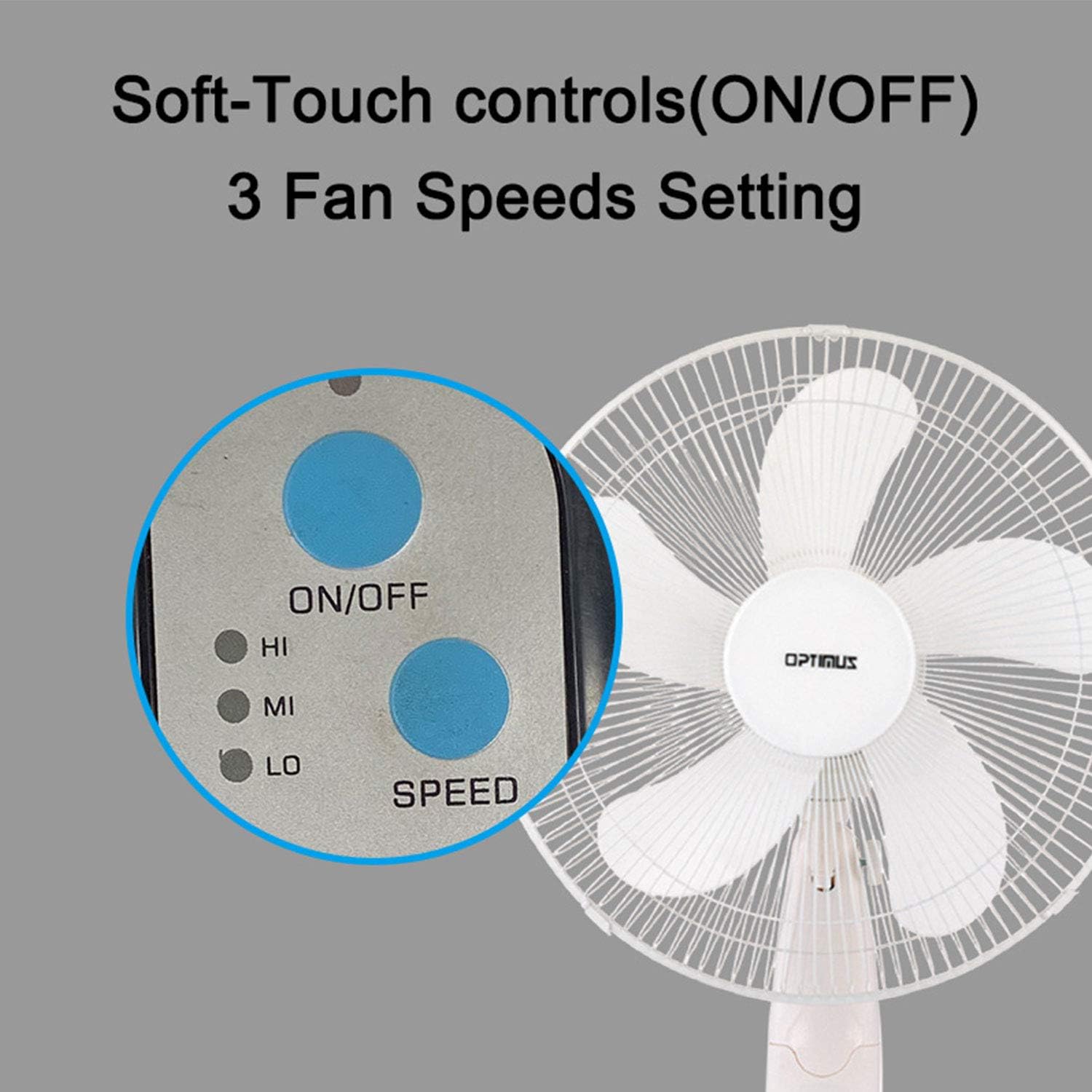
Image: The fan's soft-touch control panel, showing buttons for ON/OFF and SPEED, with indicators for High (HI), Medium (MI), and Low (LO) fan speeds.
- AAN/UIT: Druk om die waaier aan of af te skakel.
- Spoedinstellings: Select from Low, Medium, or High speeds. The 3-speed, energy-saving, whisper-quiet operation motor provides efficient airflow.
Afstandbeheer
The fan comes with a remote control for convenient operation from a distance. (Batteries not included).

Image: The remote control for the fan, featuring buttons for Mode, Time, Speed, and ON/OFF functions.
- AAN/UIT: Skakel die waaier aan of af.
- SPOED: Cycles through the three fan speeds (Low, Medium, High).
- WYSE: Selects between different wind modes.
- TYD: Activates and sets the shut-off timer.
Windmodusse
The fan offers three distinct wind modes to suit your preference:

Image: The fan's control panel highlighting the MODE button and indicators for Normal, Natural, and Sleep wind modes.
- Normale modus: The fan blows at a constant speed based on your selected setting.
- Natuurlike modus: The fan speed fluctuates to mimic a natural breeze.
- Slaap stelling: The fan operates at a lower, quieter speed, ideal for sleeping, with gentle speed variations.
ossillasie
The F-1760 features unique wave oscillation for comprehensive air distribution.

Image: A diagram illustrating the fan's capability for both vertical (up/down) and horizontal (left/right) wave oscillation, providing wider air coverage.
- Up/Down & Left/Right Wave Oscillating: Activates a unique oscillation pattern that moves the fan head both horizontally and vertically, distributing air throughout the room.
- Om ossillasie te stop, druk weer die ossillasieknoppie.
Timer funksie
Set the fan to automatically turn off after a specified period.

Image: The fan's control panel showing the TIME button and indicators for 1 hour (1H), 2 hours (2H), and 4 hours (4H) timer settings. The fan can be programmed for up to 7 hours.
- The timer can be set for 1, 2, 4, or up to 7 hours. Press the TIME button repeatedly to cycle through the desired duration.
Onderhoud en Skoonmaak
Gereelde skoonmaak help om die waaier se werkverrigting te handhaaf en sy lewensduur te verleng.
- Voor skoonmaak: Always unplug the fan from the electrical outlet before cleaning.
- Buitenste skoonmaak: Gebruik 'n sagte, damp lap om die buite-oppervlaktes van die waaier af te vee. Moenie skuurmiddels of oplosmiddels gebruik nie.
- Skoonmaak van die rooster: The metal grill can be cleaned with a soft brush or vacuum cleaner to remove dust. For thorough cleaning, the grill may need to be carefully removed.
- Lemme skoonmaak: If necessary, the fan blades can be cleaned. Ensure the fan is completely off and unplugged. The care instructions specify "Hand Wash" for components.
- Berging: Wanneer dit nie vir lang tye gebruik word nie, bêre die waaier op 'n koel, droë plek, verkieslik in sy oorspronklike verpakking.
Probleemoplossing
| Probleem | Moontlike oorsaak | Oplossing |
|---|---|---|
| Die waaier skakel nie aan nie. | No power supply. Blown fuse. | Ensure the fan is plugged into a working outlet. Check the fuse in the plug and replace if necessary (refer to safety instructions for fuse replacement). |
| Fan operates but air movement is weak. | Low speed setting. Dust accumulation on blades/grill. | Increase the fan speed. Clean the fan blades and grills as per maintenance instructions. |
| Afstandbeheer werk nie. | Dead batteries. Obstruction between remote and fan. | Replace batteries in the remote control. Ensure a clear line of sight between the remote and the fan's receiver. |
| Fan changes speed automatically or unexpectedly. | Interference from other remote controls (e.g., TV remote). | This fan may respond to frequencies from other remote controls. Try operating the fan manually or repositioning the fan/other devices to minimize interference. |
| Fan makes clicking noises during oscillation. | Normal operation of oscillation gears. | A slight clicking noise from the oscillation gears can occur during normal operation. If the noise is excessive or new, ensure the fan head is securely attached. |
| Fan feels unstable. | Base not properly assembled or tightened. Uneven surface. | Ensure all base components are securely fastened and the fan is placed on a firm, level surface. |
Spesifikasies
- Model Naam: F-1760
- Handelsmerk: Optimus
- Fan deursnee: 16 duim
- Elektriese waaier ontwerp: Vloerwaaier
- Kragbron: Elektries met koord
- Wattage: 60 watt
- Voltage: 6 Volt
- Aantal lemme: 3
- Spoedinstellings: 3 RPM (Laag, Medium, Hoog)
- Beheer metode: Afstandbeheer, drukknop
- Spesiale kenmerke: Up/Down & Left/Right Wave Oscillating, Adjustable Height, Timer Function (up to 7 hours), Wind Modes (Normal, Natural, Sleep)
- Binne/buiteluggebruik: Binneshuise
- Item gewig: 9.9 pond
- Ingesluit komponente: Produk, Handleiding
Waarborg inligting
This Optimus F-1760 fan comes with a 1-jaar beperkte waarborg from the date of purchase. This warranty covers defects in materials and workmanship under normal use. It does not cover damage resulting from misuse, accident, alteration, or unauthorized repair. Please retain your proof of purchase for warranty claims.
Kliënte ondersteuning
For technical assistance, warranty claims, or questions regarding your Optimus F-1760 fan, please contact Optimus customer service. Refer to the product packaging or the official Optimus webwebwerf vir die mees onlangse kontakinligting.