
1. Inleiding
Thank you for choosing the SHARP KC850U Air Purifier and Humidifier. This appliance is designed to improve indoor air quality and maintain optimal humidity levels in medium-sized rooms. It combines a multi-stage filtration system with Plasmacluster Ion Technology to effectively reduce airborne particles, odors, and maintain a comfortable environment.
Lees asseblief hierdie handleiding deeglik deur voordat u die eenheid gebruik om veilige en doeltreffende gebruik te verseker. Bewaar hierdie handleiding vir toekomstige verwysing.
2. Veiligheidsinligting
To reduce the risk of electric shock, fire, or injury, always follow basic safety precautions when using electrical appliances:
- Moenie die eenheid met 'n beskadigde koord of prop gebruik nie.
- Moenie die eenheid naby hittebronne of in direkte sonlig plaas nie.
- Maak seker dat die eenheid op 'n stabiele, gelyk oppervlak geplaas word.
- Moenie luginlate of -uitlate blokkeer nie.
- Ontkoppel die eenheid voordat u skoonmaak of enige onderhoud uitvoer.
- Moenie die eenheid in water of ander vloeistowwe dompel nie.
- Hou buite bereik van kinders en troeteldiere.
- Use only genuine SHARP replacement parts and filters.
3. Produk verbyview
The SHARP KC850U integrates air purification and humidification functions into a single unit. Key components include the air intake, air outlet, control panel, dust and humidity sensors, and water tank.

Figuur 3.1: Voorkant view of the SHARP KC850U Air Purifier and Humidifier, showing the control panel and display.
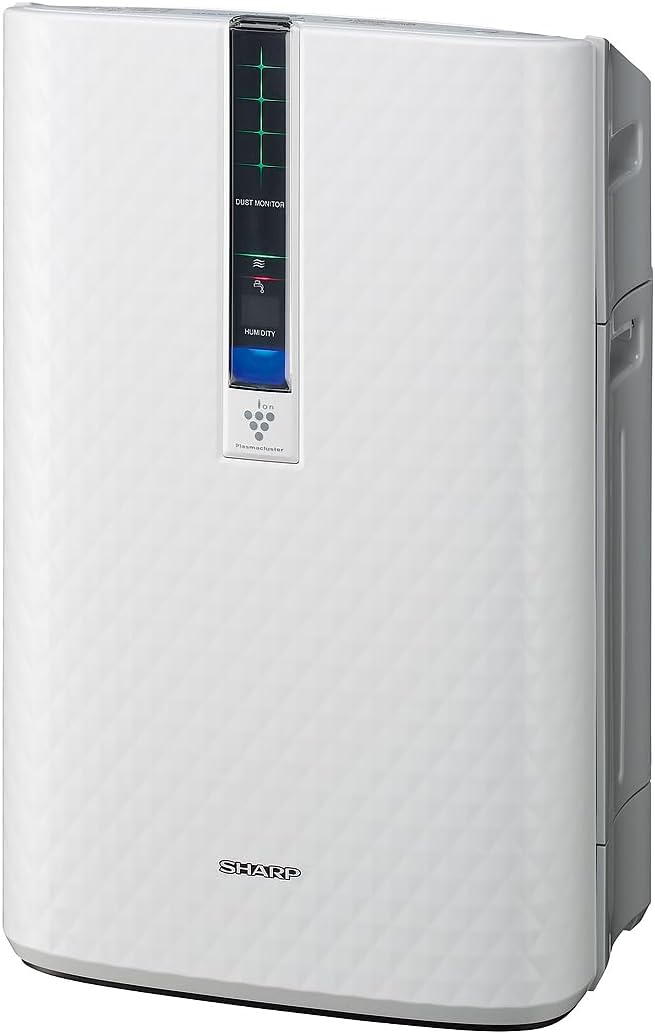
Figuur 3.2: Kant view of the SHARP KC850U, illustrating its compact design.
Beheerpaneel en skerm
The unit features an intuitive control panel and a display that provides real-time information on air quality and humidity levels.

Figuur 3.3: Top view of the control panel, showing buttons for power, fan speed, modes, and light control.
- Kragknoppie: Skakel die eenheid aan of af.
- Fan Speed Button: Cycles through Max, Med, and Low fan speeds.
- Modusknoppie: Selects operating modes including Auto, Pollen, and Quick Clean.
- Ligte knoppie: Adjusts the brightness of the display lights (Bright, Dim, Off).
- Dust Monitor: Visual indicator of air impurity levels (e.g., green for clean, red for high impurity).
- Humiditeit vertoon: Toon die huidige relatiewe humiditeitspersentasietage.
4. Opstelling
4.1 Uitpak
- Haal die eenheid versigtig uit sy verpakking.
- Verwyder alle beskermende materiale en plastieksakke.
- Ensure all filters are properly installed before first use. Refer to the Maintenance section for filter installation details.
4.2 Plasing
For optimal performance, place the air purifier in a location where air can circulate freely. Avoid placing it directly against a wall or furniture that might obstruct air intake or output.
- Recommended for use in bedrooms, living rooms, studies, or exercise rooms.
- Ensure at least 12 inches (30 cm) of clear space around the unit.
- Place on a firm, level surface.
4.3 Vul die watertenk (vir bevogtiging)
If you intend to use the humidification function, fill the water tank:
- Remove the water tank from the side of the unit.
- Open the tank cap and fill with clean tap water.
- Maak die doppie stewig toe en plaas die watertenk terug in die eenheid.
5. Bedryfsinstruksies
5.1 Krag aan/af
Druk die Krag knoppie om die eenheid aan of af te skakel.
5.2 Keuse van waaierspoed
Druk die Fan Spoed button repeatedly to cycle through the available fan speeds:
- Maksimum: Highest air purification and humidification.
- Med: Moderate operation.
- Laag: Quiet operation, suitable for sleeping (as quiet as 23 dBA).
5.3 Moduskeuse
Druk die Modus button repeatedly to select an operating mode:
- Outomatiese modus: The unit automatically adjusts fan speed and humidification based on sensor readings for air quality and humidity.
- Stuifmeelmodus: Geoptimaliseer vir stuifmeelverwydering.
- Vinnige skoonmaakmodus: Releases high-density Plasmacluster ions for rapid air purification.
5.4 Plasmakluster-ioontegnologie
The Plasmacluster Ion Technology actively disperses positive and negative ions into the air to help reduce microscopic pollutants. This function operates automatically with the unit. A slight clicking sound may be audible during operation, which is normal.
5.5 Vertoonligbeheer
Druk die Ligte button to adjust the brightness of the display indicators:
- Helder: Full illumination.
- Dim: Reduced illumination.
- Af: Display lights are off, suitable for dark rooms.

Figuur 5.1: Display showing 'Lo' for low humidity and green dust monitor indicators.

Figuur 5.2: Display showing 'Hi' for high humidity and red dust monitor indicators, indicating higher impurity levels.
6. Onderhoud
Regular maintenance ensures optimal performance and extends the lifespan of your SHARP KC850U. Always unplug the unit before cleaning or replacing filters.
6.1 Filter System Overview
The KC850U utilizes a triple filtration system:
- Wasbare voorfilter: Traps large airborne particles like dust and pet dander.
- Activated Carbon Deodorizing Filter: Helps reduce common household odors.
- Ware HEPA-filter: Vang 99.97% van deeltjies van 0.3 mikron en groter vas.
- Humidifying Filter: Used for the humidification function.

Figuur 6.1: Diagram showing the air purification process through the humidifying filter, True HEPA filter, carbon filter, and pre-filter.
6.2 Filter Skoonmaak en Vervanging
- Voorfilter: Clean regularly by vacuuming or washing with water. Allow to dry completely before reinstallation.
- Activated Carbon Deodorizing Filter: May be washed. Refer to the filter's specific instructions for cleaning frequency and method. Replace as needed, typically every 2-5 years depending on usage and environment.
- Ware HEPA-filter: This filter is not washable. Replace typically every 2-5 years, depending on usage and environment. The unit will indicate when replacement is due.
- Humidifying Filter: Clean regularly to prevent mineral buildup. Replace as needed, typically every 2-5 years depending on water quality and usage.
Actual filter life may vary significantly based on air quality, usage frequency, and environmental conditions.
6.3 Algemene Skoonmaak
- Vee die buitekant van die eenheid af met 'n sagte, damp lap.
- Clean the dust and humidity sensors periodically to ensure accurate readings.
- Clean the water tank and humidifying tray regularly to prevent mold or bacteria growth.
7. Probleemoplossing
If you encounter issues with your SHARP KC850U, refer to the following common problems and solutions:
| Probleem | Moontlike oorsaak | Oplossing |
|---|---|---|
| Eenheid skakel nie aan nie. | Power cord not properly plugged in; no power at outlet. | Check power connection; test outlet with another device. |
| Air purification/humidification is ineffective. | Filters are dirty or clogged; water tank is empty (for humidification). | Clean or replace filters as per Maintenance section; refill water tank. |
| Unusual noise (e.g., clicking). | Normal operation of Plasmacluster Ion generator; foreign object in fan. | A slight clicking is normal. If noise is excessive, unplug and check for obstructions. |
| Odor persists or unit emits strange smell. | Carbon filter saturated; new unit odor; mold in water tank. | Replace carbon filter; new unit odor will dissipate; clean water tank and humidifying filter. |
| Humidity level not increasing. | Water tank empty; humidifying filter dirty or damaged. | Refill water tank; clean or replace humidifying filter. |
Indien die probleem voortduur nadat u hierdie oplossings probeer het, kontak asseblief SHARP-kliëntediens.
8. Spesifikasies
| Kenmerk | Spesifikasie |
|---|---|
| Modelnommer | KC850U |
| Handelsmerk | Skerp |
| Kleur | Wit |
| Produk Afmetings (D x B x H) | 10.5" x 14.87" x 23.11" |
| Item gewig | 20.5 pond |
| Aanbevole vloeroppervlakte | 254 vierkante voet (4.8 lugwisselings/uur) |
| Geraasvlak | 23 dBA (Quiet Sleep setting) to 36 dB (typical) |
| Deeltjieretensiegrootte | 0.3 Micrometer (HEPA filter) |
| Tipe beheerder | Knoppie beheer |
| Wattage | 50 watt |
| CADR (Rook / Stof / Stuifmeel) | 164 / 164 / 174 |
| Sertifiserings | ENERGY STAR Rated, AHAM Verifide Tested, CARB Certified |

Figuur 8.1: Dimensions of the SHARP KC850U unit.

Figuur 8.2: Room coverage diagram, showing 254 sq. ft. for 4.8 air changes per hour.
9. Waarborg en Ondersteuning
9.1 Waarborginligting
The SHARP KC850U Air Purifier and Humidifier comes with a 1-jaar beperkte waarborg. Please retain your proof of purchase for warranty claims. For detailed terms and conditions, refer to the warranty card included with your product or visit the official SHARP webwebwerf.
9.2 Kliëntediens
For technical assistance, troubleshooting beyond this manual, or to inquire about replacement parts and filters, please contact SHARP customer support. Contact information can typically be found on the SHARP official webwebwerf of op die produkverpakking.