
Degen DE1125
DEGEN DE1125 User Manual
Model: DE1125 | Brand: Degen
1. Produk verbyview
The DEGEN DE1125 is a compact and versatile portable device that integrates multiple functionalities into a single unit. It serves as a world-band radio, an MP3 player, a digital recorder, and an ebook reader. Designed for portability, it features a slim profile and lightweight construction, making it ideal for travel and on-the-go use.
Sleutel kenmerke sluit in:
- Pocket-size world-band radio with built-in speaker and Digital Signal Processing (DSP) technology.
- 4 GB flash memory MP3 player for music playback.
- Digital recorder for radio programs and voice recording, offering up to 150 hours of recording time (at 32 kbps).
- 255 preset memories for radio stations.
- Built-in battery charger.
- LED back-lit display for clear visibility.
- Digital clock, sleep timer, key lock, and numeric volume indicator.
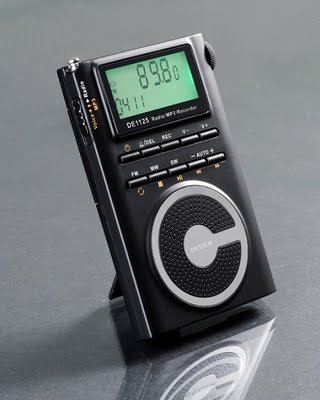
Figure 1.1: The DEGEN DE1125 portable radio and multimedia player, shown standing upright with its integrated kickstand.
2. Opstelgids
2.1 Uitpak en Aanvanklike Inspeksie
Verwyder alle komponente versigtig uit die verpakking. Verifieer dat alle items wat hieronder gelys word, teenwoordig en onbeskadig is:
- DEGEN DE1125 Unit
- Oorfone
- AC Wall Plug (Charger)
- USB kabel
- Drasak
- Herlaaibare battery
- Gebruikershandleiding (hierdie dokument)
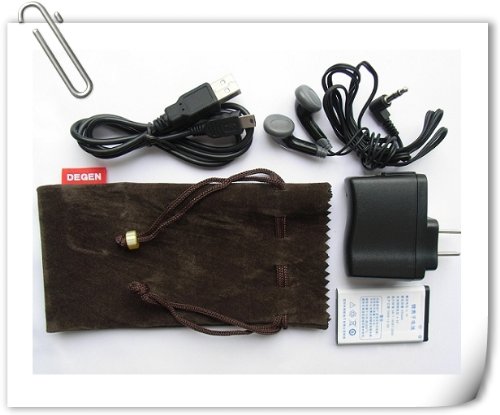
Figure 2.1: All included accessories for the DEGEN DE1125, including earphones, USB cable, AC adapter, carrying pouch, and rechargeable battery.
2.2 Batteryinstallasie en -laai
The DE1125 is powered by a rechargeable lithium battery. Before first use, ensure the battery is properly installed and fully charged.
- Vind die batterykompartement aan die agterkant van die toestel.
- Insert the rechargeable battery, ensuring correct polarity as indicated inside the compartment.
- Maak die batterykompartement se deksel stewig toe.
- Connect the small end of the USB cable to the mini-USB port on the side of the DE1125.
- Connect the standard USB end of the cable to the AC wall plug, then plug the AC wall plug into a standard electrical outlet. Alternatively, connect the standard USB end directly to a computer's USB port for charging.
- The display will indicate charging status. Allow the battery to fully charge before initial use.
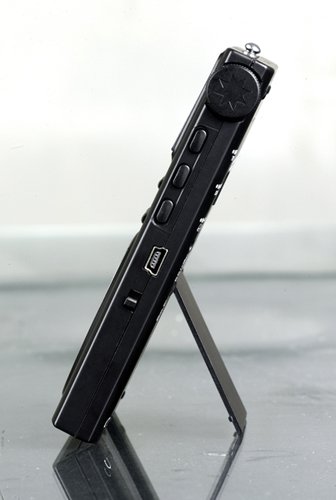
Figuur 2.2: Kant view of the DEGEN DE1125, highlighting the mini-USB port for charging and data transfer.
3. Bedryfsinstruksies
3.1 Algemene Beheermaatreëls
Familiarize yourself with the buttons and display on the DE1125:
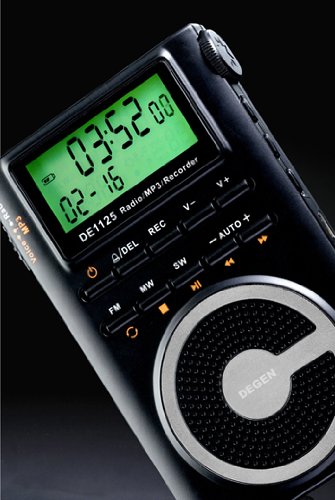
Figuur 3.1: Close-up view of the DEGEN DE1125's display and control panel, showing buttons for power, mode selection, tuning, and volume.
- Kragknoppie (): Druk en hou om die toestel aan of af te skakel.
- Volume Buttons (V+, V-): Pas die klankuitsetvlak aan.
- Kieslys-knoppie: Access the main menu or settings within a mode.
- Navigasie knoppies (, ): Navigate through menus or adjust frequencies/tracks.
- Mode Buttons (FM, MW, SW, MP3, REC): Kies die gewenste bedryfsmodus.
- Speel/Pause-knoppie (): Start or pause playback in MP3 mode, or confirm selections.
3.2 Radio Operation (FM, AM, SW)
The DE1125 supports FM (64.0 - 108.0 MHz), MW (520-1710 KHz), and SW (2.3-23.0 MHz) bands.
- Skakel die toestel aan.
- Press the corresponding mode button (FM, MW, or SW) to select the desired radio band.
- Instelopsies:
- Outomatiese skandering: Press and hold the 'AUTO' button to automatically scan and store available stations.
- Handmatige instelling: Gebruik die navigasieknoppies (, ) to fine-tune the frequency step-by-step.
- Digital Tuning: Enter the desired frequency directly using the numeric keypad (if available, or through menu options).
- ATS (Auto Tuning Storage): Automatically scans and stores strong signals into memory presets.
- Vooraf ingestelde stasies: The device can store up to 255 preset stations. Use the 'M+' and 'M-' buttons to navigate through stored presets.
3.3 MP3-spelerfunksie
The DE1125 features 4GB of internal flash memory for MP3 playback.

Figure 3.2: The DEGEN DE1125 display indicating the 'Music' mode, ready for MP3 playback.
- Press the 'MP3' button to enter MP3 player mode.
- Om musiek oor te dra files from your computer, connect the DE1125 to your computer using the provided USB cable. The device will appear as a removable disk drive. Drag and drop your MP3 files into the device's storage.
- Gebruik die navigasieknoppies (, ) to select tracks.
- Druk die Play / Pause-knoppie () to start or pause playback.
3.4 Digital Recorder Function
The DE1125 can record radio programs or function as a voice recorder.

Figure 3.3: The DEGEN DE1125 display showing the 'Record' mode, indicating readiness for audio capture.

Figure 3.4: The DEGEN DE1125 display showing the 'Voice' mode, used for voice recording functions.
- Press the 'REC' button to enter recording mode.
- Select either 'Radio Record' or 'Voice Record' from the menu.
- Press the 'REC' button again to start recording. The display will show recording time.
- Press the 'REC' button again to stop recording. Recorded files are saved to the internal memory.
- To play back recordings, navigate to the 'Recordings' folder in MP3 mode.
3.5 Ebook Reader Function
The DE1125 supports basic ebook reading functionality.

Figure 3.5: The DEGEN DE1125 display showing the 'Ebook' mode, indicating readiness to display text files.
- Connect the DE1125 to your computer via USB.
- Transfer compatible text files (e.g., .TXT) to the device's internal memory.
- Ontkoppel die toestel van die rekenaar.
- Navigate to the 'Ebook' mode using the menu or mode selection.
- Select the desired ebook file oop te maak en te lees.
4. Sorg en Onderhoud
Proper care ensures the longevity and optimal performance of your DEGEN DE1125.
- Skoonmaak: Use a soft, dry cloth to clean the exterior of the device. Do not use liquid cleaners, aerosols, or abrasive materials.
- Berging: Store the device in a cool, dry place away from direct sunlight, extreme temperatures, and high humidity. Use the provided carrying pouch for protection during transport.
- Batterysorg: To maintain battery health, avoid fully discharging the battery frequently. If storing for an extended period, charge the battery to about 50% and recharge every few months.
- Waterblootstelling: Hierdie toestel is nie waterdig nie. Vermy blootstelling aan water of ander vloeistowwe.
- Impak: Beskerm die toestel teen val en impakte, wat interne komponente of die skerm kan beskadig.
5. Probleemoplossing
If you encounter issues with your DEGEN DE1125, refer to the following common problems and solutions:
| Probleem | Moontlike oorsaak | Oplossing |
|---|---|---|
| Toestel kan nie aangeskakel word nie. | Die battery is leeg of nie korrek geïnstalleer nie. | Laai die battery. Maak seker dat die battery met die korrekte polariteit ingesit is. |
| No radio reception or poor signal. | Weak signal area, antenna not extended, interference. | Extend the telescopic antenna fully. Move to an area with better reception. Avoid sources of electronic interference. |
| MP3 files not playing. | Ongesteun file formaat, korrup file, nee files op toestel. | Verseker files are in MP3 format. Re-transfer files. Verify files exist in the device's memory. |
| Cannot record audio. | Insufficient storage space, incorrect mode. | Vee ou uit files to free up space. Ensure you are in the correct recording mode (Radio Record or Voice Record). |
| Die skerm is leeg of gevries. | System error, low battery. | Press and hold the power button for 10 seconds to force a restart. Charge the battery. |
6. Tegniese spesifikasies
| Kenmerk | Spesifikasie |
|---|---|
| Handelsmerk | Degen |
| Model | DE1125 |
| Produk afmetings | 11 x 1.5 x 6.7 cm |
| Item gewig | 113 g |
| Geheue berging kapasiteit | 4 GB |
| Hardeware-koppelvlak | USB |
| Tuner Tegnologie | AM, FM, SW |
| FM frekwensie reeks | 64.0 - 108.0 MHz |
| MW-frekwensiebereik | 520 - 1710 kHz |
| SW frekwensiereeks | 2.3 - 23.0 MHz |
| Versoenbare toestelle | Oorfoon |
| Tipe vertoon | LED |
| Skerm grootte | 0.5 duim (sigbare diagonaal 1" / 2 cm) |
| Kragbron | Battery aangedrewe |
| Battery Tipe | Lithium Rechargeable |
| Connector Tipe | USB |
| Compatible Media Type | MP3 |
| Materiaal | Ander |
7. Waarborg en Ondersteuning
7.1 Waarborginligting
This product is covered by a manufacturer's warranty. Please refer to the warranty policy provided at the time of purchase or contact your retailer for specific details regarding warranty duration and terms. Keep your proof of purchase for warranty claims.
7.2 Kliëntediens
For technical assistance, troubleshooting beyond this manual, or inquiries about your DEGEN DE1125, please contact the retailer or the manufacturer's customer support. Refer to the contact information provided with your purchase documentation.