
1. Inleiding
Thank you for choosing the One Touch KC32 Automatic Multi-Grater. This device is designed to safely and effortlessly grate various food items such as cheese, chocolate, nuts, hazelnuts, and cookies. Its hands-free operation makes it ideal for all users, including those with limited dexterity. This manual provides essential information for the proper setup, operation, and maintenance of your new grater.
2. Veiligheidsinstruksies
- Lees alle instruksies sorgvuldig deur voor die eerste gebruik.
- Hou die toestel buite bereik van kinders.
- Do not immerse the motor unit (top part) in water or any other liquid.
- Always ensure the device is switched off before assembling, disassembling, or cleaning.
- Handle grater blades with care as they are sharp.
- Gebruik die toestel slegs vir die beoogde doel soos beskryf in hierdie handleiding.
- Do not attempt to grate frozen foods or extremely hard items, as this may damage the blades or motor.
- Maak seker dat batterye korrek volgens die polariteitsmerkies geplaas word.
- Verwyder batterye as die toestel vir 'n lang tydperk nie gebruik gaan word nie.
3. Pakketinhoud
Your One Touch KC32 Automatic Multi-Grater package includes:
- 1x One Touch KC32 Automatic Multi-Grater unit (motor housing, grating chamber)
- 1x Airtight collection container
- 1x Coarse grater disc
- 1x Fine grater disc
- 1x Lid for collection container

Image: The One Touch KC32 Automatic Multi-Grater shown with its airtight collection container and lid.
4. Opstelling
4.1. Battery Installasie
- Ensure the grater is switched off.
- Locate the battery compartment on the top part of the motor unit.
- Maak die batteryvakdeksel oop.
- Plaas 4 AA-batterye in en maak seker dat die polariteit (+/-) korrek is soos aangedui in die kompartement.
- Maak die batterykompartement se deksel stewig toe.
4.2. Vergadering
- Select the desired grater disc (coarse or fine).
- Carefully place the chosen grater disc into the grating chamber, ensuring it sits securely on the central spindle.
- Attach the grating chamber to the motor unit by twisting until it locks into place.
- Place the airtight collection container underneath the grating chamber.

Image: The two interchangeable grater discs (coarse and fine) included with the KC32.
5. Bedryfsinstruksies
- Ensure the grater is fully assembled with the desired disc and collection container in place.
- Open the top lid of the grating chamber.
- Place the food item (e.g., cheese, chocolate, nuts) into the grating chamber. Do not overfill.
- Maak die boonste deksel stewig toe.
- Press and hold the "One Touch" button located on the top of the unit to begin grating. The device will operate hands-free.
- Release the button to stop grating.
- Once grating is complete, remove the collection container. You can use the included lid to store grated items.

Image: The One Touch KC32 grater actively grating cheese into fine strands.
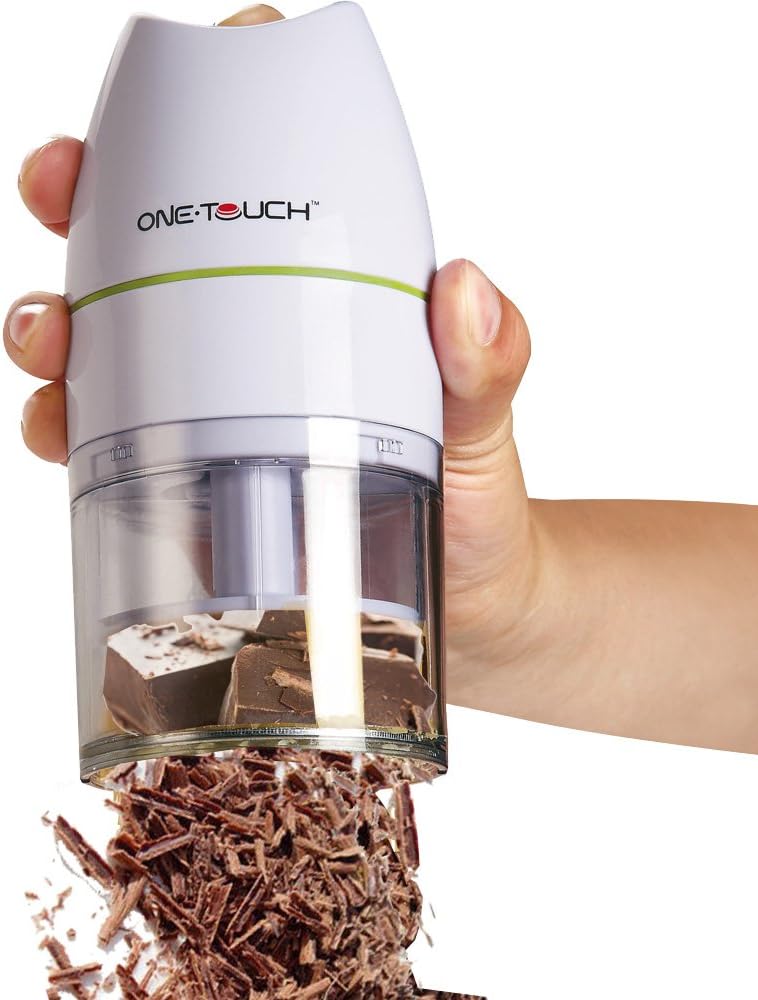
Image: The One Touch KC32 grater actively grating chocolate into fine shavings.
6. Skoonmaak en Onderhoud
Regular cleaning ensures optimal performance and hygiene of your grater.
- Before cleaning, ensure the device is switched off and remove the batteries if performing a deep clean.
- Disassemble the grating chamber, grater disc, and collection container from the motor unit.
- The grating chamber, grater discs, and collection container are dishwasher safe. Alternatively, wash them by hand with warm, soapy water and rinse thoroughly.
- Wipe the motor unit (top part) with a damp lap. Moenie die motoreenheid in water dompel nie.
- Maak seker dat alle dele heeltemal droog is voordat dit weer aanmekaargesit of gestoor word.
7. Probleemoplossing
| Probleem | Moontlike oorsaak | Oplossing |
|---|---|---|
| Grater does not turn on. | Batterye is pap of verkeerd geplaas. | Kontroleer die polariteit van die batterye of vervang dit met nuwe AA-batterye. |
| Grating performance is poor. | Food item is too hard or too large; grater disc is dull or clogged. | Ensure food items are suitable for grating. Clean the grater disc. |
| Toestel stop tydens werking. | Overload protection activated; batteries are low. | Reduce the amount of food. Replace batteries. Allow motor to cool if it feels warm. |
8. Spesifikasies
- Model: One Touch KC32
- Kleur: Wit
- Afmetings: 18 x 18 x 18 cm
- Gewig: 392 gram
- Kragbron: 4x AA-batterye (nie ingesluit nie)
- Materiaal: Durable plastic body, stainless steel grater discs.
- Onderdele vir skottelgoedwasser: Grating chamber, grater discs, collection container.
- UPC: 771948514941
9. Waarborginligting
One Touch products are manufactured to high-quality standards. For specific warranty details, please refer to the warranty card included with your purchase or contact your retailer. Keep your proof of purchase for any warranty claims.
10. Ondersteuning
If you encounter any issues or have questions not covered in this manual, please contact the retailer where you purchased the One Touch KC32 Automatic Multi-Grater. For further assistance, you may also visit the official One Touch website (if available) for product support and FAQs.