
KLH KL-300i
KLH AUDIO KL-300i Nostalgia 5-n-1 System
Model: KL-300i
Inleiding
Dankie vir die aankoopasing the KLH AUDIO KL-300i Nostalgia 5-n-1 System. This integrated audio system combines classic and modern audio playback capabilities, including a turntable, CD player, cassette player, AM/FM radio, and an iPod dock. This manual provides essential information for setting up, operating, and maintaining your system to ensure optimal performance and longevity.
Veiligheidsinligting
Lees asseblief alle veiligheidsinstruksies sorgvuldig deur voordat u hierdie produk gebruik. Bewaar hierdie handleiding vir toekomstige verwysing.
- Kragbron: Koppel die eenheid slegs aan 'n WS-kragaansluiting van die gespesifiseerde volumetage.
- Ventilasie: Verseker voldoende ventilasie. Moenie ventilasie-openinge blokkeer nie.
- Water en vog: Moenie die eenheid aan reën of vog blootstel nie. Moenie voorwerpe gevul met vloeistowwe, soos vase, op die eenheid plaas nie.
- Hitte: Moenie die eenheid naby hittebronne soos verkoelers, hitteregisters, stowe of ander apparaat (insluitend ampversterkers) wat hitte produseer.
- Skoonmaak: Ontkoppel die eenheid van die muurprop voordat u dit skoonmaak. Gebruik slegs 'n droë lap.
- Diens: Moenie probeer om hierdie produk self te onderhou nie. Verwys alle diens na gekwalifiseerde dienspersoneel.
Pakketinhoud
Verifieer dat al die items wat hieronder gelys word, in die pakket ingesluit is:
- KLH AUDIO KL-300i Main Unit
- Afstandbeheer
- Hulp -ingangskabel
- AM/FM Antenna Wire
- Instructiehandleiding (hierdie dokument)
Produk verbyview
Familiarize yourself with the various components and controls of your KLH AUDIO KL-300i system.
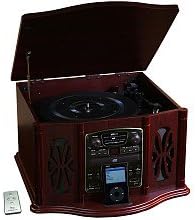
This image displays the KLH AUDIO KL-300i Nostalgia 5-n-1 System. The unit features a dark wood finish. The top lid is open, revealing a turntable. Below the turntable, the front panel includes controls for the CD player, AM/FM radio tuner, and an iPod dock. A small remote control is visible to the left of the main unit.
Voorpaneelkontroles:
- Kragknoppie: Skakel die eenheid aan of af.
- Funksiekieser: Switches between Phono, CD, Radio, iPod, and Aux modes.
- Volumeknop: Verstel die hoofvolumevlak.
- CD-spelerkontroles: Speel/Pouseer, Stop, Slaan vorentoe/agtertoe.
- Radio-ontvanger: AM/FM band selector, Tuning knob.
- iPod Dock: Connector for iPod devices.
- Aux-in-aansluiting: 3.5 mm-inset vir eksterne klanktoestelle.
- Koptelefoonaansluiting: 3.5 mm-uitset vir privaat luister.
Boonste paneel:
- draaitafel: For playing vinyl records.
- Deksel: Protects the turntable when not in use.
Sypaneel:
- Cassette Deck: For playing audio cassette tapes.
Opstelling
Follow these steps for initial setup of your audio system.
- Plasing: Place the unit on a stable, flat surface away from direct sunlight, heat sources, and excessive dust or moisture. Ensure there is adequate space around the unit for ventilation.
- Koppel Antenna: For optimal AM/FM radio reception, connect the supplied antenna wire to the antenna terminal on the rear of the unit. Extend the wire fully for better reception.
- Kragverbinding: Steek die netsnoer in 'n standaard stopcontact.
- Aanvanklike krag aan: Press the Power button on the front panel to turn on the unit.
Bedryfsinstruksies
Algemene werking:
- Krag aan/af: Druk die Power-knoppie om die eenheid aan of af te skakel.
- Funksie keuse: Use the Function Selector knob or buttons to choose your desired audio source (Phono, CD, Radio, iPod, Aux).
- Volume aanpassing: Draai die volumeknop om die klankvlak te verhoog of te verlaag.
Draaitafel werking:
- Lift the lid of the unit.
- Plaas 'n vinielplaat op die draaitafelbord.
- Select the appropriate speed (33 1/3, 45, or 78 RPM) using the speed selector switch. For 45 RPM records, place the included adapter on the spindle if needed.
- Gently lift the tonearm and position the stylus over the desired starting groove of the record.
- Laat sak die toonarm stadig op die plaat. Die terugspeel sal outomaties begin.
- To stop playback, gently lift the tonearm and return it to its rest.
CD-speler werking:
- Press the Function Selector to CD mode.
- Press the Eject button to open the CD tray.
- Plaas 'n CD met die etiketkant na bo in die laai.
- Press the Eject button again to close the tray. The CD will begin playing automatically or display the track count.
- Gebruik die Speel/Pause-, Stop- en Slaan oor-knoppies om terugspeel te beheer.
Cassette Player Operation:
- Insert a cassette tape into the cassette slot on the side of the unit.
- Druk die Speel-knoppie om afspeel te begin.
- Use the Fast Forward (FF) button to advance the tape quickly.
- To stop playback, press the Stop/Eject button. Pressing it halfway will eject the tape.
AM/FM Radio Bediening:
- Press the Function Selector to Radio mode.
- Kies die AM- of FM-band met die bandkiesskakelaar.
- Rotate the Tuning knob to search for radio stations.
- Adjust the antenna wire for best reception.
iPod Dock Operation:
- Press the Function Selector to iPod mode.
- Carefully place your compatible iPod device onto the iPod dock connector.
- Use your iPod's controls to select and play music. Audio will be routed through the KLH AUDIO system's speakers.
Aux-In Operation:
- Press the Function Selector to Aux mode.
- Connect an external audio device (e.g., MP3 player, smartphone) to the Aux-In jack on the front panel using the supplied 3.5mm auxiliary cable.
- Play audio from your external device. The sound will be played through the KLH AUDIO system's speakers.
Afstandbeheergebruik:
The remote control primarily operates the CD player functions (Play, Pause, Stop, Skip). Note that the remote cannot turn the unit on or off.
Onderhoud
Behoorlike sorg sal die lewensduur van jou stelsel verseker.
- Maak die eenheid skoon: Vee die buitekant van die eenheid af met 'n sagte, droë lap. Moenie skuurmiddels, was of oplosmiddels gebruik nie.
- Stylus sorg: Handle the turntable stylus with extreme care. Clean the stylus periodically with a soft brush, brushing from back to front.
- CD/Cassette Care: Keep CDs and cassette tapes clean and free of dust. Store them in their cases when not in use.
Probleemoplossing
If you experience issues with your system, refer to the following common problems and solutions.
| Probleem | Moontlike oorsaak | Oplossing |
|---|---|---|
| Geen krag | Kragkabel nie stewig ingeprop nie. | Kontroleer die kragkabelverbinding met die eenheid en die muuraansluiting. |
| Geen klank nie | Volume too low; Incorrect function selected; Headphones connected. | Increase volume; Select correct function; Disconnect headphones. |
| Draaitafel draai nie | Unit not powered on; Belt dislodged. | Ensure unit is on; Contact service if belt issue suspected. |
| Swak radio-ontvangs | Antenne nie uitgestrek of korrek geposisioneer nie. | Extend and adjust the antenna wire for better signal. |
| CD speel nie | CD inserted incorrectly; CD is scratched or dirty. | Ensure CD is label-side up; Clean or replace CD. |
Spesifikasies
| Kenmerk | Spesifikasie |
|---|---|
| Kragbron | AC 120V ~ 60Hz |
| Afmetings (B x D x H) | Ongeveer 43.2 cm x 43.2 cm x 26.7 cm (17" x 17" x 10.5") |
| Draaitafel Snelhede | 33 1/3, 45, 78 RPM |
| Radiofrekwensie-reeks | AM: 530-1710 kHz, FM: 88-108 MHz |
| CD-versoenbaarheid | CD, CD-R / RW |
| iPod Dock | Compatible with older generation iPods (30-pin connector) |
Waarborg en Ondersteuning
This product is covered by a limited manufacturer's warranty. For specific warranty terms and conditions, please refer to the warranty card included with your purchase or contact KLH customer support. If you require technical assistance or have questions not covered in this manual, please contact KLH customer service through their official webwebwerf of die kontakinligting wat saam met jou produk verskaf word.
Ask a question about this manual
Ask about setup, troubleshooting, compatibility, parts, safety, or missing instructions. Manuals+ will review the question and use this page’s manual context to help answer it.