
1. Inleiding
The IOGEAR GHDMIFDVIMW6 adapter facilitates the connection between an HDMI-enabled source device and a DVI-enabled display device. This adapter features a gold-plated HDMI female connector on one end and a DVI-D Dual Link male connector on the other, ensuring a reliable digital video signal transmission.
2. Produk verbyview
The IOGEAR GHDMIFDVIMW6 is designed for high-quality video signal conversion. Its gold-plated connectors resist corrosion and enhance signal integrity.
- Skakelaar 1: HDMI Female (19-pin Type A)
- Skakelaar 2: DVI-D Dual Link Male (24-pin)
- Doel: Connects HDMI output to DVI input.
- Kenmerke: Gold-plated connectors for optimal signal transfer.
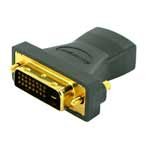
Figuur 2.1: IOGEAR GHDMIFDVIMW6 Adapter. This image shows the compact adapter with an HDMI female port on one side and a DVI-D Dual Link male connector on the other.
3. Pakketinhoud
- 1 x IOGEAR GHDMIFDVIMW6 HDMI Female to DVI-D Dual Link Male Adapter
4. Opstelinstruksies
Follow these steps to connect your HDMI source device to a DVI display:
- Identifiseer poorte: Locate the HDMI output port on your source device (e.g., computer, game console, media player) and the DVI-D input port on your display (e.g., monitor, projector).
- Connect Adapter to Display: Plug the DVI-D Dual Link male connector of the IOGEAR GHDMIFDVIMW6 adapter directly into the DVI-D input port on your display device. Ensure a secure connection.
- Koppel HDMI-kabel: Take a standard HDMI cable (not included) and plug one end into the HDMI output of your source device.
- Connect HDMI Cable to Adapter: Plug the other end of the HDMI cable into the HDMI female port on the IOGEAR GHDMIFDVIMW6 adapter.
- Krag aan toestelle: Ensure both your source device and display device are powered on.
The connection is now complete.
5. Bedryfsinstruksies
Once the physical connection is established as described in the Setup section:
- Kies invoer: On your DVI display, use its menu or input selection button to choose the correct DVI input source.
- Adjust Resolution: If the image does not appear correctly or is distorted, adjust the display resolution settings on your source device to match the native resolution of your DVI display. Refer to your source device's operating manual for instructions on changing display settings.
- Oudio: Note that DVI connections transmit video signals only. For audio, a separate audio cable connection from your source device to an audio system or speakers will be required.
6. Onderhoud
The IOGEAR GHDMIFDVIMW6 adapter requires minimal maintenance.
- Skoonmaak: Use a soft, dry cloth to gently wipe the adapter if it becomes dusty. Do not use liquid cleaners or solvents.
- Berging: Bêre die adapter op 'n koel, droë plek weg van direkte sonlig en uiterste temperature wanneer dit nie gebruik word nie.
- Hantering: Avoid bending or twisting the adapter excessively, as this can damage the internal wiring or connectors.
7. Probleemoplossing
If you encounter issues, refer to the following troubleshooting steps:
- Geen videosein nie:
- Ensure all connections (HDMI cable, adapter, DVI cable if applicable) are secure and fully seated.
- Verify that both the source device and the display are powered on.
- Confirm that the correct DVI input is selected on your display.
- Test with a different HDMI cable or DVI display if possible to rule out faulty components.
- Distorted or Incorrect Resolution:
- Adjust the display resolution settings on your source device. DVI displays often have a native resolution that provides the best picture quality.
- Ensure your source device's graphics driver is up to date.
- Geen oudio nie:
- This adapter transmits video only. For audio, a separate audio connection is required from your source device to an audio system.
8. Spesifikasies
| Kenmerk | Detail |
|---|---|
| Modelnommer | GHDMIFDVIMW6 |
| Connector Type (Left) | 19 pin HDMI Type A Female |
| Connector Type (Right) | 24 pin DVI-Digital (Dual-Link) Male |
| Produkafmetings (L x B x H) | 0.63 x 0.63 x 1.73 duim |
| Item gewig | 0.96 onse (ongeveer 0.06 pond) |
| Voltooi Tipe | Gold-plated HDMI |
| Vervaardiger | IOGEAR |
9. Veiligheidsinligting
- Moenie die adapter aan water, vog of uiterste temperature blootstel nie.
- Moenie probeer om die adapter uitmekaar te haal of te wysig nie.
- Hou buite bereik van kinders.
- Use only as intended for connecting HDMI to DVI-D video signals.
10. Waarborg en Ondersteuning
IOGEAR products are backed by a manufacturer's warranty. For specific warranty details, technical support, or customer service, please visit the official IOGEAR webwebwerf of kontak hul kliëntediens direk.
IOGEAR Amptelik Webwebwerf: www.iogear.com