
1. Inleiding
The Jung AUT238DWW is an LCD display cover designed for the Jung UT 238 E programmable thermostat mechanism. This unit provides a user interface for precise control over your heating system, featuring a clear display and intuitive buttons for programming and adjustments. It integrates a weekly timer to manage heating schedules efficiently, ensuring comfort and energy savings.
Sleutel kenmerke sluit in:
- Three adjustable temperature settings: Comfort, Setback (night/economy), and Frost Protection.
- Automatic summer/winter time switching.
- Temperature detection via internal and/or external sensor.
- Additional energy-saving button for reduced temperature mode.
- "Party" mode to extend comfort temperature for selected periods.
- Power reserve for settings retention during power outages.
- Cooling function for passive cooling systems.
2. Veiligheidsinstruksies
Please read these instructions carefully before installation and operation. Keep this manual for future reference.
- Installation should only be performed by a qualified electrician in accordance with local regulations.
- Ensure the power supply is disconnected before any installation or maintenance work.
- Moenie die toestel blootstel aan vog, uiterste temperature of direkte sonlig nie.
- Moenie die toestel self oopmaak of probeer herstel nie. Verwys alle diens na gekwalifiseerde personeel.
3. Produkkomponente en meerview
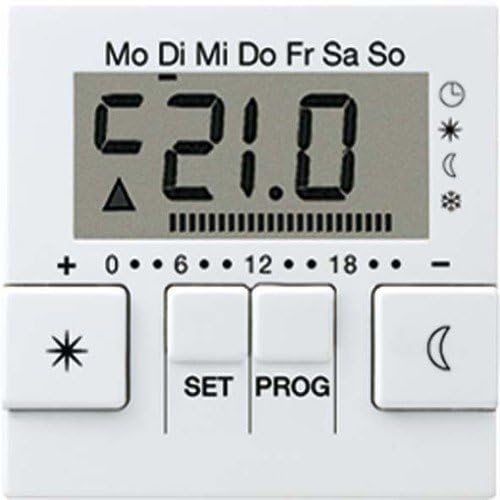
The Jung AUT238DWW display cover consists of an LCD screen and several control buttons. Refer to the image below for a visual guide to the main components.
Sleutelkontroles:
- LCD-skerm: Shows current temperature, time, day of the week, and active mode icons.
- '+' en '-' knoppies: Used to adjust values such as time or temperature.
- SET -knoppie: Confirms set values. If not pressed within 1 minute after adjustment, the display returns to normal mode without saving changes.
- PROG-knoppie: Allows access to programming functions and returns to the normal time program.
- Star/Snowflake Button: (Left button) Likely for quick access to Comfort or Frost Protection modes.
- Moon Button: (Right button) Likely for quick access to Setback (night) mode.
4. Installasie en aanvanklike opstelling
This AUT238DWW unit is a display cover designed to be mounted onto the Jung UT 238 E programmable thermostat mechanism. Ensure the UT 238 E mechanism is correctly installed and wired according to its specific instructions before attaching this display cover.
4.1 Attaching the Display Cover
- Ensure the power supply to the thermostat mechanism is completely disconnected at the main circuit breaker.
- Carefully align the AUT238DWW display cover with the UT 238 E thermostat mechanism.
- Gently press the cover into place until it clicks securely. Do not force it.
- Restore power to the thermostat mechanism. The display should illuminate.
4.2 Aanvanklike Tyd- en Datuminstelling
By die eerste aanskakeling of na 'n langdurige kragonderbrekingtage (beyond the power reserve), you may need to set the current time and date. Refer to the "Operating Instructions" section for detailed steps on using the +, -, en STEL buttons to adjust these values.
5. Bedryfsinstruksies
5.1 Basiese werking
To adjust values such as time or temperature, use the + or - buttons. Confirm your settings by pressing the STEL knoppie. As die STEL button is not pressed within 1 minute after the last button press, the display will automatically revert to the normal display mode, and any unsaved changes will be lost.
Druk die PROG button allows you to navigate through programming menus or return to the normal time program.
5.2 Understanding Thermostat Modes
The thermostat operates by controlling the heating system based on three adjustable temperature settings at specific times:
- Geriefstemperatuur: Typically used during the day or periods of presence.
- Setback Temperature (Economy/Night): Usually applied during the night or periods of absence to save energy.
- Frost Protection Temperature: Used during extended periods of absence (e.g., holidays) to prevent the heating system from freezing. This temperature is set just high enough to protect the system.
5.3 Weekly Timer Programming
The integrated weekly timer allows for time-controlled temperature management for a single room or floor heating. You can set up to 32 individual switching times throughout the week. For each switching time, you define the start time, end time, and the desired temperature mode (Comfort, Setback, or Frost Protection).
- Druk die PROG button to enter the programming menu.
- Gebruik die + or - buttons to navigate through the program slots (e.g., P1, P2, etc.).
- Druk STEL to select a program slot.
- Gebruik + or - to set the start time, then press STEL.
- Gebruik + or - to set the end time, then press STEL.
- Gebruik + or - to select the desired temperature mode (Comfort, Setback, Frost Protection) for this period, then press STEL.
- Repeat for all desired switching times. Press PROG to exit the programming menu.
The system includes heating optimization, which means it will activate heating in advance to ensure the desired temperature is reached precisely at the programmed time.
5.4 Spesiale Funksies
- Energiebesparingsknoppie: An additional button allows for quick switching to the reduced (setback) temperature.
- "Party" Mode: Activates the comfort temperature for a selectable period of 1 to 4 hours, overriding the current program. This is useful for temporary extensions of comfort.
- Verkoelingsfunksie: The thermostat supports a simple cooling function for passive cooling systems (e.g., via geothermal exchangers). Refer to the UT 238 E mechanism manual for activation details.
6. Onderhoud en versorging
The Jung AUT238DWW display cover requires minimal maintenance.
- Skoonmaak: Wipe the display and buttons with a soft, dry, or slightly damp cloth. Do not use abrasive cleaners, solvents, or chemical sprays, as these can damage the surface.
- Battery (Power Reserve): The device features a power reserve (capacitor, not a battery) that retains settings for up to 4 hours during power interruptions and programming for up to 10 years. No user maintenance is required for this feature.
7. Probleemoplossing
If you encounter issues with your Jung AUT238DWW display cover or the connected thermostat mechanism, consider the following:
- Die vertoning is leeg: Check the power supply to the thermostat mechanism. Ensure it is correctly installed and receiving power.
- Instellings word nie gestoor nie: Ensure you press the STEL button to confirm changes after adjusting values. If you wait too long (over 1 minute), changes will not be saved.
- Verkeerde temperatuurlesings: Verify that the temperature sensor (internal or external, depending on configuration) is not obstructed and is functioning correctly.
- Heating not responding: Check the programming schedule to ensure the thermostat is set to a heating mode and desired temperature. Verify the UT 238 E mechanism is correctly wired to your heating system.
For persistent issues, consult the full manual for the Jung UT 238 E thermostat mechanism or contact Jung customer support.
8. Tegniese spesifikasies
| Kenmerk | Spesifikasie |
|---|---|
| Handelsmerk | Jung |
| Modelnommer | AUT238DWW |
| Kleur | Alpine Wit |
| Voltage | 230 Volt |
| Kragbron | Powered by mechanism (UT 238 E) |
| Agterlig | Ja |
| Afmetings (Pakket) | 23.4 x 15.6 x 6 cm |
| Item gewig | 240 gram |
| Materiaal | Termoplastiese |
| Timer tipe | Electronic with weekly program, automatic summer/winter time switching |
| Temperatuurverskil | ± 0.1 ... ± 1.3 K, adjustable (0.1 K steps) |
| Program Slots | 32, assignable over the week (10-minute steps) |
| Kragreserwe | Minimum 4 hours (capacitor), settings retained up to 10 years |
| Minimum skakeltyd | 20 seconds to 500 seconds (10-second steps) |
| Blockade Protection | After 7 days of no relay actuation, activates at 10:00 AM the next day |
| Verbinding | Skroef terminale |
| Aksiemodus | 1.C (no limiting operation) |
| Elektriese Lewe | At least 5 x 10⁴ skakel siklusse |
| Temperatuurreekse |
|
9. Waarborg en Ondersteuning
9.1 Waarborginligting
Specific warranty details for the Jung AUT238DWW are typically provided with the product packaging or can be found on the official Jung webwebwerf. Bewaar asseblief u bewys van aankoop vir waarborgeise.
9.2 Kliëntediens
For technical assistance, troubleshooting, or further information regarding your Jung AUT238DWW display cover or the UT 238 E thermostat mechanism, please contact Jung customer support through their official webwebwerf of die kontakbesonderhede wat in u produkdokumentasie verskaf word.
Jy kan gewoonlik ondersteuningsinligting vind op die Jung official webwebwerf.