
Inleiding
This manual provides detailed instructions for the proper use and maintenance of your Casio WV-59E-1AVEF digital watch. This timepiece features radio-controlled timekeeping, ensuring accurate time display by receiving time calibration signals. Please read this manual thoroughly to ensure optimal performance and longevity of your watch.
Key features include display illumination, world time function, 5-bar water resistance, and an automatic calendar.
Produk verbyview
The Casio WV-59E-1AVEF is a robust digital watch designed for daily wear. It features a square case, digital display, and a comfortable resin strap. The watch is equipped with multiple buttons for navigating its various functions.
Figuur 1: Voorkant view of the Casio WV-59E-1AVEF digital watch, displaying the time, date, and various mode indicators.
Beheer en vertoning
- Vertoon: Shows time, date, and function indicators.
- Knoppies: Typically located on the sides of the watch for mode selection, adjustment, and illumination.

Figuur 2: Kant view of the Casio WV-59E-1AVEF watch, highlighting the control buttons on the left and right sides of the case.

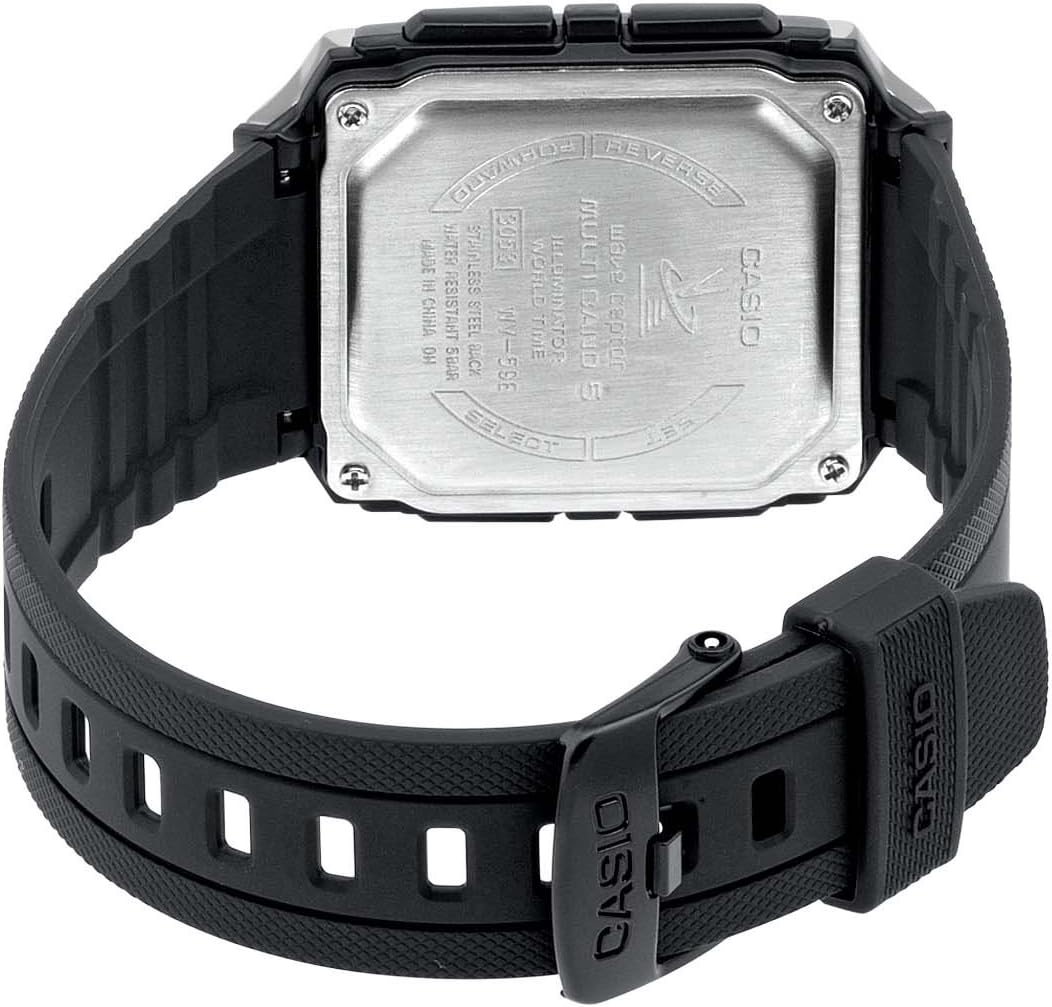
Figuur 3: Agter view of the Casio WV-59E-1AVEF watch, showing the stainless steel case back with model number WV-59E, water resistance rating, and 'Wave Ceptor' branding.
Opstelling
Initial Time Setting and Time Zone
Upon first use or after a battery change, you may need to set your home city (time zone) manually. This is crucial for the watch to receive the correct time calibration signal.
- In Tydhoudingsmodus, druk en hou die AANPAS button (usually top-left) until the city code starts to flash.
- Gebruik die VORENTOE en OMKEER buttons (usually on the right side) to select your desired home city code. Refer to the world time map for city codes corresponding to your region.
- Druk die MODUS button (usually bottom-left) to cycle through other settings like DST (Daylight Saving Time) and 12/24-hour format. Adjust these as needed using the VORENTOE en OMKEER knoppies.
- Druk die AANPAS button again to exit the setting screen.
Radio Signal Reception (Wave Ceptor)
Your watch automatically receives time calibration signals to maintain accurate time. Automatic reception typically occurs in the early hours of the morning. For best reception, place the watch near a window overnight.
To manually initiate signal reception:
- In Tydhoudingsmodus, druk en hou die ONTVANG button (refer to watch diagram for exact button, often bottom-right) for about two seconds.
- The watch will display "RCV" or "GET" to indicate it is attempting to receive the signal.
- Keep the watch stationary and away from sources of interference (e.g., computers, televisions) during reception.
- Successful reception will be indicated by "OK" or "RCVD". If reception fails, "ERR" or "FAIL" will be displayed.

Figuur 4: The 'Wave Ceptor' logo, indicating the watch's radio-controlled timekeeping capability.
Bedryfsmodusse
Druk die MODUS button (usually bottom-left) to cycle through the different modes:
- Tydhoumodus: Wys die huidige tyd en datum.
- Wêreldtydmodus: Laat jou toe om view the current time in various cities around the world.
- Stophorlosiemodus: Meet verstreke tyd.
- Alarmmodus: Stel daaglikse alarms.
Wêreldtydmodus
In World Time Mode, use the VORENTOE en OMKEER buttons to scroll through different city codes and view their current times.
Stophorlosiemodus
- Enter Stopwatch Mode.
- Druk die BEGIN/STOP button (often top-right) to start and stop the stopwatch.
- Druk die TERUGSTEL button (often bottom-right) to reset the stopwatch to zero.
Alarmmodus
- Enter Alarm Mode.
- Gebruik die VORENTOE en OMKEER buttons to select an alarm number (if multiple are available).
- Druk en hou die AANPAS button until the alarm time starts to flash.
- Gebruik die VORENTOE en OMKEER buttons to set the alarm hour and minute.
- Druk die AANPAS knoppie om die alarminstelling te stoor.
- Druk die AAN/AF button (often top-right) to toggle the alarm on or off.
Verligting
Druk die LIG button (usually top-right or a dedicated button) to illuminate the display for easy viewin toestande met swak lig.
Onderhoud
Battery vervanging
The watch is powered by a Lithium metal battery. When the display becomes dim or functions become unreliable, it is time to replace the battery. It is recommended to have battery replacement performed by a qualified watch technician to ensure proper sealing and water resistance.
Water Resistance (50 Meters / 5 Bar)
Your watch is water resistant to 50 meters (5 bar). This means it is suitable for everyday use and can withstand splashes, rain, showering, and shallow swimming. It is nie suitable for diving, snorkeling, or high-impact water sports. Do not operate buttons while the watch is wet or submerged.
Skoonmaak
Wipe the watch case and strap with a soft, dry cloth. For resin straps, you can use a mild soap solution and rinse thoroughly, then dry completely. Avoid using harsh chemicals or abrasive cleaners.
Probleemoplossing
- Time is incorrect or not synchronizing:
- Ensure your home city code is set correctly for your time zone.
- Place the watch near a window overnight for automatic reception.
- Manually initiate signal reception (refer to "Radio Signal Reception" section).
- Check for strong interference sources nearby (e.g., electronic devices).
- Die battery mag dalk laag wees en vervang moet word.
- Skerm is dof of leeg:
- Die battery is dalk leeg. Vervang die battery.
- Ensure the watch is not in a power-saving mode (if applicable to your model).
- Knoppies reageer nie:
- Ensure the watch is not in a locked mode (if applicable).
- If the watch is wet, dry it thoroughly before operating buttons.
- A low battery can affect button responsiveness.
Spesifikasies

Figuur 5: Diagram illustrating the dimensions of the Casio WV-59E-1AVEF watch face, with measurements in millimeters and inches for reference.
| Handelsmerk | Casio |
| Model Naam | WV-59E |
| Modelnommer | WV-59E-1AVEF |
| Item Vorm | Vierkantig |
| Tipe vertoon | Digitaal |
| Tipe Materiaal van die omhulsel | Akriel |
| Dial Venster Materiaal Tipe | Akriel |
| Band Materiaal Tipe | Hars |
| Band kleur | Swart |
| Skakelkleur | Swart |
| Tipe sluiting | Gespe |
| Kas deursnee | 39 millimeter |
| Kasdikte | 12.5 millimeter |
| Bandbreedte | 18 millimeter |
| Item gewig | 40 gram |
| Beweging Tipe | Kwarts |
| Waterweerstand Diepte | 50 meter (5 bar) |
| Kragbron | Battery Powered (1 Lithium metal battery included) |
| Spesiale kenmerke | Radio-controlled time, Stopwatch, Alarm, Illumination, World Time, Automatic Calendar |
| Ingesluit komponente | Resin strap |
| Internasionale Artikelkode | 04971850882220 |
Waarborg en Ondersteuning
For warranty information and customer support, please refer to the warranty card included with your product or visit the official Casio webwebwerf. Bewaar u aankoopbewys as bewys van aankoop.
For service or repairs, contact an authorized Casio service center.