
1. Inleiding
The Iwata-Medea Studio Series Smart Jet Pro is a single-piston, oil-less air compressor designed for airbrush applications. This unit features an auto shut-off function, an adjustable air-pressure gauge, and a moisture filter. It is engineered for quiet operation and reliability, making it suitable for both occasional and professional artists.
This manual provides essential information for the safe and efficient operation, setup, and maintenance of your Smart Jet Pro compressor.
2. Veiligheidsinligting
Please read and understand all safety instructions before operating the compressor. Failure to follow these instructions may result in electric shock, fire, or serious injury.
- Gebruik altyd die kompressor in 'n goed geventileerde area.
- Moet nie naby vlambare vloeistowwe of gasse gebruik nie.
- Maak seker dat die kragkabel onbeskadig en behoorlik geaard is.
- Ontkoppel die kragtoevoer voordat enige onderhoud of skoonmaak uitgevoer word.
- Hou kinders en troeteldiere weg van die kompressor tydens werking.
- Hierdie produk bevat chemikalieë wat aan die staat Kalifornië bekend is om kanker en geboortedefekte of ander reproduktiewe skade te veroorsaak.
3. Pakketinhoud
Verifieer dat alle items in die pakket teenwoordig is:
- Iwata-Medea Studio Series Smart Jet Pro Air Compressor (Model IS 875)
- High-strength polyurethane air hose
- Moisture filter (pre-installed)
- Instructiehandleiding (hierdie dokument)
4. Produk verbyview
The Smart Jet Pro compressor features a compact design with an all-metal protective case and a convenient carrying handle. Key components include the air pressure gauge, pressure regulator knob, and moisture filter.

Figuur 1: Voorkant view of the Iwata-Medea Smart Jet Pro Air Compressor, showing the pressure gauge, regulator, and included air hose.
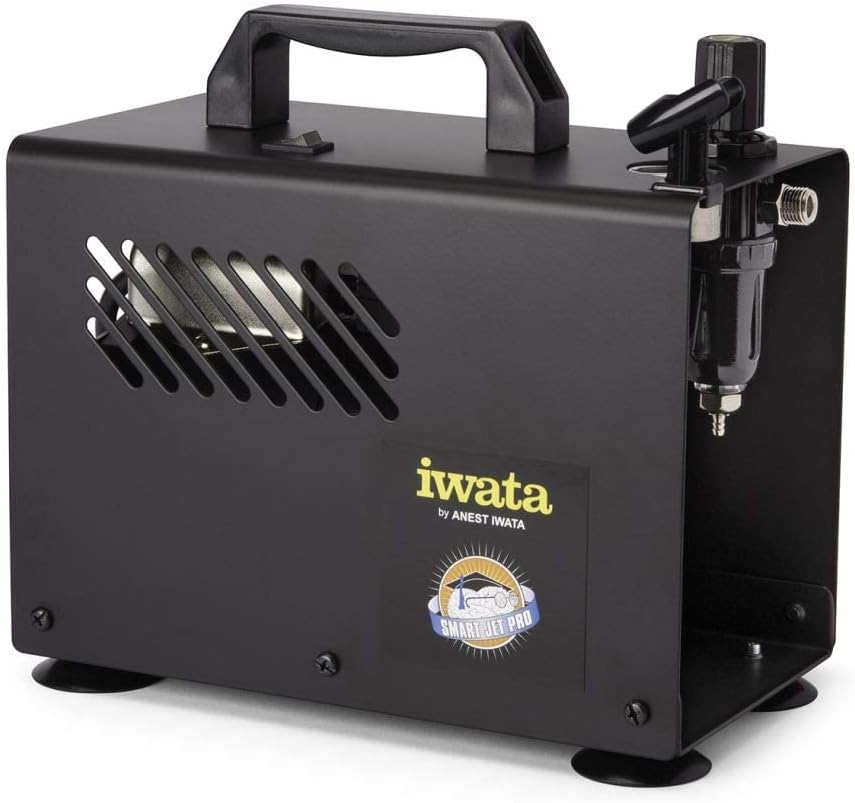
Figuur 2: Kant view of the compressor, highlighting the integrated moisture filter and pressure adjustment knob.
5. Opstelling
- Plasing: Plaas die kompressor op 'n stabiele, gelyke oppervlak in 'n skoon, goed geventileerde area. Maak seker dat daar voldoende ruimte rondom die eenheid is vir lugsirkulasie.
- Koppel lugslang: Connect one end of the provided air hose to the air outlet on the compressor. Connect the other end to your airbrush. Ensure connections are secure to prevent air leaks.
- Kragverbinding: Plug the compressor's power cord into a standard 120V AC electrical outlet.
6. Bedryfsinstruksies
- Krag aan: Flip the power switch located on the top of the compressor to the "ON" position. The compressor will start running.
- Pas lugdruk aan: Use the pressure regulator knob (typically located near the air outlet and gauge) to adjust the desired air pressure. Turn clockwise to increase pressure and counter-clockwise to decrease. Monitor the air pressure gauge for accurate readings. The maximum operating pressure is 35 PSI.
- Outo-afskakelfunksie: The Smart Jet Pro features an automatic shut-off function. When the airbrush trigger is released and air flow stops, the compressor will automatically turn off to conserve energy and reduce wear. It will restart automatically when the airbrush trigger is pressed again.
- Begin Airbrushing: Once the desired pressure is set, you can begin your airbrushing work.
- Skakel af: After use, flip the power switch to the "OFF" position and unplug the compressor from the power outlet.
7. Onderhoud
Regular maintenance ensures optimal performance and longevity of your compressor.
- Moisture Filter Drainage: The integrated moisture filter collects condensation. Periodically check the filter bowl for accumulated water. To drain, ensure the compressor is off and depress the small valve at the bottom of the filter bowl to release the water.
- Skoonmaak: Wipe the exterior of the compressor with a clean, damp cloth. Do not use harsh chemicals or abrasive cleaners. Ensure no liquids enter the internal components.
- Lugfilter: The compressor is designed with an internal air filter. No user-serviceable air filter replacement is typically required for this model.
8. Probleemoplossing
Verwys na hierdie afdeling vir algemene probleme en hul oplossings.
| Probleem | Moontlike oorsaak | Oplossing |
|---|---|---|
| Kompressor skakel nie aan nie. | Geen krag, los verbinding, kragskakelaar af. | Check power cord connection, ensure outlet is functional, verify power switch is ON. |
| Lae of geen lugdruk nie. | Regulator set too low, air leaks, clogged airbrush. | Adjust pressure regulator, check hose connections for leaks, clean airbrush. |
| Kompressor loop voortdurend. | Air leak in system, airbrush trigger stuck open. | Check all connections for leaks, ensure airbrush trigger is fully released. |
| Excessive moisture in air line. | Moisture filter needs draining. | Drain the moisture filter as described in the Maintenance section. |
9. Spesifikasies
Technical specifications for the Iwata-Medea Studio Series Smart Jet Pro Air Compressor (Model IS 875).

Figure 3: Product dimensions of the Iwata-Medea Smart Jet Pro Air Compressor.
| Kenmerk | Spesifikasie |
|---|---|
| Model Naam | IS 875 |
| Handelsmerk | Iwata |
| Voltage | 120 Volt |
| Kragbron | Elektries met koord |
| Geraasvlak | 50 Desibel |
| Maksimum bedryfsdruk | 35 PSI (Pond per vierkante duim) |
| Motorperdkrag | 0.13 HP (1/8 hp) |
| Item gewig | 12.67 pond (5.76 kilogram) |
| Produkafmetings (L x B x H) | 6.18" x 8.65" x 2.25" |
| Spesiale kenmerk | Moisture Filter, Auto Shut-Off |
| Ingesluit komponente | Filter, Air Hose |
10. Waarborg en Ondersteuning
For warranty information or technical support, please refer to the documentation included with your purchase or contact Iwata customer service. Keep your purchase receipt as proof of purchase for warranty claims.
For further assistance, visit the official Iwata webwebwerf of kontak hul gemagtigde dienssentrums.