
1. Inleiding
This manual provides essential information for the safe and efficient operation of your Grundig Lenaro 40 LXW 102-8620 Dolby HD Television. Please read these instructions thoroughly before using the product and retain them for future reference. This television features a 40-inch LCD screen, offering high-definition viewing and integrated Dolby audio technology.
2. Veiligheidsinligting
Om veilige werking te verseker en skade te voorkom, neem die volgende veiligheidsmaatreëls in ag:
- Do not expose the television to rain or moisture to prevent fire or electric shock.
- Verseker behoorlike ventilasie. Moenie ventilasie-openinge blokkeer nie.
- Place the television on a stable, level surface to prevent it from falling.
- Moenie swaar voorwerpe op die netsnoer plaas nie.
- Disconnect the power plug from the wall outlet during lightning storms or when unused for long periods.
- Verwys alle diens na gekwalifiseerde dienspersoneel.
3. Pakketinhoud
Verifieer dat alle items in die pakket teenwoordig is:
- Grundig Lenaro 40 LXW 102-8620 Dolby HD Television
- Afstandbeheer
- Kragkabel
- Table Stand (components for assembly)
- Gebruikershandleiding (hierdie dokument)
4. Opstelling
4.1 Uitpak
Carefully remove the television and all accessories from the packaging. Retain the packaging materials for future transport or storage.
4.2 Bevestiging van die tafelstaander
The Grundig Lenaro 40 LXW 102-8620 Dolby is designed for table mounting. Follow these steps to attach the stand:
- Place the television face down on a soft, clean cloth to prevent screen damage.
- Align the stand base with the mounting holes on the bottom of the television.
- Maak die staander vas met die meegeleverde skroewe. Maak seker dat alle skroewe stewig vasgedraai is.
- Carefully lift the television and place it on a stable, level surface.
4.3 Aansluitkrag
Connect the power cable to the power input on the back of the television, then plug the other end into a wall outlet.
4.4 Eksterne Toestelle Koppel
Your television supports various connections:
- HDMI: For high-definition video and audio from devices like Blu-ray players, game consoles, or set-top boxes. Use an HDMI cable to connect the device to an HDMI port on the TV.
- Ethernet: For wired network connectivity. Connect an Ethernet cable from your router to the LAN port on the TV.
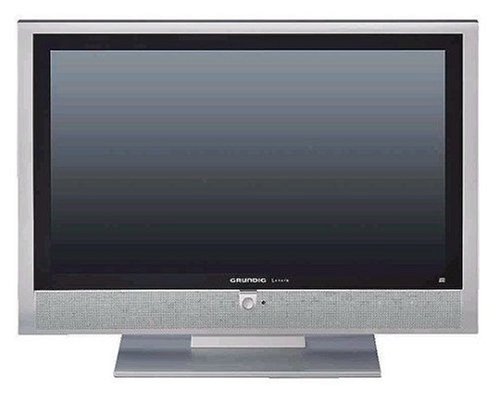
Figuur 1: Voorkant view of the Grundig Lenaro 40 LXW 102-8620 Dolby HD TV, showing the screen and bezel.
5. Bedryfsinstruksies
5.1 Aan-/afskakel
Druk die KRAG button on the remote control or on the television to turn the TV on or off.
5.2 Afstandbeheerfunksies
The remote control allows you to access all television functions. Key buttons include:
- KRAG: Skakel die TV aan of af.
- SOURCE/INPUT: Selects the input source (HDMI, TV, etc.).
- VOL +/-: Pas die volumevlak aan.
- CH +/-: Verander kanale.
- SPYSKAART: Kry toegang tot die hoofkieslys vir instellingsaanpassings.
- NAVIGASIEKNOPPIES (Op/Af/Links/Regs): Navigeer deur spyskaarte.
- OK/ENTER: Bevestig keuses.
- EXIT/BACK: Keer terug na die vorige skerm of verlaat die kieslys.
5.3 Aanvanklike Opstellingsassistent
Upon first power-on, the television will guide you through an initial setup wizard to configure language, country, time zone, and scan for available channels.
5.4 Netwerkkonnektiwiteit
If connected via Ethernet, the TV can access network features. Navigate to the network settings in the main menu to configure or verify the connection.
6. Onderhoud
6.1 Skoonmaak van die skerm
Vee die skerm liggies af met 'n sagte, pluisvrye lap. Vir hardnekkige merke, vee dit effens af.ampMaak die lap skoon met water of 'n gespesialiseerde skermskoonmaker. Moenie die skoonmaker direk op die skerm spuit nie.
6.2 Die skoonmaak van die kabinet
Vee die televisiekas af met 'n sagte, droë lap. Vermy die gebruik van skuurmiddels of oplosmiddels.
6.3 Algemene sorg
Ensure the television is placed in a well-ventilated area, away from direct sunlight and heat sources. Avoid placing objects on top of the television.
7. Probleemoplossing
As jy probleme met jou televisie ondervind, raadpleeg die volgende algemene probleme en oplossings:
| Probleem | Moontlike Oplossing |
|---|---|
| Geen krag nie | Kontroleer of die kragkabel stewig aan beide die TV en die muursok gekoppel is. Probeer 'n ander sok. |
| Geen beeld nie, maar klank is teenwoordig | Maak seker dat die korrekte invoerbron gekies is. Kontroleer kabelverbindings na eksterne toestelle. |
| Geen klank nie, maar beeld is teenwoordig | Check the volume level and ensure the TV is not muted. Verify audio settings in the menu. |
| Afstandbeheer werk nie | Vervang die batterye in die afstandbeheerder. Maak seker daar is geen obstruksies tussen die afstandbeheerder en die TV se IR-sensor nie. |
| Swak beeldkwaliteit | Check antenna/cable connections. Adjust picture settings (brightness, contrast, sharpness) in the TV menu. |
8. Spesifikasies
| Kenmerk | Detail |
|---|---|
| Modelnommer | Lenaro 40 LXW 102-8620 Dolby |
| Handelsmerk | Grundig |
| Skerm grootte | 40 duim |
| Vertoon tegnologie | LCD |
| Spesiale kenmerk | Platskerm |
| Verbindingstegnologie | Ethernet |
| Hardeware-koppelvlak | HDMI |
| Montage tipe | Tafelstaander |
| Produk Gewig | 68.56 pond (ongeveer 31.1 kg) |
| Modeljaar | 2018 |
| Wattage | 20 Watt |
| Reaksie Tyd | 8 millisekondes |
| Beheer metode | Afstandbeheer |
| Pakket afmetings | 108.2 x 80.7 x 34.5 cm |
9. Waarborg en Ondersteuning
For warranty information and technical support, please refer to the warranty card included with your product or visit the official Grundig website. You may also contact Grundig customer service for assistance with product registration, troubleshooting, or service requests.
Official Grundig Webwebwerf: www.grundig.com