
Inleiding
This manual provides detailed instructions for the setup, operation, maintenance, and troubleshooting of your Casio W93H-1AV Multifunction Sport Watch. Designed for durability and functionality, this digital watch is water-resistant and features a resin case, polyurethane band, and mineral dial window. It includes a digital display with day and date calendars, and a quartz movement for precise timekeeping.

Opstelling
Aanvanklike tyd- en datuminstelling
- In the Timekeeping Mode, press and hold the AANPAS button (top left) until the seconds digits start to flash. This indicates the setting mode.
- Druk die MODUS button (bottom left) to cycle through the settings: Seconds → Hour → Minutes → Year → Month → Day.
- Gebruik die BEGIN button (bottom right) to increase the flashing value. Use the SPLIT button (top right) to decrease the flashing value (for time and date settings).
- Sodra alle instellings aangepas is, druk die AANPAS knoppie weer om die instellingsmodus te verlaat.
12/24-uur-formaat
In die Tydhoumodus, druk die 12/24 uur button (top left, labeled ADJUST) to toggle between 12-hour and 24-hour time formats.

Uitpak en Aanvanklike Oorview
Video 1: An unboxing and initial overview of the Casio W93H-1AV watch, demonstrating its appearance and basic functions right out of the box.
Bedryfsinstruksies
Modus Navigasie
Druk die MODUS button (bottom left) to cycle through the different modes: Timekeeping, Stopwatch, Alarm, and Dual Time.
Ligte funksie
Druk die LIG button (bottom center) to illuminate the display for easy viewing in low-light conditions. The watch features an Auto EL Backlight with Afterglow.
Stophorlosiemodus
- Navigate to the Stopwatch Mode using the MODUS knoppie.
- Druk BEGIN (bottom right) to begin timing.
- Druk SPLIT (top right) to record lap times without stopping the main timer.
- Druk BEGIN again to pause the timer. Press BEGIN te hervat.
- Druk AANPAS (top left) to reset the stopwatch to zero.
Alarmmodus
- Navigate to the Alarm Mode using the MODUS knoppie.
- Druk die AANPAS button until the alarm time digits flash.
- Gebruik die MODUS knoppie om tussen uur- en minuutinstellings te kies.
- Gebruik die BEGIN knoppie om die alarmtyd aan te pas.
- Druk AANPAS om te bevestig en te verlaat.
- Druk BEGIN to toggle the alarm on/off. An alarm indicator will appear on the display when active.
Dubbele tydmodus
This mode allows you to keep track of a second time zone. Navigate to the Dual Time Mode using the MODUS knoppie. druk en hou AANPAS to enter setting mode, then use BEGIN en MODUS to set the second time zone.
Onderhoud
Battery vervanging
The Casio W93H-1AV uses one Lithium Metal battery (CR1616). To replace the battery, carefully remove the four screws on the stainless steel back cover using a small screwdriver. Replace the battery, ensuring correct polarity, and then reattach the back cover securely. It is recommended to have the water resistance seal checked by a professional after battery replacement to maintain its integrity.
Waterweerstandsorg
This watch is water resistant to 165 feet (50 meters). This means it is suitable for short periods of recreational swimming, but not for diving or snorkeling. Avoid operating buttons while the watch is wet or submerged to prevent water intrusion.
Skoonmaak
Maak die horlosie gereeld skoon met 'n sagte, droë lap. Vir hardnekkige vuiligheid, gebruik 'n effens droë lap.amp cloth can be used, followed by drying. Avoid using harsh chemicals or abrasive cleaners.
Probleemoplossing
- Skerm is leeg of dof: The battery may be low or depleted. Refer to the "Battery Replacement" section.
- Tyd is verkeerd: Ensure the time and date settings are correctly configured as per the "Initial Time and Date Setting" section. Check if the 12/24 hour format is set as desired.
- Light function not working: This could indicate a low battery. If the battery has been recently replaced and the issue persists, contact customer support.
- Knoppies reageer nie: Ensure the watch is not in a locked mode (if applicable, though this model does not feature a lock). If the watch is wet, dry it thoroughly before attempting to use buttons. If the issue persists, a reset may be necessary.
- To perform a full reset: In some cases, removing and reinserting the battery can perform a hard reset. Note that this will erase all settings, and you will need to reconfigure the time and date.
Spesifikasies
| Kenmerk | Spesifikasie |
|---|---|
| Modelnommer | W93H-1AV (930102) |
| Tipe vertoon | Digitaal |
| Beweging | Japannese kwarts |
| Waterweerstand | 165 voet (50 meter) |
| Materiaal van die saak | Hars |
| Bandmateriaal | Hars |
| Battery Tipe | 1 Litiummetaal (CR1616) |
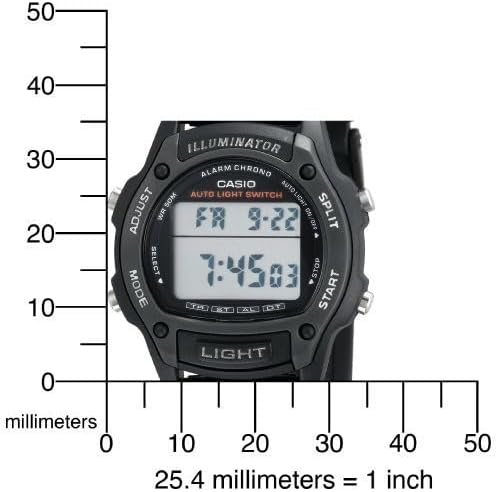
| Kas deursnee | 36 millimeter |
| Kasdikte | 10 millimeter |
| Item gewig | 95 gram |

Waarborg en Ondersteuning
Vervaardiger se waarborg
This Casio watch is covered by a manufacturer's warranty. Please refer to the warranty card included with your purchase for specific terms, conditions, and duration. Keep your proof of purchase for warranty claims.
Kliënte ondersteuning
For further assistance, technical support, or service inquiries, please visit the official Casio webwebwerf of kontak hul kliëntediensafdeling. Jy kan ook die Casio Winkel op Amazon vir produkinligting en hulpbronne.
Casio Brand Overview
Video 2: A brief brand video from Casio, highlighting their commitment to innovation and quality in timepieces.