
1. Inleiding
The Performance Tool W89720 is a non-contact infrared thermometer designed for measuring surface temperatures without direct physical contact. This device provides temperature readings in both Fahrenheit and Celsius, features a backlit digital display for easy readability, and includes a laser pointer for accurate targeting. A wrist strap is included for easy and safe use. It is suitable for a wide range of applications, from checking automotive components to identifying heat loss around windows and doors.
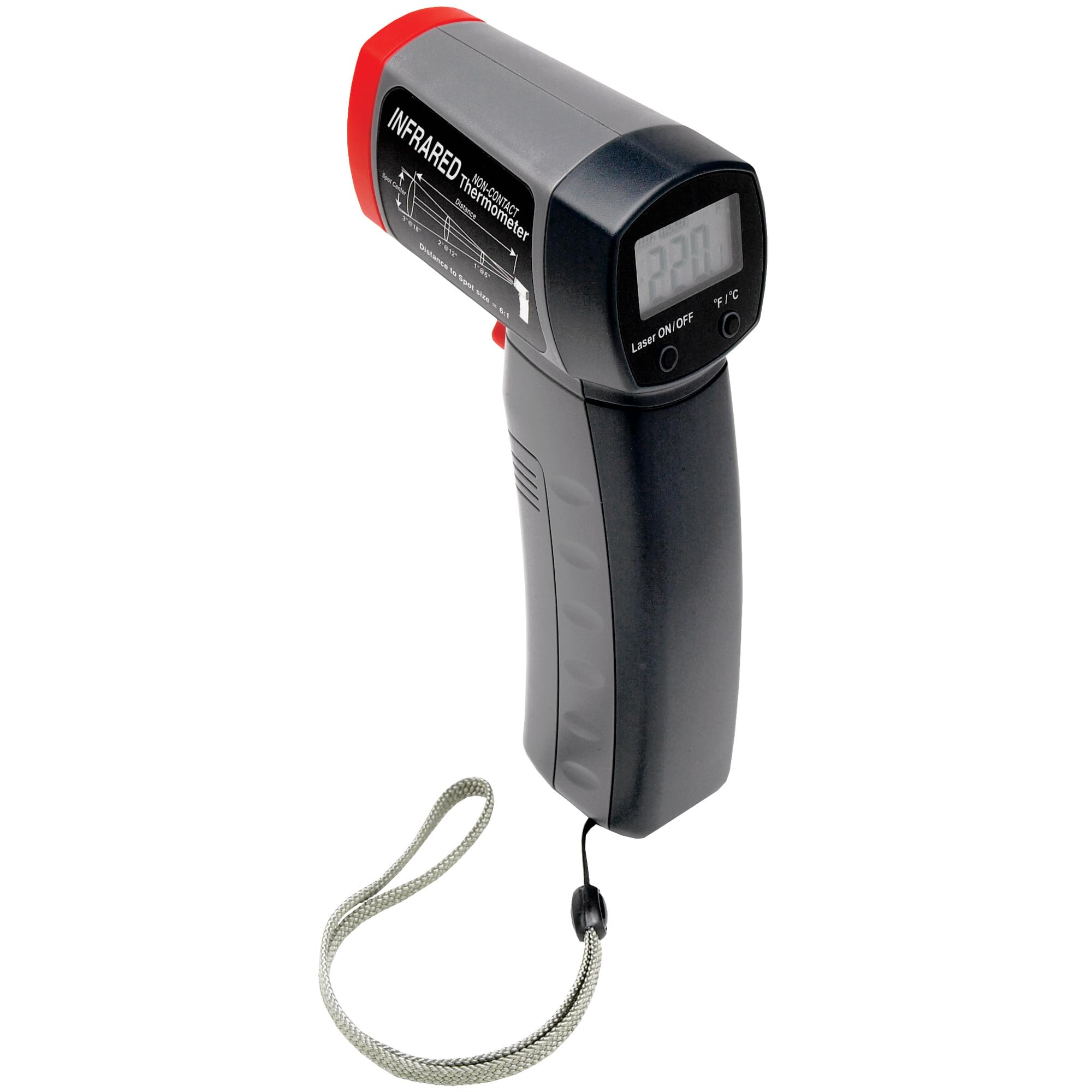
Figuur 1.1: Performance Tool W89720 Non-Contact Infrared Thermometer. This image shows the overall design of the thermometer, featuring a pistol-grip handle, a trigger for activation, and a display screen at the top.
2. Opstelling
2.1 Battery installasie
The Performance Tool W89720 thermometer requires a 9-volt battery for operation. A battery is typically included with the product.
- Locate the battery compartment cover, usually on the handle.
- Maak die batterykompartement oop.
- Insert a 9-volt battery, ensuring correct polarity (+/-).
- Maak die batterykompartement se deksel stewig toe.

Figuur 2.1: Product packaging indicating a 9-volt battery is included. This image highlights key features like the digital display and laser pointer, and confirms battery inclusion.
2.2 Aanvanklike aanskakeling
After battery installation, the device is ready for use. Point the thermometer at a surface and press the trigger to activate the display and take a reading.
3. Bedryfsinstruksies
3.1 Taking a Temperature Measurement
- Hold the thermometer by its handle.
- Point the infrared sensor (located at the front) towards the target surface.
- Press and hold the trigger. The laser pointer will activate to help aim at the desired measurement spot.
- The temperature reading will appear on the digital display. Release the trigger to hold the last reading on the screen.
For accurate readings, ensure the target area is larger than the thermometer's spot size at the measurement distance. The device has a distance-to-spot ratio of 12:1, meaning at 12 inches, it measures a 1-inch spot.

Figuur 3.1: Diagram illustrating the 12:1 Distance-to-Spot ratio of the thermometer. This helps in understanding the measurement area at various distances.
3.2 Unit Selection (Fahrenheit/Celsius)
The thermometer allows switching between Fahrenheit (°F) and Celsius (°C) temperature units. Refer to the device's buttons, typically located near the display, to toggle between these units. A dedicated button or a combination of buttons may be used.
3.3 Backlight Feature
The digital display includes a backlight for improved visibility in low-light conditions. This feature usually activates automatically when the device is in use or can be toggled with a specific button.
3.4 Algemene toepassings
- Checking temperatures of heater vents and air conditioners.
- Monitoring automotive components such as engines, radiators, mufflers, tires, and brakes.
- Detecting temperature variations around windows and doors to identify potential leaks or drafts.

Figuur 3.2: Measuring engine temperature with the infrared thermometer. This demonstrates a practical application for automotive diagnostics.

Figuur 3.3: Measuring temperature of a floor vent. This illustrates the thermometer's use for home energy efficiency checks.
4. Onderhoud
4.1 Skoonmaak
To maintain the accuracy and longevity of your thermometer, wipe the device clean with a soft, damp lap. Moenie skuurmiddels gebruik of die eenheid in water dompel nie.
4.2 Batteryvervanging
When the battery indicator shows low power, replace the 9-volt battery following the steps outlined in Section 2.1. Always dispose of used batteries responsibly according to local regulations.
4.3 Berging
Store the thermometer in a cool, dry place away from direct sunlight and extreme temperatures. If storing for extended periods, it is recommended to remove the battery to prevent leakage.
5. Probleemoplossing
5.1 Algemene kwessies en oplossings
| Probleem | Moontlike oorsaak | Oplossing |
|---|---|---|
| Toestel skakel nie aan nie. | Dooie of onbehoorlik geïnstalleerde battery. | Check battery polarity. Replace with a fresh 9-volt battery. |
| Onakkurate lesings. | Dirty sensor lens, target too small, or outside operating range. | Clean the sensor lens. Ensure target is larger than spot size. Verify target temperature is within 0 to 960°F (-18 to 520°C). |
| Display shows "---" or error code. | Temperature out of range, sensor malfunction, or low battery. | Ensure target temperature is within specified range. Replace battery. If issue persists, contact support. |
6. Spesifikasies
| Kenmerk | Detail |
|---|---|
| Model | W89720 |
| Temperatuurreeks | 0°F tot 960°F (-18°C tot 520°C) |
| Tipe meting | Nie-kontak infrarooi |
| Tipe vertoon | Digital with Backlight |
| Eenheid seleksie | Fahrenheit (°F) / Celsius (°C) |
| Laserwyser | Yes, for accurate targeting |
| Afstand tot spotverhouding | 12:1 |
| Kragbron | 9-volt battery |
| Materiaal | Plastiek |
| Item Lengte | 7 duim |
| Item gewig | 8 onse |
7. Waarborg en ondersteuning
7.1 Waarborginligting
This product comes with a limited warranty. Please contact the manufacturer or retailer if you experience any issues within 30 days of receipt for assistance or replacement.
7.2 Kliëntediens
For further assistance, technical questions, or to report issues beyond the initial warranty period, please refer to the contact information provided by Performance Tool or your product retailer. Keep your purchase receipt for warranty claims.