
Logitech Z-5500
Logitech Z-5500 THX-Certified 5.1 Digital Surround Sound Speaker System User Manual
Model: Z-5500 (P/N: 970115-0403)
Inleiding
Welcome to the user manual for your Logitech Z-5500 THX-Certified 5.1 Digital Surround Sound Speaker System. This manual provides detailed instructions on setting up, operating, and maintaining your speaker system to ensure optimal performance and longevity. The Z-5500 system is engineered to deliver a powerful and immersive audio experience, whether you are listening to music, watching movies, or playing games.
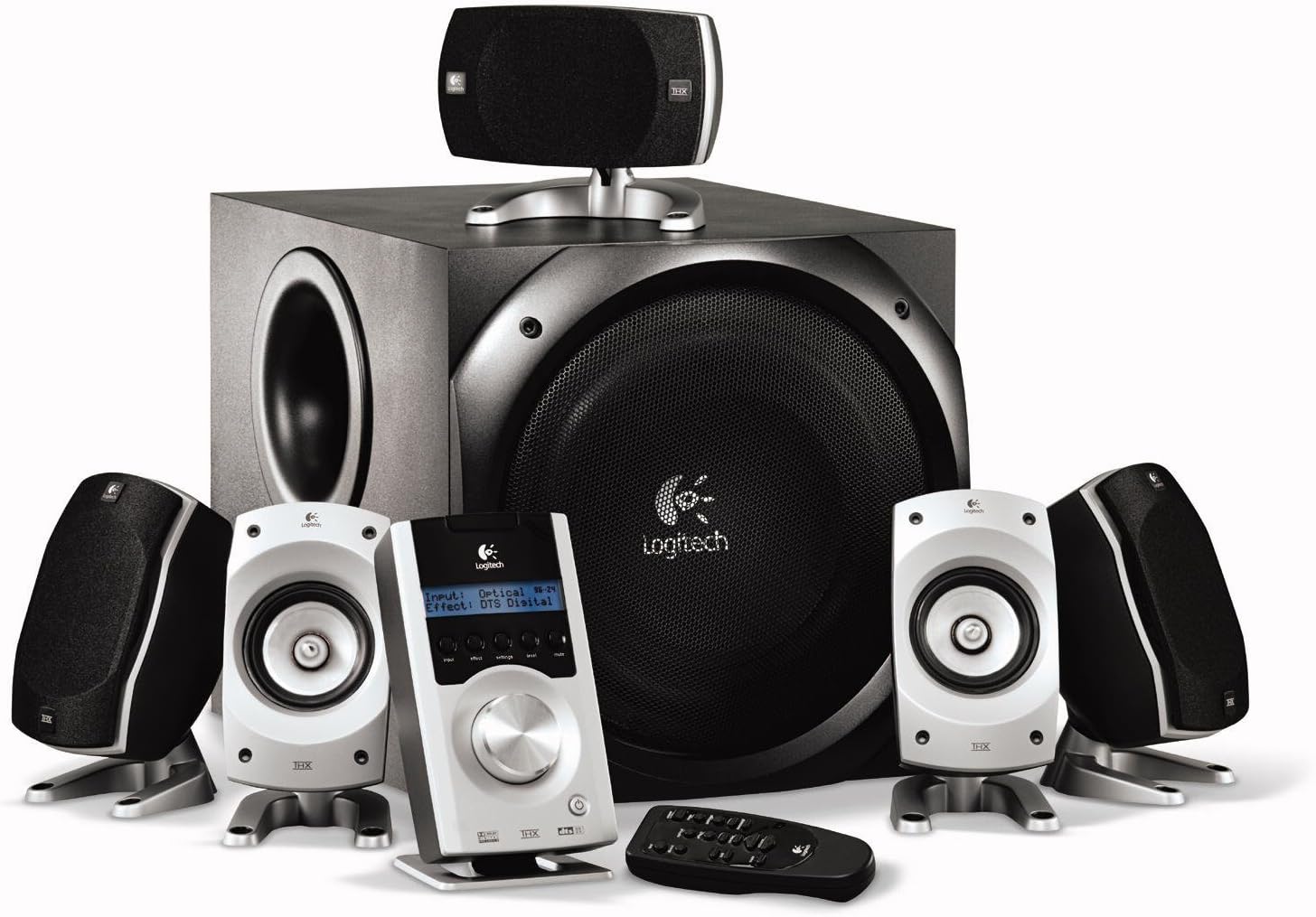
The complete Logitech Z-5500 system, showcasing the subwoofer, five satellite speakers, Digital SoundTouch control center, and wireless remote.
Veiligheidsinligting
Please read and follow all safety instructions carefully before using your Logitech Z-5500 speaker system. Failure to do so may result in injury or damage to the equipment.
- Kragbron: Connect the system only to a power outlet of the type described in this manual or marked on the unit.
- Ventilasie: Do not block any ventilation openings. Ensure adequate space around the subwoofer and satellite speakers for proper airflow.
- Water en vog: Do not expose the system to water, moisture, or excessive humidity. Do not place objects filled with liquids on or near the system.
- Hitte: Keep the system away from heat sources such as radiators, heat registers, stoves, or other apparatus (including ampversterkers) wat hitte produseer.
- Skoonmaak: Unplug the system from the wall outlet before cleaning. Use a dry cloth for cleaning. Do not use liquid cleaners or aerosol cleaners.
- Subwoofer plasing: The subwoofer contains a powerful magnet. Keep it at least 3 feet (1 meter) away from electronic components, computers, and anything sensitive to electromagnetic energy to prevent interference or damage.
- Heavy Component: The subwoofer is heavy. Exercise caution when lifting or moving it.
Pakketinhoud
Your Logitech Z-5500 system package should include the following items:
- Een (1) Subwoofer
- Four (4) Satellite Speakers
- One (1) Center Channel Speaker
- One (1) Digital SoundTouch Control Center
- One (1) Wireless Remote Control (with batteries)
- One (1) 6-Channel Direct Cable (for analog connection)
- Gebruikershandleiding (hierdie dokument)
Opstelling
1. Luidsprekerplasing
Proper speaker placement is crucial for optimal surround sound. Consider the following guidelines:
- Front Left & Right: Plaas hierdie luidsprekers ewe ver van jou luisterposisie, gewoonlik aan weerskante van jou monitor of TV.
- Sentrumkanaal: Position this speaker directly in front of your listening position, usually above or below your monitor/TV, ensuring dialogue is clear and centered.
- Rear Left & Right (Surround): Place these speakers behind or to the sides of your listening position, facing towards you. They should be roughly at ear level when seated.
- subwoofer: The subwoofer can be placed anywhere in the room, but corner placement often enhances bass response. Ensure it is not directly against a wall and has adequate ventilation. Keep it away from sensitive electronics.

A single satellite speaker, designed for versatile placement.
2. Connecting the Speakers to the Subwoofer
Each satellite and center channel speaker connects to the back of the subwoofer. The speaker cables are color-coded or labeled to match the corresponding inputs on the subwoofer.
- Connect the Front Left, Front Right, Center, Rear Left, and Rear Right speakers to their respective spring clip terminals on the back of the subwoofer. Ensure the positive (+) and negative (-) terminals on the speaker match those on the subwoofer.
3. Connecting the Digital SoundTouch Control Center
The control center connects to the subwoofer via a dedicated cable.
- Plug the control center cable into the designated port on the back of the subwoofer.
4. Connecting to Audio Sources
The Z-5500 offers multiple input options for various devices.
Analog Connection (6-Channel Direct)
Use the included 6-channel direct cable for connecting to a PC sound card with 5.1 analog outputs.
- Connect the green, black, and orange plugs from the 6-channel direct cable to the corresponding color-coded analog input jacks on the back of the Digital SoundTouch control center.
- Connect the other end of the cable to your PC's sound card outputs (typically green for front, black for rear, orange for center/subwoofer).
Digitale optiese verbinding
For high-quality digital audio from DVD players, game consoles, or some PCs.
- Connect a digital optical cable (not included) from your audio source's optical output to the OPTICAL input on the Digital SoundTouch control center.
Digital Coaxial Connection
Another option for high-quality digital audio.
- Connect a digital coaxial cable (not included) from your audio source's coaxial output to the COAXIAL input on the Digital SoundTouch control center.
Stereo Mini-Jack Connection
For connecting MP3 players, CD players, or other stereo devices.
- Connect a 3.5mm stereo audio cable (not included) from your device's headphone or line-out jack to the AUX input on the Digital SoundTouch control center.
5. Kragverbinding
- Plug the subwoofer's power cord into a wall outlet.
- Turn on the power switch located on the back of the subwoofer.
Bedryfsinstruksies
Digital SoundTouch Control Center
The control center is your primary interface for managing the Z-5500 system.

The Digital SoundTouch control center, providing comprehensive control over your audio experience.
- Kragknoppie: Skakel die stelsel aan of af.
- Invoerknoppie: Cycles through available audio inputs (Analog, Optical, Coaxial, AUX).
- Effekknoppie: Selects different sound effects or decoding modes (e.g., Stereo, Stereo x2, Dolby Digital, DTS, Pro Logic II Movie/Music).
- Instellingsknoppie: Accesses various settings such as speaker levels, subwoofer level, and balance.
- Vlakknoppie: Allows adjustment of individual speaker levels (front, rear, center, subwoofer).
- Demp-knoppie: Demp of demp die oudio-uitvoer.
- Volumeknop: Pas die algehele stelselvolume aan.
Draadlose afstandbeheer
The remote control provides convenient access to most functions from your listening position.
- The remote duplicates most functions found on the control center, including power, input selection, volume, mute, and effect modes.
- Ensure line-of-sight between the remote and the control center for proper operation.
Onderhoud
To keep your Logitech Z-5500 speaker system in optimal condition, follow these maintenance guidelines:
- Skoonmaak: Regularly wipe down the speakers and control center with a soft, dry, lint-free cloth. Do not use abrasive cleaners, waxes, or solvents.
- Stof: Use a soft brush or a vacuum cleaner with a brush attachment to gently remove dust from speaker grilles and ventilation openings.
- Vermy vloeistowwe: Do not spray liquids directly onto the speakers or control center. If cleaning with a damp cloth is necessary, lightly dampen the cloth with water and ensure the system is unplugged.
- Omgewing: Store and operate the system in a clean, dry environment, away from extreme temperatures and direct sunlight.
Probleemoplossing
If you encounter issues with your Z-5500 system, refer to the following common problems and solutions:
| Probleem | Moontlike oorsaak | Oplossing |
|---|---|---|
| No sound from any speaker | System not powered on; Mute activated; Incorrect input selected; Loose cables | Ensure subwoofer power switch is ON; Press Mute button on control center/remote; Select correct input source; Check all cable connections (power, control center, audio inputs). |
| No sound from specific speaker(s) | Loose speaker cable; Speaker level set too low; Incorrect audio source configuration | Check speaker wire connections to subwoofer; Adjust individual speaker levels using the control center's 'Level' button; Ensure your audio source (PC, DVD player) is configured for 5.1 output. |
| Vervormde of onduidelike klank | Volume too high; Poor audio source quality; Incorrect effect mode | Reduce volume; Test with a different audio source; Cycle through 'Effect' modes to find the appropriate one for your content. |
| Afstandbeheer werk nie | Dead batteries; Obstruction; Remote out of range | Replace batteries (2 AAA required); Remove any obstructions between remote and control center; Ensure you are within effective range. |
| Subwoofer produseer nie bas nie | Subwoofer level too low; Incorrect audio source configuration; Subwoofer cable loose | Increase subwoofer level via control center; Verify audio source is sending LFE (Low-Frequency Effects) signal; Check control center cable connection to subwoofer. |
If the problem persists after trying these solutions, please contact Logitech customer support.
Spesifikasies
| Kenmerk | Spesifikasie |
|---|---|
| Tipe luidspreker | 5.1 Omringklankstelsel |
| Totale RMS-krag | 505 Watt RMS |
| Satelliet RMS Krag | 317 Watts RMS (2 x 62W Front, 2 x 62W Rear, 69W Center) |
| Subwoofer RMS Krag | 188 Watt RMS |
| Totale piekkrag | 1010 Watt |
| Frekwensierespons | 33 Hz – 20 kHz |
| Sein-tot-geraas verhouding | > 93.5 dB |
| Insetimpedansie | 8,000 ohm |
| Subwoofer diameter | 10 duim |
| Konnektiwiteit | Analog (6-channel direct), Digital Optical, Digital Coaxial, 3.5mm Stereo AUX |
| Sertifiserings | THX, Dolby Digital, DTS |
| Produk Afmetings (Subwoofer) | 20.47 cm D x 26.85 cm B x 16.18 cm H (ongeveer) |
| Item gewig | 54.5 pond |
| Modelnommer | 970115-0403 |
Waarborg en Ondersteuning
Your Logitech Z-5500 Digital Surround Sound Speaker System comes with a 2-jaar beperkte waarborg dekking van onderdele en arbeid vanaf die aankoopdatum.
For warranty claims, technical assistance, or further support, please visit the official Logitech support webwebwerf of kontak hul kliëntediensafdeling. Bewaar u bewys van aankoop vir waarborgvalidering.
Logitech-ondersteuning: www.logitech.com/support