
1. Belangrike veiligheidsinligting
Please read all instructions carefully before operating your Thomson RR 68 M clock. Keep this manual for future reference.
- Moenie die horlosie blootstel aan uiterste temperature, direkte sonlig of hoë humiditeit nie.
- Vermy om die horlosie te laat val of dit aan harde impakte bloot te stel.
- Do not attempt to disassemble or modify the clock. This will void the warranty.
- Gebruik slegs die gespesifiseerde batterytipe. Maak seker dat die polariteit korrek is wanneer die batterye ingesit word.
- Verwyder batterye as die horlosie nie vir 'n lang tydperk gebruik gaan word om lekkasie te voorkom.
2. Produk verbyview
Familiarize yourself with the components of your Thomson RR 68 M clock.
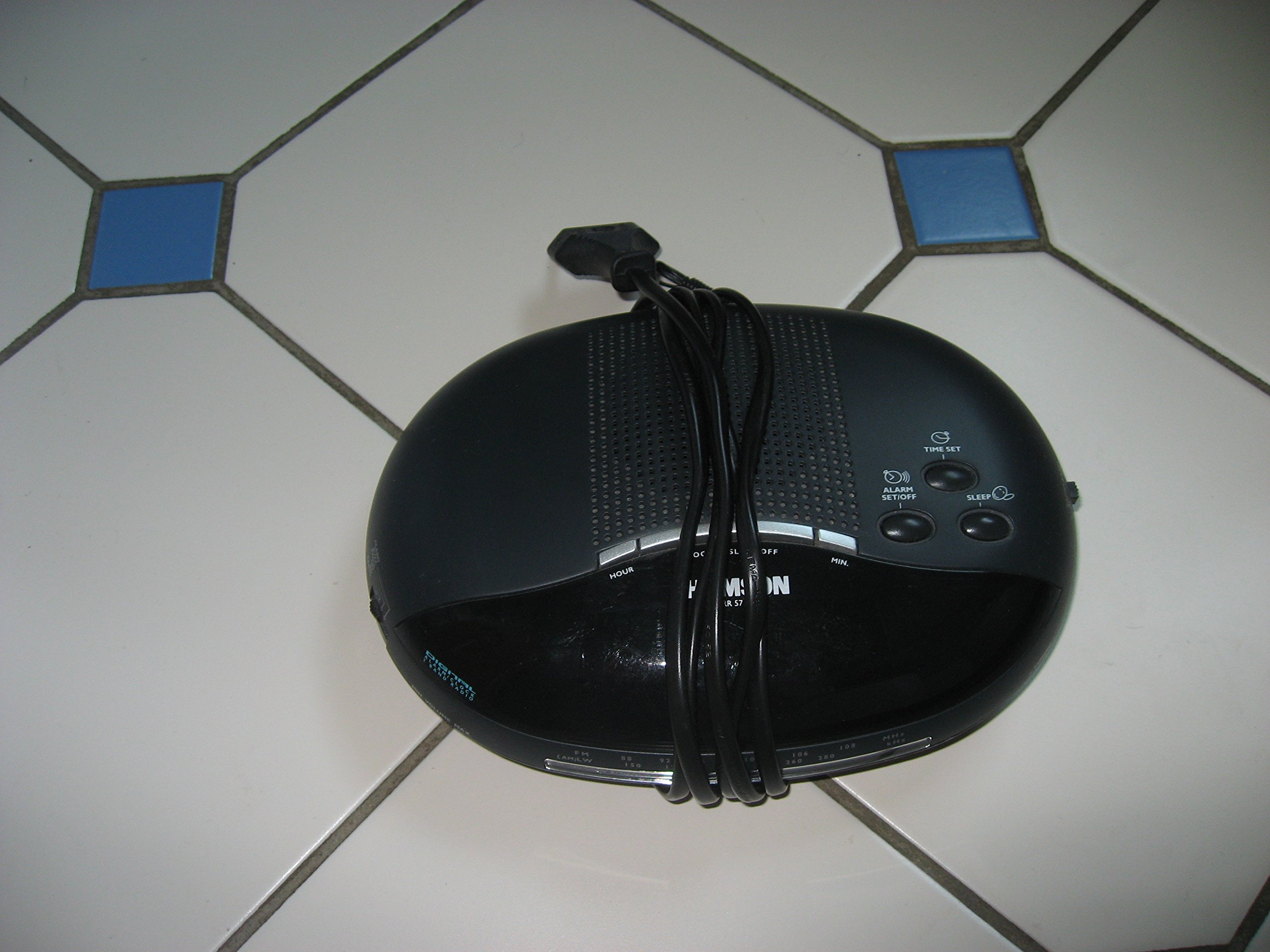
Prent 1: Voorkant view of the Thomson RR 68 M clock, showing the digital display and control buttons. This image illustrates the compact design suitable for tabletop placement.
2.1 Pakketinhoud
- Thomson RR 68 M Clock Unit
- Gebruikershandleiding (hierdie dokument)
3. Opstelling
3.1 Aandryf die klok
The Thomson RR 68 M clock operates on batteries (not included). Ensure you have the correct type and quantity of batteries before proceeding.
- Vind die batteryklepdeksel aan die agterkant of onderkant van die horlosie.
- Remove the battery compartment cover by sliding or unlatching it.
- Insert the required batteries, paying close attention to the polarity markings (+ and -) inside the compartment.
- Replace the battery compartment cover securely. The clock display should now illuminate.
4. Bedryfsinstruksies
4.1 Stel die tyd in
To set the current time on your Thomson RR 68 M clock:
- Locate the 'SET' or 'MODE' button, usually on the back or side of the clock. Press and hold this button for a few seconds until the hour digits begin to flash.
- Use the '+' or 'HOUR' button to adjust the hour. Press repeatedly to advance the hour.
- Press the 'SET' or 'MODE' button again. The minute digits will begin to flash.
- Use the '+' or 'MINUTE' button to adjust the minutes. Press repeatedly to advance the minutes.
- Press the 'SET' or 'MODE' button one last time to confirm the time setting and exit the setting mode. The display will stop flashing.
Note: This model does not feature an alarm function.
5. Onderhoud
5.1 Skoonmaak
Om die voorkoms van jou horlosie te behou:
- Vee die buitekant van die horlosie af met 'n sagte, droë lap.
- Moenie skuurmiddels, oplosmiddels of chemiese spuitmiddels gebruik nie, aangesien dit die afwerking kan beskadig.
5.2 Batteryvervanging
When the display dims or the clock stops functioning, it is time to replace the batteries. Follow the steps in Section 3.1 to replace the old batteries with new ones. Dispose of used batteries responsibly according to local regulations.
6. Probleemoplossing
If you encounter issues with your Thomson RR 68 M clock, refer to the following common problems and solutions:
6.1 Clock Display is Blank or Dim
- Gaan batterye na: Ensure batteries are inserted correctly with the correct polarity. Replace with fresh batteries if necessary.
- Battery kompartement: Maak seker dat die batteryklep stewig toe is.
6.2 Tyd is verkeerd
- Stel tyd terug: Follow the instructions in Section 4.1 to manually set the time.
- Batterykrag: If the time frequently resets or loses accuracy, the batteries may be low and require replacement.
7. Spesifikasies
| Modelnommer | RR 68 M |
| Handelsmerk | THOMSON |
| Montage tipe | Tafelblad |
| Kragbron | Batterye (nie ingesluit nie) |
| Alarm funksie | Nee |
8. Waarborginligting
Specific warranty details for the Thomson RR 68 M clock are not provided within this user manual. Please refer to the product packaging, the point of purchase, or the official Thomson webwebwerf vir omvattende waarborgbepalings en -voorwaardes.
9. Kliëntediens
For further assistance, technical support, or inquiries regarding your Thomson RR 68 M clock, please visit the official Thomson webwebwerf of kontak hul kliëntediensafdeling. Kontakbesonderhede is tipies beskikbaar op die vervaardiger se webwebwerf of produkverpakking.