
1. Inleiding
Thank you for choosing the MAC AUDIO Red Attack 4800 2-Channel Ampverligter. Hierdie hoë gehalte amplifier is designed to enhance your car audio experience by providing powerful and clear sound reproduction. This manual provides essential information for proper installation, operation, and maintenance of your ampLees dit asseblief deeglik deur voor gebruik om optimale werkverrigting en veiligheid te verseker.
2. Veiligheidsinstruksies
Neem altyd die volgende veiligheidsmaatreëls in ag om beserings of skade aan die amplifier and vehicle:
- Kragontkoppeling: Ontkoppel die voertuig se negatiewe batteryklem voor enige installasie of bedrading om elektriese kortsluitings te voorkom.
- Professionele installasie: If you are unsure about the installation process, seek assistance from a qualified professional car audio installer.
- Behoorlike bedrading: Use appropriate gauge wiring for power, ground, and speaker connections as specified in this manual to prevent overheating and damage.
- Ventilasie: Verseker die amplifier is mounted in a location with adequate ventilation to prevent overheating. Do not block cooling fins or vents.
- Vogblootstelling: Moenie die blootstel nie amplifier to moisture, water, or extreme temperatures.
- Sekeringbeskerming: Always use the correct fuse rating as specified. Never replace a blown fuse with one of a higher amperageer.
- Volumevlakke: Langdurige blootstelling aan hoë volumevlakke kan gehoorskade veroorsaak. Pas die volume verantwoordelik aan.
3. Produk verbyview
The MAC AUDIO Red Attack 4800 is a robust 2-channel amplifier engineered for reliable performance in car audio systems. It features a durable design and essential controls for sound customization.
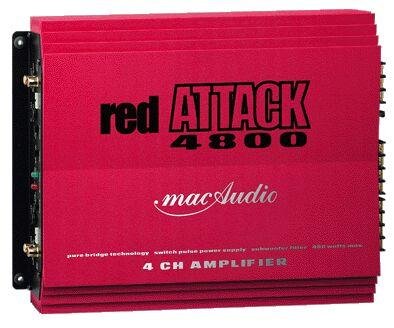
Figuur 1: Voorkant view of the MAC AUDIO Red Attack 4800 2-Channel Amplifier, showing input and output terminals, and control knobs.
Hierdie amplifier is designed to deliver clean power to your speakers, enhancing the clarity and impact of your music. Its compact design allows for flexible installation options within your vehicle.
4. Opstelling en installering
Careful installation is crucial for the amplifier's performance and longevity. Follow these steps for a successful setup.
4.1. Monteerplek
- Choose a dry, well-ventilated location away from direct sunlight and heat sources.
- Verseker voldoende lugvloei rondom die ampverligter se hitteafleiers.
- Monteer die amplifier securely to a solid surface using appropriate screws to prevent movement during vehicle operation.
4.2. Bedradingsverbindings
Before making any connections, ensure the vehicle's battery negative terminal is disconnected.
4.2.1. Krag- en aardbedrading
- Krag (B+): Connect a heavy-gauge power cable (e.g., 8 AWG or 4 AWG depending on power requirements) directly from the positive terminal of the vehicle's battery to the amplifier's B+ terminal. Install an in-line fuse holder with the correct amperage fuse (refer to specifications) within 18 inches (45 cm) of the battery.
- Grond (GND): Connect a heavy-gauge ground cable of the same length and gauge as the power cable from the amplifier's GND terminal to a clean, unpainted metal surface on the vehicle's chassis. Ensure a good electrical connection by scraping away any paint or rust.
- Afstandsbediening (REM): Connect a smaller gauge wire (e.g., 18 AWG) from the amplifier's REM terminal to the remote output of your car stereo or head unit. This wire turns the amplifier on and off with the stereo.
4.2.2. Audio Input Wiring
- Connect RCA cables from the pre-out outputs of your car stereo to the RCA input jacks on the amplifier. Ensure correct channel matching (Left to Left, Right to Right).
4.2.3. Speaker Output Wiring
- Koppel jou luidsprekers aan die amplifier's speaker output terminals. Observe correct polarity (+ to + and - to -) for each speaker. Incorrect polarity can lead to poor sound quality and reduced bass response.
- Ensure the total impedance of the connected speakers matches the amplifier's minimum impedance rating (refer to specifications).
4.3. Aanvanklike instellings
After all wiring is complete and verified, reconnect the vehicle's negative battery terminal.
- Kry beheer: Start with the gain control set to minimum. Play a familiar piece of music at a moderate volume on your head unit. Slowly increase the amplifier's gain control until you hear distortion, then back it off slightly. This sets the ampdie insetgevoeligheid van die versterker om by jou hoofeenheid se uitset te pas.
- Crossover-instellings: As jou amplifier has built-in crossover filters (e.g., Low Pass Filter, High Pass Filter), adjust them according to your speaker type and system configuration. For full-range speakers, you might use a high-pass filter to protect them from low frequencies. For subwoofers, a low-pass filter is essential.
5. Bedryf die Amplewendiger
Once installed and configured, operating your MAC AUDIO Red Attack 4800 amplifier is straightforward.
- Krag aan/af: Die amplifier will automatically turn on when your car stereo is powered on (via the remote wire) and turn off when the stereo is off.
- Volumebeheer: Adjust the overall system volume using your car stereo's volume control. The amplifier's gain control should only be used for initial level matching, not as a volume knob.
- Klankaanpassings: Fine-tune your sound using the crossover controls and any bass boost features available on the amplifier or your head unit. Make small adjustments and listen carefully to the changes.
6. Onderhoud
Gereelde onderhoud verseker die lang lewensduur en optimale prestasie van u amplewendiger.
- Skoonmaak: Maak die van tyd tot tyd skoon ampVee die buitekant van die koeler af met 'n sagte, droë lap. Moenie harde chemikalieë of skuurmiddels gebruik nie. Maak seker dat die koelvinne vry van stof en puin is.
- Verbindingskontrole: Occasionally check all wiring connections (power, ground, remote, RCA, speaker) to ensure they are secure and free from corrosion. Loose connections can cause performance issues or damage.
- Ventilasie: Maak seker dat die ampDie monteringsplek van die verligter bly vry van obstruksies om behoorlike lugvloei te handhaaf.
7. Probleemoplossing
As jy probleme ondervind met jou amplifer, raadpleeg die volgende probleemoplossingsgids voordat u ondersteuning kontak.
| Probleem | Moontlike oorsaak | Oplossing |
|---|---|---|
| Ampverligter skakel nie aan nie. | No power, poor ground, remote wire not connected or faulty, blown fuse. | Check power (B+) and ground (GND) connections. Verify remote (REM) wire connection to head unit. Check in-line fuse and amplifier's internal fuses. |
| Geen klankuitset nie. | RCA cables disconnected, speaker wires disconnected or shorted, amplifier in protection mode, head unit settings. | Check RCA input connections. Verify speaker wire connections and ensure no shorts. Check if protection LED is on. Confirm head unit output is active. |
| Verwronge klank. | Gain set too high, poor ground, speaker impedance mismatch, damaged speakers. | Reduce gain setting. Check ground connection. Verify speaker impedance. Inspect speakers for damage. |
| Ampdie verligter oorverhit. | Onvoldoende ventilasie, te lae impedansie, langdurige hoë volume. | Verseker voldoende lugvloei rondom die amplifier. Check speaker impedance. Reduce volume or operating time. |
8. Spesifikasies
The following are general specifications for the MAC AUDIO Red Attack 4800 amplifier. Specific performance figures may vary.
- Handelsmerk: MAC AUDIO
- Modelnommer: RED 4800 Attack
- Aantal kanale: 2
- Montage tipe: Vrye staande
- Item gewig: 10 g (Note: This weight seems unusually low for an amplifier and might be a data entry error. Please refer to product packaging for accurate weight.)
- GTIN: 04023037264807
- ASIN: B0000WR722
Note: For detailed power output ratings (RMS/Max power), frequency response, signal-to-noise ratio, and other electrical specifications, please refer to the official product packaging or manufacturer's webwebwerf.
9. Waarborg en Ondersteuning
MAC AUDIO products are manufactured to high-quality standards. For information regarding warranty coverage, terms, and conditions, please refer to the warranty card included with your product or visit the official MAC AUDIO website. For technical support or service inquiries, please contact your authorized MAC AUDIO dealer or the manufacturer directly.
Bewaar u aankoopbewys as bewys van aankoop vir waarborgeise.