
Inleiding
This manual provides detailed instructions for the installation, operation, and maintenance of your Russound SDB4.1 Speaker Selector. The SDB4.1 is designed to distribute audio from up to two amplifiers to four pairs of speakers, featuring individual volume controls and impedance matching for optimal performance.
Belangrike veiligheidsinligting
- Lees alle instruksies voordat u die toestel gebruik.
- Moenie hierdie toestel blootstel aan reën of vog nie.
- Verseker behoorlike ventilasie rondom die eenheid.
- Disconnect power before making any connections or adjustments.
- Verwys alle diens na gekwalifiseerde dienspersoneel.
Pakketinhoud
Verifieer dat alle items teenwoordig is:
- Russound SDB4.1 Speaker Selector
- Instructiehandleiding (hierdie dokument)
- Printed room labels
Produk verbyview
The Russound SDB4.1 is a high-quality speaker selector designed for multi-room audio distribution. It features dual amplifier inputs and supports up to four pairs of speakers, each with independent volume control. The unit incorporates autoformer-based impedance matching to maintain sound quality and protect your amplewendiger.
Agterpaneelverbindings
The rear panel of the SDB4.1 provides all necessary connections for amplifiers and speakers. It includes color-coded detachable snap connectors for easy wire termination.
- AMP A / AMP B Inputs: Koppel jou amplifiers here. Each input supports Left (+) and (-), and Right (+) and (-) channels.
- SPEAKER 1-4 Outputs: Connect your speaker pairs here. Each output supports Left (+) and (-), and Right (+) and (-) channels.
Opstelling
1. plasing
Place the SDB4.1 in a well-ventilated area, away from heat sources and direct sunlight. Ensure there is sufficient space around the unit for air circulation and cable management.
2. Bedradingsverbindings
Voordat u enige verbindings maak, maak seker dat u amplifier(s) and the SDB4.1 are powered off and unplugged from the mains.
- Koppel luidsprekers: For each speaker pair, connect the speaker wires to the corresponding SPEAKER output terminals (SPEAKER 1, SPEAKER 2, etc.) on the SDB4.1. Ensure correct polarity (Left+, Left-, Right+, Right-). The detachable snap connectors are color-coded for ease of use.
- Koppel Ampverligter(s): Connect the speaker outputs from your amplifier(s) to the AMP A en/of AMP B input terminals on the SDB4.1. If using a single amplifier, connect it to AMP A. If using two amplifiers, connect the first to AMP A and the second to AMP B. Maintain correct polarity.
3. Impedance Matching Settings
The SDB4.1 features selectable impedance matching to accommodate various speaker configurations (4-ohm or 8-ohm speakers) and protect your amplifier. The impedance matching setting is typically located inside the unit. It is crucial to verify and adjust this setting according to your speaker setup to prevent damage to your amplifier. Consult the internal diagrams or markings for the correct jumper or switch positions for 2X, 4X, or 8X impedance matching. The factory default setting may vary, so always confirm it before operation.
Operasie
1. Skakel aan
Sodra alle verbindings veilig is, koppel dit in en skakel dit aan. amplifier(s) and then the SDB4.1.
2. Selecting an Ampverligter Bron
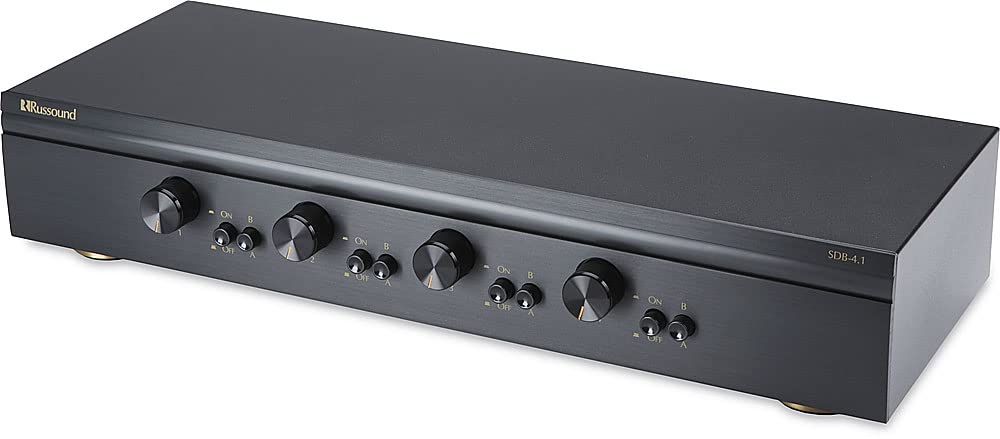
The SDB4.1 allows you to select between Amplifier A and Amplifier B for each speaker zone. Use the corresponding selector buttons on the front panel to choose the desired amplifier for each room.
3. Activating Speaker Zones
Each speaker zone has an individual button on the front panel. Press the button for the desired speaker zone to turn it on or off. Ensure the buttons are fully engaged when pressed.
4. Aanpassing van volume
Each speaker zone is equipped with a rotary volume control knob. Turn the knob clockwise to increase the volume and counter-clockwise to decrease it. The volume controls have twelve detent positions for precise adjustment.
Onderhoud
- Skoonmaak: Gebruik 'n sagte, droë lap om die buitekant van die eenheid skoon te maak. Moenie vloeibare skoonmaakmiddels of aërosolsproei gebruik nie.
- Ventilasie: Ensure that the ventilation openings are not blocked.
- Verbindings: Kontroleer gereeld alle bedradingsverbindings om te verseker dat hulle veilig is.
Probleemoplossing
| Probleem | Moontlike oorsaak | Oplossing |
|---|---|---|
| Geen klank van luidsprekers nie. |
|
|
| Vervormde of swak klankgehalte. |
|
|
| Speaker zone button stuck. | Meganiese probleem. | Gently try to free the button. If it remains stuck, contact Russound customer support for assistance. |
Spesifikasies
| Model | SDB4.1 |
| Speaker Pairs Supported | 4 |
| Amplifier Insette | 2 (AMP A, AMP B) |
| Kraghantering | Up to 200W per channel RMS continuous |
| Impedansie-passing | Selectable (accommodates 4- or 8-ohm speakers) |
| Volumekontroles | Individual per zone, 12 detent positions |
| Afmetings (B x H x D) | 18.43 x 4.76 x 9.65 inches (Product dimensions) |
| Item gewig | 8.82 pond |
| Kleur | Swart |
| Verbindings | Detachable snap connectors for bare speaker wire (L+ L- R+ R-) |
| Vervaardiger | Russies |
Opmerking: Spesifikasies kan sonder kennisgewing verander word.
Waarborg en Ondersteuning
For warranty information or technical support, please refer to the official Russound webwebwerf of kontak hul kliëntediensafdeling. Bewaar u aankoopbewys as bewys van aankoop vir waarborgeise.
Russound Contact Information:
- Webwebwerf: www.russound.com
- Verwys na die website for current contact details and support resources.


