
1. Inleiding
The ADTRAN ISU 2x64 is a standalone ISDN Service Unit designed to connect Data Terminal Equipment (DTE) to an ISDN network. This unit facilitates the transfer of data and images over a single ISDN line, offering a reliable solution for various communication needs. It functions as a dual modem, supporting two independent applications simultaneously, each operating at speeds up to 64 kbps. For applications requiring higher bandwidth, a single DTE interface can achieve rates up to 128 kbps.
Key applications for the ISU 2x64 include video-conferencing, audio broadcasting at 128 kbps, and serving as a dual modem replacement. The device is equipped with a front panel featuring a two-line by 16-character display, seven LEDs, and a 16-button keypad, enabling direct configuration, dialing, testing, and monitoring without external data terminals. Additionally, AT commands and a VT100 terminal interface can be used for local or remote configuration and status monitoring via the ISDN network or a dedicated maintenance port.
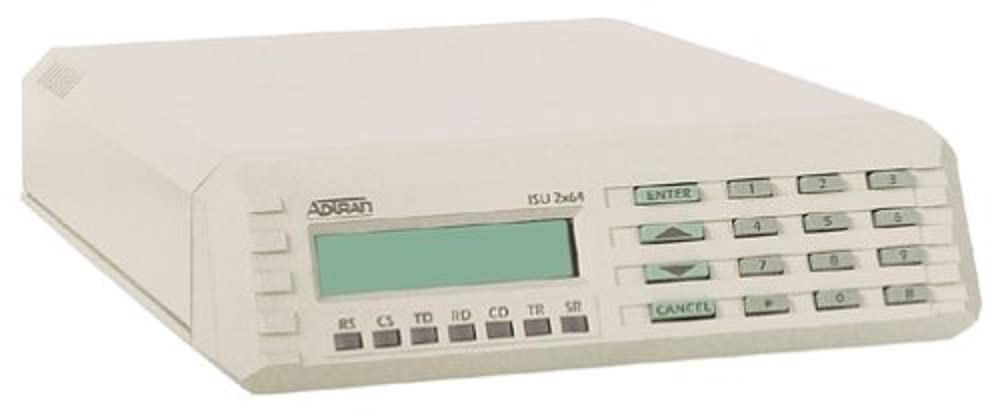
Figuur 1: Voorkant view of the ADTRAN ISU 2x64 Standalone ISDN BRI TA, showing the display, LEDs, and keypad.
2. Kenmerke
- Standalone ISDN Service Unit for DTE connectivity.
- Supports dual independent applications up to 64 kbps each.
- High-speed single DTE interface up to 128 kbps.
- Integrated front panel with 2x16 character display, 7 LEDs, and 16-button keypad for direct control.
- Configuration and monitoring via keypad, AT commands, or VT100 terminal interface.
- Remote configuration capabilities via ISDN or dedicated maintenance port.
- Responds to loopback commands for network testing.
- Ideal for video-conferencing, audio broadcasting, and dual modem replacement.
3. Opstelling
3.1 Fisiese verbindings
Connect your Data Terminal Equipment (DTE) to the appropriate interface ports on the ADTRAN ISU 2x64. Ensure all cables are securely connected. Connect the unit to the ISDN network line using the designated ISDN port. Power on the device after all connections are established.
3.2 Aanvanklike konfigurasie
The ISU 2x64 can be configured using several methods:
- Front Panel Keypad: Use the 16-button keypad and the 2-line by 16-character display to navigate menus and set parameters directly on the unit. Refer to the on-screen prompts for guidance.
- AT-opdragte: Connect a terminal or computer with terminal emulation software to a DTE interface. Use standard AT commands to configure and monitor the unit. A list of supported AT commands can be found in the detailed technical reference guide.
- VT100 Terminal Interface: For local configuration, connect a VT100 compatible terminal to the unit. This interface provides a menu-driven environment for comprehensive setup and maintenance.
4. Bedryfsinstruksies
4.1 Data-oordrag
The ISU 2x64 supports data transfer in two primary modes:
- Dual Application Mode: Two separate DTE interfaces can operate simultaneously and independently, each transferring data at speeds up to 64 kbps. This is suitable for running two distinct data sessions concurrently.
- High-Speed Single Application Mode: For applications requiring higher bandwidth, a single DTE interface can be configured to achieve data rates up to 128 kbps. This mode is ideal for demanding tasks such as video-conferencing or high-quality audio broadcasting.
4.2 Netwerktoetsing
The ISU 2x64 is designed to respond to loopback commands issued from the telephone company central office. This feature allows for network testing and diagnostics to ensure proper ISDN line functionality and connectivity.
5. Onderhoud
The ADTRAN ISU 2x64 can be maintained and reconfigured both locally and remotely.
- Local Maintenance: Utilize the front panel keypad and display or a locally connected VT100 terminal for direct access to configuration settings and status information.
- Afstandonderhoud: The unit can be accessed and configured remotely over the ISDN network itself, or through a dedicated maintenance port located on the back panel. This allows for convenient management and troubleshooting from a distant location.
6. Probleemoplossing
If you encounter issues with your ADTRAN ISU 2x64, consider the following basic troubleshooting steps:
- Kragkontrole: Ensure the unit is properly connected to a power source and the power indicator LED is illuminated.
- Kabelverbindings: Verify that all DTE and ISDN network cables are securely connected and not damaged.
- Konfigurasie instellings: Review your configuration settings using the front panel or a terminal interface to ensure they match your network requirements. Incorrect settings are a common cause of connectivity issues.
- ISDN Line Status: Check the status LEDs on the front panel for indications of ISDN line activity or errors. If the ISDN line appears down, contact your service provider.
- Herbegin toestel: Power cycle the unit by disconnecting and reconnecting the power supply.
For more complex issues, refer to the comprehensive technical documentation or contact ADTRAN technical support.
7. Spesifikasies
| Eienskap | Waarde |
|---|---|
| Produk Tipe | Modem / ISDN Terminal Adapter |
| Modelnommer | 1200051L1 |
| Handelsmerk | ADTRAN |
| ASIN | B0000515XC |
| Item gewig | 4.6 pond (2.09 kg) |
| Pakket afmetings | 15.25 x 10.25 x 4 duim (38.74 x 26.04 x 10.16 cm) |
| Datum Eerste Beskikbaar | 4 September 1973 |
| Taal | Engels |
8. Waarborg en Ondersteuning
For information regarding product warranty, technical support, or service, please refer to the documentation provided with your ADTRAN ISU 2x64 or visit the official ADTRAN website. Contacting ADTRAN customer service directly will provide the most accurate and up-to-date support information.


